API Platform End of Life (EOL) Dates and End of Support (EOS) Dates
API Platform end of life (EOL) and end of support (EOS) dates: 16 API Platform versions have reached EOL, including API Platform 4.2 (EOL date: Sep 16, 2026) — no longer receiving security updates or patches. API Platform 4.4.10 is the current supported release — 3 versions in active support. Also see Laravel EOSL information for related end-of-life information.
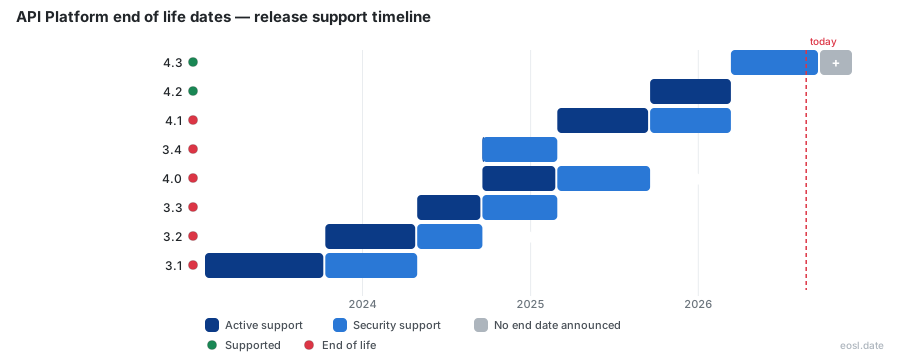
Currently Supported API Platform Releases - Active EOS/EOSL Support (3)
API Platform End of Life (EOL) Releases - No Longer Supported (16)
| Release | Released | Security Support | Active Support | Latest |
|---|---|---|---|---|
| 4.2 | (1 year and 2 months ago) | (2 months ago) | (8 months ago) | 4.2.26 (5 months ago) |
| 4.1 | (1 year and 8 months ago) | (8 months ago) | (1 year and 2 months ago) | 4.1.30 (5 months ago) |
| 3.4 | (2 years and 2 months ago) | (1 year and 8 months ago) | (2 years and 2 months ago) | 3.4.17 (1 year and 7 months ago) |
| 4.0 | (2 years and 2 months ago) | (1 year and 2 months ago) | (1 year and 8 months ago) | 4.0.22 (1 year and 7 months ago) |
| 3.3 | (2 years and 6 months ago) | (1 year and 8 months ago) | (2 years and 2 months ago) | 3.3.15 (1 year and 10 months ago) |
| 3.2 | (3 years and 1 month ago) | (2 years and 2 months ago) | (2 years and 6 months ago) | 3.2.26 (2 years and 4 months ago) |
| 3.1 | (3 years and 9 months ago) | (2 years and 6 months ago) | (3 years and 1 month ago) | 3.1.29 (2 years and 6 months ago) |
| 2.7 | (4 years and 2 months ago) | (3 years and 9 months ago) | (3 years and 9 months ago) | 2.7.18 (2 years and 8 months ago) |
| 3.0 | (4 years and 2 months ago) | (3 years and 1 month ago) | (3 years and 9 months ago) | 3.0.12 (3 years and 8 months ago) |
| 2.6 | (5 years and 9 months ago) | (4 years and 2 months ago) | (4 years and 2 months ago) | 2.6.8 (4 years and 10 months ago) |
| 2.5 | (7 years and 1 month ago) | (4 years and 2 months ago) | (5 years and 9 months ago) | 2.5.10 (5 years and 9 months ago) |
| 2.4 | (7 years and 7 months ago) | (5 years and 9 months ago) | (7 years and 1 month ago) | 2.4.7 (7 years and 2 months ago) |
| 2.3 | (8 years and 4 months ago) | (7 years and 1 month ago) | (7 years and 7 months ago) | 2.3.6 (7 years and 10 months ago) |
| 2.2 | (8 years and 9 months ago) | (7 years and 7 months ago) | (8 years and 4 months ago) | 2.2.10 (7 years and 10 months ago) |
| 2.1 | (9 years and 2 months ago) | (8 years and 4 months ago) | (8 years and 9 months ago) | 2.1.6 (8 years and 9 months ago) |
| 2.0 | (9 years and 11 months ago) | (8 years and 9 months ago) | (9 years and 2 months ago) | 2.0.11 (9 years and 2 months ago) |
Nobody wants to learn about an API platform end of life from a failed production deploy. This guide shows you how to read a release table, understand support windows, and plan a retirement before the cutoff arrives, whether you run the full stack PHP framework called API Platform or depend on a vendor's hosted API and its published service change notices.
API Platform End of Life: Dates, Support and Retirement
An end of life milestone is the day a vendor or maintainer stops shipping fixes for a product. For the open source API Platform framework, that milestone arrives branch by branch: each version gets a window of regular improvement, a shorter window where only fixes land, and then nothing at all. The same word also covers a hosted cloud service that is switched off, which is why a search for this topic returns framework tables and cloud service change announcements side by side.
The table below uses the published support data for the framework's recent versions, so you can see how the dates stack up. Every version older than these rows is already unmaintained.
| Version | Release date | Active support ends | Security support ends | Latest patch |
|---|---|---|---|---|
| 5.0 | 16 Sep 2026 | Still active | Still active | 5.0.5 |
| 4.4 | 16 Sep 2026 | 16 Sep 2026 (ended) | Still active | 4.4.6 |
| 4.3 | 13 Mar 2026 | 16 Sep 2026 (ended) | Still active | 4.3.21 |
| 4.2 | 18 Sep 2025 | 13 Mar 2026 (ended) | 16 Sep 2026 (ended) | 4.2.26 |
| 4.1 | 28 Feb 2025 | 18 Sep 2025 (ended) | 13 Mar 2026 (ended) | 4.1.30 |
Read it from the right: once the security column says ended, that version is unmaintained. It will receive no patches even if a new vulnerability is reported tomorrow.
Active Support and Security Support in the Release Lifecycle
Each version moves through a predictable release lifecycle, and the two support phases mean different things. Active support covers regular bug fixes and small improvements, so you can expect your reports to be looked at and fixed on that branch. Security support is security maintenance only: the maintained branch receives patches for vulnerabilities, but ordinary defects stay open.
Besides the development branch, the project maintains three branches at any time. The newest is actively supported, the one before it is kept for security fixes, and anything older than the latest two is left alone. Comparing support lifecycles across the products you run is worth an hour, because the windows are rarely the same length. Treat the security-only phase as a countdown, not a comfortable place to stay, because every month in it narrows your upgrade runway.
How Semantic Versioning Shapes Minor Release, Major Release and Deprecation Rules
The framework follows semantic versioning, which tells you what to expect from each version number. A new minor release arrives about every six months, and a new major release about every two years, normally alongside a minor release that carries an upgrade path. In practice, that means a minor bump should not break your application, while a major jump is where removed behavior can appear.
- Patch versions fix defects and should be safe to apply quickly.
- Minor versions add features and mark old behavior as deprecated before it disappears.
- Major versions remove what the earlier versioning cycle deprecated.
Deprecation is the quiet first step of every end-of-life story: the feature still works, but the notice starts your clock. A deprecated class, a deprecated option and a deprecated endpoint all behave normally today, yet each one is a promise that removal is coming. Search your logs for every deprecated call you make, and fix the deprecated ones that sit on your busiest paths first.
Latest Release and Supported Release Checks Before EOL
Check your installed version against the latest release of your branch every time you plan a sprint. With Composer, composer show api-platform/core lists the version installed in a PHP project, and you can compare it with the supported release numbers in the rightmost column of any lifecycle table. If the number you run is not on that list, you are already past the schedule's end.
The tracking site behind the table above also exposes the same release information as machine-readable data, which makes it easy to fail a build when a version approaches EOL. Pair that with a calendar reminder set a quarter ahead, because an EOL notice read at the last minute is how teams end up patching under pressure.
Upgrade Path and Breaking Changes Before Sunset
An upgrade path is the documented route from one major version to the next. Before you take it, list the breaking changes that apply to your code: removed classes, renamed configuration, changed defaults. Run your full test suite against a branch with the new version, then deploy to a staging copy of production before any real traffic touches it. Deploying while the old branch still receives security support gives you room to roll back without running unpatched software, and it keeps the version you ship consistent across environments.
Full Life Cycle API Management and the End of Support
When the vendor, not a framework, is the one ending things, the relevant idea is the full life cycle API management model. Full life cycle API management means overseeing an API from creation to retirement: design, implementation and management, with documentation and discoverability so other teams can reuse it. Governance keeps every API consistent, which cuts errors and makes security reviews simpler across an organization. Good API management also gives organizations one place to see which version of each interface is live, how it is monitored and which ones are nearing retirement.
The model matters here because the last stage is retirement. Analysts have recently begun describing the market simply as API management, dropping the "full life cycle" label, yet the final stage still exists. Every interface you publish needs an owner, a monitoring dashboard, an end date and a plan for the end of support, otherwise it lingers as an unwatched endpoint. Strong API design up front, with versioned contracts, makes that final stage far cheaper to run.
API Gateway Changes and the Great Unbundling of Deprecated Suites
Suites get deprecated in pieces because, for years, buying API management meant buying one large suite. The so-called great unbundling is the move toward modular products: a gateway for traffic, separate tools for design and testing, and others for monitoring. The API gateway itself has narrowed to its core jobs of routing, authentication and rate limits.
The consequence for lifecycle planning is practical. When a suite is split up, individual features inside it can be deprecated on their own schedules, so a legacy bundle you bought as one item may reach end of life as ten separate pieces. Keep an inventory of which cloud features and cloud services you actually call, rather than which product name is on the invoice. Whatever API management layer you use, the gateway is only one of several services to track.
API Generation, Agility and Retirement Planning
API generation automates the repetitive part of building an interface by producing endpoints from a data model or a database schema, which matters at end of life because it gives you consistency across interfaces, so integration with a replacement is straightforward and cloud integration work stays predictable. Teams that generate their APIs can retire and rebuild them faster, which is a real form of agility during a forced migration.
Plan the retirement of an interface the way you plan its launch: name a responsible owner, publish the end date, keep the old version running in parallel for a fixed overlap, and tell developers directly instead of hoping they read a changelog. Organizations that treat this as part of digital transformation, and as an integration task shared by every team, rather than cleanup, avoid the emergency rewrites that dominate bad EOL stories.
How an API Lifecycle Deprecation Notice Is Structured
A good deprecation notice answers the same few questions every time, and cloud vendors have converged on one pattern for it across their service change announcements. Learning the pattern lets you triage dozens of notices quickly, because you only need to find the dates and the action. Each entry in an API lifecycle announcement normally has a service change summary, a date announced, a date in effect, details, an impact statement and an action list.
Date Announced and Date in Effect
The gap between the date announced and the date in effect is your migration window. A short gap, such as 60 days, means you should start immediately; a gap of a year gives you room to schedule the work.
Does This Impact Me?
This line tells your customers, your cloud account owners or internal teams whether a deprecated feature touches them. Read it first, since most notices turn out not to affect you at all. When the answer is yes, check whether the deprecated item is used by your own code or only by a partner, then name the end-of-life notice in your tracker so customers and organizations downstream can see it.
What Do I Need to Do?
The action list is the part to copy into your tracker. It usually names the replacement, a deadline, and a contact for exceptions.
The thirteen fictional notices below follow the structure and show how different the impact can be. They are invented examples of the format, not real announcements.
- Service change: The orders endpoint v1 is deprecated. Date announced: 4 March 2027. Date in effect: 4 March 2028. Does this impact me? Yes, if you still call /v1/orders. What do I need to do? Move to v2 before the date in effect.
- Service change: Legacy webhook signatures are deprecated. Date announced: 12 April 2027. Date in effect: 12 October 2027. Does this impact me? Only if your receiver verifies the old header. What do I need to do? Verify the new signature scheme.
- Service change: The sandbox cloud region is deprecated. Date announced: 2 May 2027. Date in effect: 2 August 2027. Does this impact me? Yes, for every test tenancy created there. What do I need to do? Recreate test data in the new region.
- Service change: Basic authentication for the reporting service is deprecated. Date announced: 9 June 2027. Date in effect: 9 June 2028. Does this impact me? Yes, for any script holding a password. What do I need to do? Switch to token authentication.
- Service change: TLS 1.1 listeners are deprecated. Date announced: 1 July 2027. Date in effect: 1 January 2028. Does this impact me? Only older clients. What do I need to do? Test with a current TLS library.
- Service change: The XML response format is deprecated. Date announced: 15 August 2027. Date in effect: 15 February 2028. Does this impact me? Yes, if you parse XML. What do I need to do? Request JSON instead.
- Service change: The bulk export service is retiring. Date announced: 20 September 2027. Date in effect: 20 March 2028. Does this impact me? Yes, for scheduled exports. What do I need to do? Move the jobs to the streaming API.
- Service change: The v1 SDK for Java is deprecated. Date announced: 3 October 2027. Date in effect: 3 April 2028. Does this impact me? Yes, for Java builds. What do I need to do? Upgrade to the current SDK.
- Service change: Rate limit headers are deprecated. Date announced: 11 November 2027. Date in effect: 11 May 2028. Does this impact me? Only if you read the old names. What do I need to do? Read the standard headers.
- Service change: The metrics dashboard service is deprecated. Date announced: 6 December 2027. Date in effect: 6 June 2028. Does this impact me? Yes, for saved views. What do I need to do? Export your views before the date in effect.
- Service change: The classic cloud load balancer tier is deprecated, and the older cloud services built on it are deprecated too. Date announced: 8 January 2028. Date in effect: 8 July 2028. Does this impact me? Yes, for every cloud account still on the classic tier. What do I need to do? Move cloud traffic to the current tier.
- Service change: The cloud queue service v1 is deprecated, and the older cloud services built on it are deprecated too. Date announced: 14 February 2028. Date in effect: 14 August 2028. Does this impact me? Yes, for customers who publish messages through it. What do I need to do? Re-point producers to the new cloud queue.
- Service change: The legacy cloud billing export is deprecated, and the older cloud services built on it are deprecated too. Date announced: 19 March 2028. Date in effect: 19 September 2028. Does this impact me? Only finance teams. What do I need to do? Rebuild the report from the cloud usage API.
Reading End-of-Life Dates in JSON and API Documentation
The most reliable end-of-life dates live in documentation maintained by the vendor, but aggregators make them easier to consume. One open source project on GitHub collects release and support data for hundreds of products and exposes it as JSON through its own API, plus a calendar feed, so CI jobs, dashboards and cloud integration scripts can consume the schedule without scraping pages. Its maintainers welcome anyone who wants to contribute a correction.
When you read an end of life date, always note which kind it is. Some vendors give the last day of active support, others the last day of security fixes, and a few mean the day the service itself switches off. Confirm which one applies in the API documentation before you convert it into a deadline in your own tracker.
Migration Period Planning Before a Retirement Date
A migration period is the overlap in which the old and new versions both work. Vendors commonly promise a minimum, and a cloud service may announce that eligible customers keep receiving support for at least three months after a final date is confirmed. Use that time deliberately.
- List every endpoint, SDK and scheduled job that uses the deprecated feature.
- Rank them by business impact, not by how easy they are to move.
- Migrate the risky workloads first, then the simple ones.
- Keep a rollback until the old service is switched off.
Each migration also gives you a chance to drop dependencies on a legacy architecture, such as a Jamstack front end wired to endpoints that an end-of-life notice says will no longer exist.
Monitoring Services for a Sunset Notice
You cannot react to a notice you never read. Subscribe to the vendor's changelog and security mailing list, watch the repository's releases, and add a monitoring check that alerts when your running version leaves the supported list. Track performance after each upgrade, to spot a performance drop that reveals deprecated code paths still in use, with the same monitoring you use for uptime, since a change in latency is often the first sign that a deprecated code path was still in use.
Security and Compliance Risk After EOL
The real danger of running past EOL is not downtime, it is exposure. Once security support ends, new vulnerabilities in that version are not patched, and attackers know it. Customers and auditors alike expect a clear version policy, and many compliance frameworks also expect software to be supported, so an unmaintained dependency can become an audit finding regardless of whether it has ever been breached. Treat the end of security support as a hard deadline, because a deprecated version that still runs is the one auditors and customers ask about first, and organizations that wait tend to explain it later under pressure, and write the risk down if you must accept it.