MongoDB Server End of Life (EOL) Dates and End of Support (EOS) Dates
MongoDB Server end of life (EOL) and end of support (EOS) dates: 29 MongoDB Server versions have reached EOL, including MongoDB Server 8.2 (Rapid Release) (EOL date: Jul 31, 2026) — no longer receiving security updates or patches. MongoDB Server 9.0.8 is the current supported release, with support through Oct 31, 2031 — 4 versions in active support. Also see ArangoDB end of support dates for related end-of-life information.
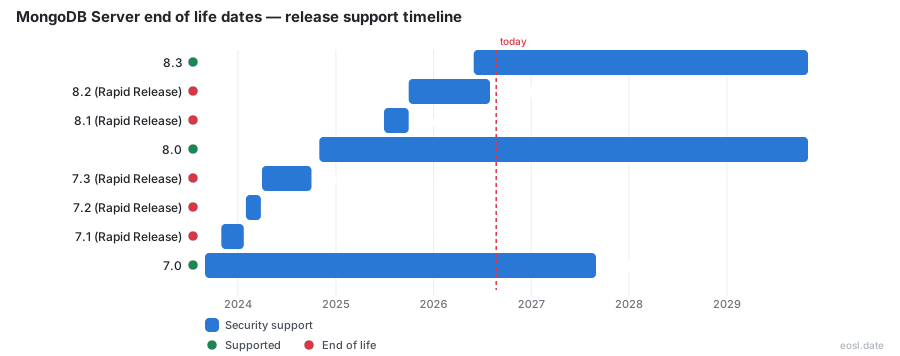
Currently Supported MongoDB Server Releases - Active EOS/EOSL Support (4)
| Release | Released | Security Support | Latest |
|---|---|---|---|
| 9.0 | (1 month and 3 weeks ago) | (in 4 years and 11 months) | 9.0.8 (1 week and 3 days ago) |
| 8.3 | (5 months ago) | (in 2 years and 11 months) | 8.3.17 (1 week and 3 days ago) |
| 8.0 | (2 years ago) | (in 2 years and 11 months) | 8.0.38 (1 week and 4 days ago) |
| 7.0 | (3 years and 2 months ago) | (in 9 months) | 7.0.48 (1 week and 4 days ago) |
MongoDB Server End of Life (EOL) Releases - No Longer Supported (29)
| Release | Released | Security Support | Latest |
|---|---|---|---|
| 8.2 (Rapid Release) | (1 year and 1 month ago) | (3 months ago) | 8.2.12 (3 months ago) |
| 8.1 (Rapid Release) | (1 year and 4 months ago) | (1 year and 1 month ago) | 8.1.3 (1 year and 3 months ago) |
| 7.3 (Rapid Release) | (2 years and 7 months ago) | (2 years and 1 month ago) | 7.3.4 (2 years and 3 months ago) |
| 7.2 (Rapid Release) | (2 years and 9 months ago) | (2 years and 7 months ago) | 7.2.2 (2 years and 8 months ago) |
| 7.1 (Rapid Release) | (3 years ago) | (2 years and 9 months ago) | 7.1.1 (3 years ago) |
| 6.3 (Rapid Release) | (3 years and 6 months ago) | (3 years and 2 months ago) | 6.3.2 (3 years and 4 months ago) |
| 6.2 (Rapid Release) | (3 years and 8 months ago) | (3 years and 6 months ago) | 6.2.1 (3 years and 8 months ago) |
| 6.1 (Rapid Release) | (4 years ago) | (3 years and 9 months ago) | 6.1.1 (3 years and 10 months ago) |
| 6.0 | (4 years and 3 months ago) | (1 year and 3 months ago) | 6.0.30 (1 week and 4 days ago) |
| 5.3 (Rapid Release) | (4 years and 7 months ago) | (4 years and 4 months ago) | 5.3.2 (4 years and 5 months ago) |
| 5.2 (Rapid Release) | (4 years and 9 months ago) | (4 years and 7 months ago) | 5.2.1 (4 years and 9 months ago) |
| 5.1 (Rapid Release) | (4 years and 11 months ago) | (4 years and 10 months ago) | 5.1.1 (4 years and 11 months ago) |
| 5.0 | (5 years and 3 months ago) | (2 years ago) | 5.0.35 (1 week and 4 days ago) |
| 4.4 | (6 years and 3 months ago) | (2 years and 8 months ago) | 4.4.32 (1 week and 4 days ago) |
| 4.2 | (7 years and 2 months ago) | (3 years and 6 months ago) | 4.2.25 (2 years and 11 months ago) |
| 4.0 | (8 years and 4 months ago) | (4 years and 6 months ago) | 4.0.28 (4 years and 9 months ago) |
| 3.6 | (8 years and 11 months ago) | (5 years and 6 months ago) | 3.6.23 (5 years and 8 months ago) |
| 3.4 | (9 years and 11 months ago) | (6 years and 9 months ago) | 3.4.24 (6 years and 9 months ago) |
| 3.2 | (10 years and 10 months ago) | (8 years and 1 month ago) | 3.2.22 (7 years and 10 months ago) |
| 3.0 | (11 years and 7 months ago) | (8 years and 8 months ago) | 3.0.15 (9 years and 6 months ago) |
| 2.6 | (12 years and 7 months ago) | (10 years ago) | 2.6.12 (10 years and 7 months ago) |
| 2.4 | (13 years and 8 months ago) | (13 years and 7 months ago) | 2.4.14 (11 years and 6 months ago) |
| 2.2 | (14 years and 2 months ago) | (12 years and 8 months ago) | 2.2.7 (12 years and 10 months ago) |
| 2.0 | (15 years and 2 months ago) | (13 years and 7 months ago) | 2.0.9 (13 years and 7 months ago) |
| 1.8 | (15 years and 8 months ago) | (14 years and 1 month ago) | 1.8.5 (14 years and 9 months ago) |
| 1.6 | (16 years and 3 months ago) | (14 years and 8 months ago) | 1.6.5 (15 years and 11 months ago) |
| 1.4 | (16 years and 7 months ago) | (14 years and 1 month ago) | 1.4.5 (16 years and 2 months ago) |
| 1.2 | (16 years and 11 months ago) | (15 years and 4 months ago) | 1.2.5 (16 years and 7 months ago) |
| 1.0 | (17 years and 2 months ago) | (16 years and 2 months ago) | 1.0.1 (17 years ago) |
MongoDB server end of life is the day a release stops getting security patches and bug fixes from MongoDB, and it decides how long your document-based database can safely stay on one version. This guide lists every EOL date by version, explains what changes for the Atlas cloud service and self-managed software, and shows how to plan your move before support runs out.
MongoDB Server End of Life Dates by Version
MongoDB publishes end dates for every release, and the table below summarizes it as of 26 October 2026. Every end of life date marks the last day MongoDB ships fixes for that release. Past it, the MongoDB end of life status applies and your production data and the software around it run without a safety net.
| Version | Release date | End of life date | Status |
|---|---|---|---|
| MongoDB 9.0 | September 2026 | October 31, 2031 | Supported |
| MongoDB 8.3 | May 2026 | October 31, 2029 | Supported |
| MongoDB 8.2 (rapid release) | September 2025 | July 31, 2026 | End of life |
| MongoDB 8.1 (rapid release) | June 2025 | September 30, 2025 | End of life |
| MongoDB 8.0 | October 2024 | October 31, 2029 | Supported |
| MongoDB 7.0 | August 2023 | August 31, 2027 | Supported |
| MongoDB 6.0 | July 2022 | July 31, 2025 | End of life |
| MongoDB 5.0 | July 2021 | October 31, 2024 | End of life |
| MongoDB 4.4 | July 2020 | February 29, 2024 | End of life |
| MongoDB 4.2 | August 2019 | April 30, 2023 | End of life |
| MongoDB 4.0 | June 2018 | April 30, 2022 | End of life |
MongoDB 9.0 and MongoDB 8.0: Which Are Supported Now
Four lines of the schedule are still inside their window and keep full security support: 9.0 runs to October 31, 2031, 8.3 and 8.0 to October 31, 2029, and 7.0 to August 31, 2027. That last one has under a year left, so treat 7.0 as a stopgap and aim for 8.0 or 9.0. A GA release used to be supported for 30 months, but MongoDB lengthened 7.0 to four years and 8.0 and later major versions to five. Any other release is an unsupported version, and its end of support has already passed.
Release Date Pattern: Major Release and Rapid Release Tracks
A new major release lands about every one to two years, such as 8.0 in October 2024 and 9.0 in September 2026. Between them, a quarterly rapid release adds features, but it is supported only inside MongoDB Atlas, never on-premises, and it ends when the next minor release ships, as 8.2 did on July 31, 2026. Atlas Dedicated clusters follow the same end dates as the server for 5.0 through 9.0.
When Is MongoDB 4.4 End of Life?
This release reached end of life on February 29, 2024, and 4.2 ended on April 30, 2023. These MongoDB end of life dates matter because both are four or more major releases behind 9.0, and every release between them has to be installed in turn.
How the MongoDB Support Policy Works
MongoDB's support policy for its software is blunt: it has no obligation to provide technical support for a version past its end-of-life date. Bug fixes and patches flow only to versions on the schedule. If you hold a support contract, the response goals by severity apply to supported releases alone, and anything below 5.0 falls under the separate legacy support policy. Staying on an old release has a cost that does not show up on any invoice.
Reading the Lifecycle Schedule for GA Releases
The lifecycle schedule is one table per product in the software lifecycle: server, Ops Manager, and Atlas. Use the Enterprise Advanced table for self-hosted dates and the Atlas auto-upgrade table for quarterly releases. Each GA release of the Stable API works with every GA major server release shipped within five years of it.
Drivers and Compatibility Limits
One rule catches application teams: a driver released more than three years after a server version's end of life will not work with that server. Newer drivers also stop listing old servers; the Node.js driver 7.6 and 7.7, for example, no longer list 4.2, while 7.3 to 7.5 still do. Check compatibility before you pin a release.
EOL Consequences for Atlas, Enterprise Advanced and Community Server
The server dates are identical everywhere, but what an EOL date means depends on how you run the database. Community Server has no vendor contract, so the fixes simply stop. Enterprise Advanced covers versions inside their lifecycle and offers a paid two-year extension. On a self-hosted or on-premises deployment, you own every software upgrade and its maintenance window.
Atlas Dedicated Clusters After the Cut-Off
MongoDB Atlas patches the service itself, but a deployment pinned to one major version must be moved before its end date. MongoDB notifies you, and after the cut-off Atlas upgrades the cluster to its current default target, which is not always the next major. Because a rolling upgrade goes one major at a time, a forced move lands on the vendor's calendar, not yours. MongoDB Atlas customers on 6.0 faced exactly this after July 31, 2025.
Ops Manager Lifecycle
Ops Manager keeps its own schedule, separate from the server's:
| Component | Released | Ends |
|---|---|---|
| Ops Manager 8.0 | October 2024 | October 31, 2027 |
| Ops Manager 7.0 | January 2024 | February 28, 2026 |
| Ops Manager 6.0 | July 2022 | January 31, 2025 |
Risks of an End-of-Life Version
Running past the cut-off does not break the database overnight, but it removes protection. The main risk is exposure to cyber threats while your data sits unpatched with nobody obliged to fix it, followed by drivers that drift away and audit findings, since an unsupported database is a finding in most frameworks.
Security Vulnerabilities and Patches
CVE-2025-14847, nicknamed MongoBleed, is an unauthenticated out-of-bounds read disclosed in December 2025. Fixed releases include 8.2.3, 8.0.17, 7.0.28, 6.0.27, 5.0.32 and 4.4.30. MongoDB also patched 4.4, 5.0 and 6.0 even though they were past end of life, yet the NVD record lists 4.2, 4.0 and 3.6 as vulnerable with no fix. A courtesy patch is not a commitment, and a missing security patch is the quickest way for an old install to become a breach.
Compliance and Operational Instability
Auditors treat unsupported software as a compliance gap, and the operational side gets worse once the cut-off passes. A replica set member offline longer than the oplog window needs a full resync, and WiredTiger throttles threads when its cache fills, so write latency climbs. On a release past its end date, a bug like either one gets no fix from MongoDB, and the resulting downtime hurts performance with no support case to open.
Planning an Upgrade Before the End of Life Date
MongoDB does not let you skip a major version. To reach 9.0 you must run 8.0 or 8.3, to reach 8.0 you need 7.0, and so on. From 4.4 that is five upgrades of every replica set and sharded cluster, each a binary change followed by raising featureCompatibilityVersion. While it stays at the old value you can roll back, so that window is the time to test. A staged rollout strategy brings stronger security, better performance and supported releases.
Upgrade Path From MongoDB 6.0 and MongoDB 5.0
Work through the checks in order:
- Run
db.version()to confirm the current release. - Confirm the host exposes AVX, which 5.0 and later require on x86_64; some virtual machine CPU models hide it.
- Check your client library against the target server before touching anything.
- Upgrade one major at a time and pause on 7.0 only briefly, since it ends in August 2027.
Backup and Testing Before You Upgrade
Take a backup of your data that you have actually restored, then rehearse the whole sequence on a staging copy. Run your application's test suite against each intermediate release to catch behavior changes early, and keep the old featureCompatibilityVersion until the new build has proven itself in production.
Options for Unsupported MongoDB Versions
When you cannot upgrade right away, you still have choices: buy extended support, move to a managed host, or accept the risk with extra security monitoring while you schedule the move. Running unsupported versions is a risk to manage, not a plan. Pick the option that matches your deadline, because none of them fixes the underlying problem.
Extended Support Add-On for Past-EOL Versions
Customers can buy the commercial Extended Lifecycle Support add-on, which covers up to two more years of fixes. It protects a deployment while the move is built, but it is a bridge to the latest version rather than a destination.
Managed Hosting and Migration
A managed provider can run a supported release for you, and moving a workload to Atlas shifts routine patching onto MongoDB. Either way you still need to land on 8.0 or 9.0, so use the time bought here to finish the upgrade.