Kuma End of Life (EOL) Dates and End of Support (EOS) Dates
Kuma end of life (EOL) and end of support (EOS) dates: 19 Kuma versions have reached EOL, including Kuma 2.12 (EOL date: Sep 09, 2026) — no longer receiving security updates or patches. Kuma 2.11 reaches its End of Support date on Dec 10, 2026 — plan your upgrade path now. Kuma 3.0.1 is the current supported release, with support through Oct 15, 2027 — 3 versions in active support. Also see Envoy EOSL information for related end-of-life information.
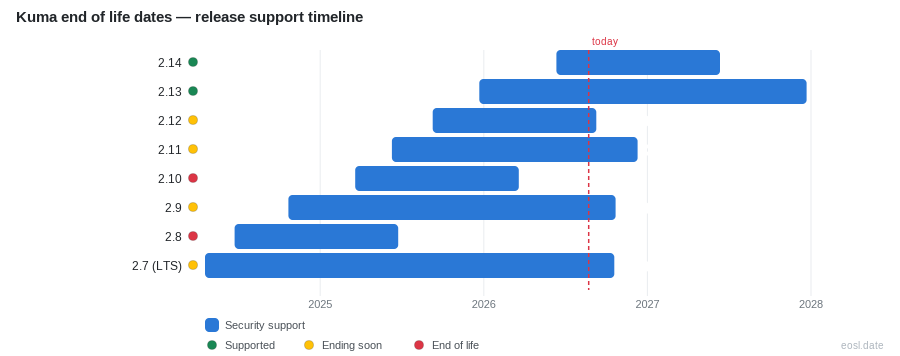
Currently Supported Kuma Releases - Active EOS/EOSL Support (3)
Kuma Releases Nearing End of Life - Support Ending Soon (1)
| Release | Released | Support | Latest | LTS |
|---|---|---|---|---|
| 2.11 | (1 year and 5 months ago) | (in 2 weeks and 4 days) | 2.11.20 (3 weeks and 2 days ago) | - |
Kuma End of Life (EOL) Releases - No Longer Supported (19)
| Release | Released | Support | Latest | LTS |
|---|---|---|---|---|
| 2.12 | (1 year and 2 months ago) | (2 months ago) | 2.12.15 (2 months ago) | - |
| 2.10 | (1 year and 8 months ago) | (8 months ago) | 2.10.11 (8 months ago) | - |
| 2.9 | (2 years and 1 month ago) | (1 month ago) | 2.9.20 (2 months ago) | - |
| 2.8 | (2 years and 4 months ago) | (1 year and 4 months ago) | 2.8.8 (1 year and 7 months ago) | - |
| 2.7 (LTS) | (2 years and 7 months ago) | (1 month and 3 days ago) | 2.7.30 (2 months ago) | LTS |
| 2.6 | (2 years and 9 months ago) | (1 year and 9 months ago) | 2.6.15 (1 year and 10 months ago) | - |
| 2.5 | (3 years ago) | (2 years ago) | 2.5.11 (2 years and 1 month ago) | - |
| 2.4 | (3 years and 2 months ago) | (2 years and 2 months ago) | 2.4.10 (2 years and 3 months ago) | - |
| 2.3 | (3 years and 4 months ago) | (2 years and 4 months ago) | 2.3.7 (2 years and 7 months ago) | - |
| 2.2 | (3 years and 7 months ago) | (2 years and 7 months ago) | 2.2.9 (2 years and 7 months ago) | - |
| 2.1 | (3 years and 9 months ago) | (2 years and 9 months ago) | 2.1.7 (3 years and 1 month ago) | - |
| 2.0 | (4 years ago) | (3 years ago) | 2.0.8 (3 years and 1 month ago) | - |
| 1.8 | (4 years and 3 months ago) | (3 years and 2 months ago) | 1.8.8 (3 years and 3 months ago) | - |
| 1.7 | (4 years and 5 months ago) | (3 years and 5 months ago) | 1.7.6 (3 years and 7 months ago) | - |
| 1.6 | (4 years and 7 months ago) | (3 years and 7 months ago) | 1.6.5 (3 years and 9 months ago) | - |
| 1.5 | (4 years and 8 months ago) | (3 years and 8 months ago) | 1.5.5 (3 years and 9 months ago) | - |
| 1.4 | (5 years ago) | (4 years ago) | 1.4.1 (4 years and 10 months ago) | - |
| 1.3 | (5 years and 2 months ago) | (4 years and 2 months ago) | 1.3.1 (5 years and 1 month ago) | - |
| 1.2 | (5 years and 5 months ago) | (4 years and 5 months ago) | 1.2.3 (5 years and 2 months ago) | - |
Planning a cluster change? Your Kuma end of life date decides how long a version keeps receiving fixes, and it is the number to check before you trust a running mesh. Kuma is a service mesh for containers, Kubernetes and VMs, and every minor line is supported for a limited window, so the newest tag matters less than the support end date of the one you run.
Kuma End of Life Dates for Every Release
The table lists each Kuma minor version, when it shipped and when its support window closes, as of 27 October 2026. Read the status column first: an ended version gets no further fixes, while a supported release still gets patches. The 2.7 branch was the LTS (long-term support) line, and even that one has now closed.
| Version | Released | Support ends | Status |
|---|---|---|---|
| 3.0 | 15 Oct 2026 | 15 Oct 2027 | Supported |
| 2.14 | 12 Jun 2026 | 12 Jun 2027 | Supported |
| 2.13 | 22 Dec 2025 | 22 Dec 2027 | Supported |
| 2.12 | 9 Sep 2025 | 9 Sep 2026 | Ended |
| 2.11 | 10 Jun 2025 | 10 Dec 2026 | Ending soon |
| 2.10 | 20 Mar 2025 | 20 Mar 2026 | Ended |
| 2.9 | 22 Oct 2024 | 22 Oct 2026 | Ended |
| 2.7 (LTS) | 19 Apr 2024 | 19 Oct 2026 | Ended |
Versions Whose Support Has Already Ended
Versions 2.7, 2.9, 2.10 and 2.12 are past their dates, so they no longer receive updates. Staying on them leaves your mesh on outdated, effectively obsolete code, and the 2.9 and 2.7 closures in October 2026 are the right trigger to move.
Versions That Still Receive Support Today
Versions 2.11, 2.13, 2.14 and 3.0 still get fixes. Version 2.11 sits closest to the edge, ending on 10 December 2026, so schedule its move now. A new major release such as 3.0 resets the clock to October 2027, though it can also carry breaking changes, so compare each release number in your clusters against the table.
Kuma Lifecycle and Support Policy Explained
The Kuma lifecycle is simple: each minor line receives support for a fixed window after general availability. The project keeps its dates in the repository documentation instead of a long formal support policy, so the table above is your working reference. Across the industry, a product lifecycle runs from launch through active support to retirement, and each vendor words those stages differently.
Versions follow an X.Y.Z pattern. X is the major release, Y the minor release and Z marks maintenance releases that ship fixes inside a line. Support windows apply to the minor line, not each patch level, so 2.13.8 and 2.13.11 share one end date. If you run a commercial distribution of Kuma, its own lifecycle support policy is the final word on contracts.
From End-of-Sale to End-of-Life: Support Phases
Kuma itself publishes only an end date, but commercial vendors split the final stretch into phases, and that model clarifies what a Kuma end date means in practice. After end-of-sale, a product is no longer offered for new orders, yet customers keep receiving help until end-of-life arrives and support stops entirely. The usual phases look like this:
- Full support covers bug fixes, workarounds and security patches for the newest versions.
- Limited support offers troubleshooting help only, with no new features, and often requires an active support license and a ticket through the support portal.
- End of version support means the version has retired and no fixes of any kind ship.
Community projects like Kuma rarely publish this ladder. Treat the project's support end date as the moment full support stops and limited support, if any, begins; assume nothing after it.
Lifecycle Risks of Running an Unsupported Mesh
When a version does reach end of life, the first casualty is security. An unpatched control plane or data plane proxy is a security risk, because flaws found later in Envoy or in mTLS handling never get fixed on your line while live traffic keeps passing through it. A zero-trust design only holds while the certificates, rules and proxies that enforce it stay maintained.
Once a Kuma line is unsupported, its dependencies grow outdated and compatibility with newer Kubernetes versions erodes. You will eventually have to retire the old version and replace it under pressure, on the project's schedule instead of yours.
Check Kuma EOL Dates Through the API and Feeds
You do not have to read tables by hand. The endoflife.date project tracks Kuma, mirrors the dates documented in the project's GitHub repository, and offers them as an API that returns JSON, an RSS feed and an iCalendar subscription. Point a scheduled job at the JSON, or subscribe your team calendar, so alerts about EOL dates reach you before a deadline. As an open source project in the CNCF, Kuma keeps its changelog public, which keeps these automated checks reliable.
Plan Your Upgrade Before the EOL Date
Pick the target before the EOL date arrives. If your cluster runs 2.11, plan to upgrade to 2.14 or 3.0 and read the notes for every step on the way. Move one minor version at a time on Kubernetes clusters and virtual machines alike, and migrate workloads only after the new version reports healthy.
Upgrade Multi-Zone Deployments in Order
Update the global control plane first, then one zone at a time. Use kumactl for universal installs and Helm for Kubernetes, and keep each remaining one within one minor version of the global one.
Test Traffic Policies After Every Step
After each Kuma step, confirm that traffic still flows, that mTLS handshakes succeed and that each Envoy-based data plane proxy reconnects. Prometheus and Grafana dashboards give you observability into error rates, so a regression shows up before your users notice, and your policies keep applying as written. Keep this live traffic check in your service mesh runbook for every Kuma move.
Kong Mesh Support After End of Sale
Kong Mesh is the commercial distribution built on Kuma, and its release numbers track the upstream line. Each distribution still has its own support terms, so read the vendor documentation for the exact date that applies to your contract instead of assuming Kuma's dates carry over. Customers on a paid plan should also confirm what happens after end of sale for their entitlement.
Software and Hardware Lifecycle Rules at Other Vendors
Kuma is pure software, so only its software window applies to you, but vendors that sell physical hardware products split their lifecycle into separate software and hardware tracks, and comparing them shows why Kuma's single track is easier to plan:
- Hardware: spares and replacement parts for hardware appliances are offered for a fixed period, such as five years from end-of-sale at Kemp.
- Software: operating system software receives fixes and maintenance releases for a fixed period after end-of-sale.
- Virtual editions: software-only editions follow the software timeline because no hardware needs replacing.
- Bare metal: hardware that you own can outlive its support, so budget a refresh before the date.
If your stack mixes software and hardware from several vendors, track every hardware date next to your Kuma dates in one calendar.