Kubernetes End of Life (EOL) Dates and End of Support (EOS) Dates
Kubernetes end of life (EOL) and end of support (EOS) dates: 19 Kubernetes versions have reached EOL, including Kubernetes 1.34 (EOL date: Oct 27, 2026) — no longer receiving security updates or patches. Kubernetes 1.35 reaches its End of Support date on Feb 28, 2027 — plan your upgrade path now. Kubernetes 1.37.2 is the current supported release, with support through Oct 28, 2027 — 2 versions in active support. Also see containerd EOSL dates for related end-of-life information.
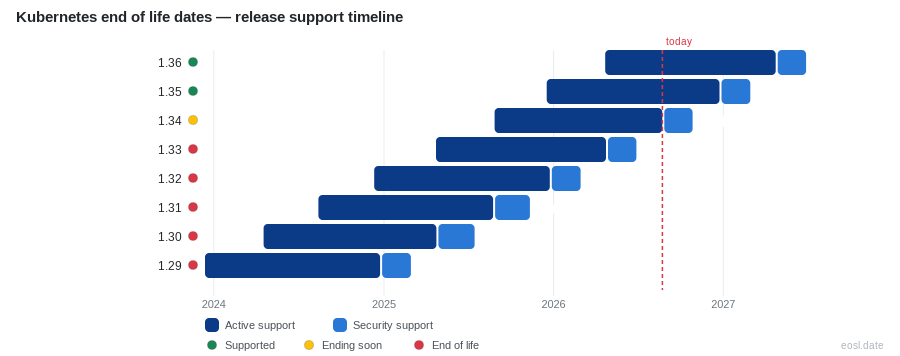
Currently Supported Kubernetes Releases - Active EOS/EOSL Support (2)
Kubernetes Releases Nearing End of Life - Support Ending Soon (1)
| Release | Released | Maintenance Support | Active Support | Latest |
|---|---|---|---|---|
| 1.35 | (11 months ago) | (in 3 months) | (in 1 month and 1 week) | 1.35.10 (3 weeks and 4 days ago) |
Kubernetes End of Life (EOL) Releases - No Longer Supported (19)
| Release | Released | Maintenance Support | Active Support | Latest |
|---|---|---|---|---|
| 1.34 | (1 year and 2 months ago) | (3 weeks and 4 days ago) | (2 months ago) | 1.34.13 (3 weeks and 4 days ago) |
| 1.33 | (1 year and 6 months ago) | (4 months ago) | (6 months ago) | 1.33.13 (5 months ago) |
| 1.32 | (1 year and 11 months ago) | (8 months ago) | (10 months ago) | 1.32.13 (8 months ago) |
| 1.31 | (2 years and 3 months ago) | (1 year ago) | (1 year and 2 months ago) | 1.31.14 (1 year ago) |
| 1.30 | (2 years and 7 months ago) | (1 year and 4 months ago) | (1 year and 6 months ago) | 1.30.14 (1 year and 5 months ago) |
| 1.29 | (2 years and 11 months ago) | (1 year and 8 months ago) | (1 year and 10 months ago) | 1.29.15 (1 year and 8 months ago) |
| 1.28 | (3 years and 3 months ago) | (2 years ago) | (2 years and 2 months ago) | 1.28.15 (2 years ago) |
| 1.27 | (3 years and 7 months ago) | (2 years and 4 months ago) | (2 years and 6 months ago) | 1.27.16 (2 years and 4 months ago) |
| 1.26 | (3 years and 11 months ago) | (2 years and 8 months ago) | (2 years and 10 months ago) | 1.26.15 (2 years and 8 months ago) |
| 1.25 | (4 years and 2 months ago) | (3 years ago) | (3 years and 2 months ago) | 1.25.16 (3 years ago) |
| 1.24 | (4 years and 6 months ago) | (3 years and 3 months ago) | (3 years and 5 months ago) | 1.24.17 (3 years and 2 months ago) |
| 1.23 | (4 years and 11 months ago) | (3 years and 8 months ago) | (3 years and 10 months ago) | 1.23.17 (3 years and 8 months ago) |
| 1.22 | (5 years and 3 months ago) | (4 years ago) | (4 years and 2 months ago) | 1.22.17 (3 years and 11 months ago) |
| 1.21 | (5 years and 7 months ago) | (4 years and 4 months ago) | (4 years and 6 months ago) | 1.21.14 (4 years and 5 months ago) |
| 1.20 | (5 years and 11 months ago) | (4 years and 8 months ago) | (4 years and 10 months ago) | 1.20.15 (4 years and 10 months ago) |
| 1.19 | (6 years and 2 months ago) | (5 years ago) | (5 years and 2 months ago) | 1.19.16 (5 years ago) |
| 1.18 | (6 years and 7 months ago) | (5 years and 5 months ago) | (5 years and 6 months ago) | 1.18.20 (5 years and 5 months ago) |
| 1.17 | (6 years and 11 months ago) | (5 years and 10 months ago) | — | 1.17.17 (5 years and 10 months ago) |
| 1.16 | (7 years and 2 months ago) | (6 years and 3 months ago) | — | 1.16.15 (6 years and 2 months ago) |
Running an old release quietly turns into a Kubernetes end of life problem: once a version drops out of the support window, nobody ships fixes for it, and your risk grows with every new disclosure. This guide lists the EOL date for each recent release, explains how the open-source project and each cloud provider set those dates, and shows how to keep production safe when you can't move right away, with security in mind.
Kubernetes End of Life and the Release Cycle Support Policy
The support policy follows an N-2 rule: the project maintains the three most recent minor releases and nothing older. New releases arrive on a 15-week cadence, and each one gets about 12 months of patch support plus a two-month upgrade period, so it stays on the list for roughly 14 months. Releases are numbered x.y.z under semantic versioning. Because Kubernetes automates deployment, scaling and management, the line you run underpins everything built on top of it.
Each line moves through active support, then maintenance support, and finally EOL. Along the way the project ships security updates and bug fixes; afterwards upstream support is gone and nothing new arrives. The Kubernetes Release Team documents who does what in each round. The rule of thumb is simple: always run a supported version.
How Minor Version Release Branches Stay Supported
Patch builds are cut from the release branches of those three lines, plus extra urgent builds when required. The Release Managers group decides what to backport based on severity and feasibility, so security patches only land on branches still inside the window. Client and server can also differ within the version skew limits, which sets the order you update components in. The patch release page lists expected dates for every active branch.
End-of-Life Releases and Release History by Minor Version
The release history below combines the project's published schedule with the endoflife.date tracker. The end of life date for each branch is fixed well in advance, so you can plan around it instead of discovering it. Skipping that planning is the real risk, because an unplanned jump is where outages and rushed upgrades start.
| Release | Released | Active support ends | Maintenance support ends (EOL) |
|---|---|---|---|
| 1.37 | 26 Aug 2026 | 28 Aug 2027 | 28 Oct 2027 |
| 1.36 | 22 Apr 2026 | 28 Apr 2027 | 28 Jun 2027 |
| 1.35 | 17 Dec 2025 | 28 Dec 2026 | 28 Feb 2027 |
| 1.34 | 27 Aug 2025 | 27 Aug 2026 | 27 Oct 2026 |
| 1.33 | 23 Apr 2025 | 28 Apr 2026 | 28 Jun 2026 |
| 1.32 | 11 Dec 2024 | 28 Dec 2025 | 28 Feb 2026 |
Fixes keep flowing until the cutoff: 1.34.12 is the latest release on its line, with 1.35.9 and 1.36.5 current beside it, and all earlier patch releases remain available. The final patch release can even trail the date, as when 1.25.16 shipped in November 2023, after its EOL date, to fix CVE-2023-5528. The upcoming release, 1.38, has its own schedule page. The same dates are available as a JSON API, an RSS feed and an iCalendar file.
When a Version Is No Longer Supported on EKS and AKS
Managed services run their own clocks on top of the project's. Amazon EKS gives each release 14 months of standard support, then 12 months of extended support at an extra charge per cluster hour. If you do nothing before that ends, the control plane is moved automatically to the oldest version still in extended support, and a cluster moved that way can't be rolled back. For 1.34, standard support ends on 2 December 2026 and extended support on 2 December 2027. AWS sends a Health Dashboard notice roughly a year after a version's release, at least 60 days before its end date.
Worker nodes in node groups don't follow the control plane on their own, so schedule them separately and keep both on the same version. Run kubectl version to see where your client and server stand, and read the release notes for breaking changes, because a deferred jump across several lines stacks them. The safest path is one minor release at a time, and a release that is no longer supported should come first in the queue.
Azure Kubernetes Service (AKS) works differently. A Microsoft moderator explained in 2022 that a version retires when the release three lines newer reaches GA, followed by a 30 day grace period, so the real cutoff lands a week or two after the month on the calendar. Treat that as a pointer, not a promise, and confirm against Azure's own documentation: the grace period is the buffer you plan around.
What EOL Means for Workloads: No Security Patches Upstream
When a release reaches EOL, three things stop:
- Fixes for newly disclosed flaws
- Changes from the project to the code
- Remediation for known exploits, including any CVE published afterwards
Newly found vulnerabilities stay open until someone ships a patched build. In Kubernetes the problem spreads, because workloads are packaged in containers, the same image is replicated across pods and nodes, and the service is exposed through ingress. Attackers who exploit one service rarely stop there; they pivot to secrets, service accounts and credentials injected at runtime.
Clear ownership matters as much as the technology. If an EOL workload runs in your environment, it is your responsibility, whichever team wrote the code. Application teams own the code; platform engineering owns the environment, network boundaries and operational security. One flaw in a single microservice can become a compliance problem and a risk to customer data.
Contain and Control: Securing a Cluster After End-of-Life
If you can't move yet, the goal is to shrink exposure and limit damage, treating the leftover as managed risk with a deadline. Ingress NGINX is the textbook case: the controller sits at the edge, routes outside traffic in, and is often the first thing attackers touch. Edge controls such as rate limits and traffic filtering, set through annotations, cut exploitability without removing the flaw. Where the project's patches have ended, vendors sell never-ending support, meaning patched drop-in replacements that keep workloads compliant while the longer-term fix moves forward.
Start With an Inventory of Affected Workloads
Find what is running before you contain it: images, versions, ingress paths and who owns each. A kubectl get deployments -A query with custom columns for the container image is enough to start. Then label each EOL workload so stricter policies can target it.
Isolate Unsupported Workloads and Lock Down Access Paths
Because an unsupported release gets no new patches, containment has to do the work. Move EOL workloads into dedicated namespaces and start from a default-deny NetworkPolicy before layering in only the paths you can justify. Enforce at least the baseline profile of Pod Security Standards so a flaw can't easily reach the host, which keeps the blast radius small. Also:
- Use dedicated node pools with taints and tolerations
- Write explicit allow-lists for east-west traffic
- Remove wildcard permissions that grew over time
Enforce Guardrails on Unsupported Releases
Back the pattern with admission policies that reject new privileged pods in namespaces holding unsupported releases, image scanning in CI/CD, and GitOps so every change is reviewed and reversible. Those guardrails stop a temporary exception from becoming permanent. Your working order:
- Find every EOL workload and label it
- Fence it off with network and pod policies
- Add edge limits and admission rules
- Roll out the migration through reviewed, reversible changes