Kiali End of Life (EOL) Dates and End of Support (EOS) Dates
Kiali end of life (EOL) and end of support (EOS) dates: 28 Kiali versions have reached EOL, including Kiali 2.25 (EOL date: Oct 31, 2026) — no longer receiving security updates or patches. Kiali 2.26 reaches its End of Support date on Dec 31, 2026 — plan your upgrade path now. Also see Bitcoin Core end of support dates for related end-of-life information.
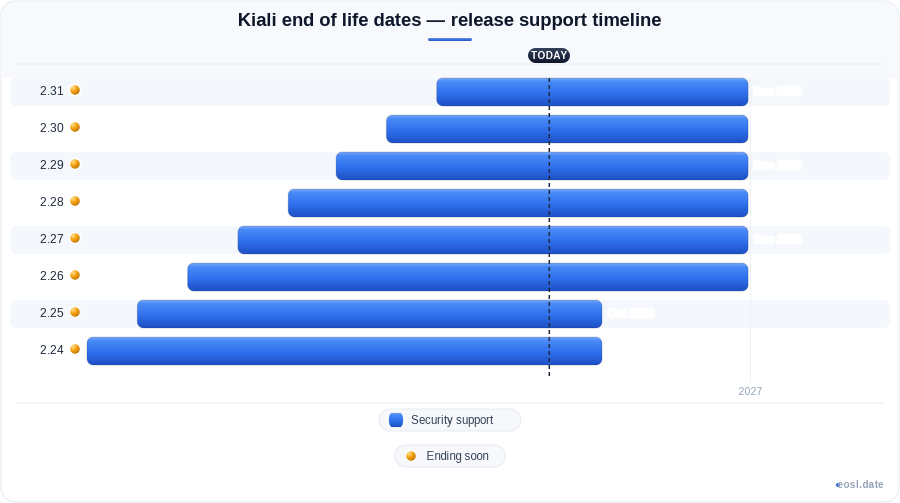
Kiali Releases Nearing End of Life - Support Ending Soon (6)
| Release | Ossm Version | Supported Istio Versions | Released | Security Support | Latest | LTS |
|---|---|---|---|---|---|---|
| 2.26 | - | 1.28 - 1.30 | (6 months ago) | (in 1 month and 1 week) | 2.26.1 (5 months ago) | - |
| 2.27 | 3.4 | 1.28 - 1.30 | (5 months ago) | (in 1 month and 1 week) | 2.27.3 (2 months ago) | - |
| 2.28 | - | 1.28 - 1.30 | (5 months ago) | (in 1 month and 1 week) | 2.28.0 (5 months ago) | - |
| 2.29 | - | 1.28 - 1.30 | (4 months ago) | (in 1 month and 1 week) | 2.29.0 (4 months ago) | - |
| 2.30 | - | 1.28 - 1.30 | (3 months ago) | (in 1 month and 1 week) | 2.30.0 (3 months ago) | - |
| 2.31 | - | 1.29 - 1.30 | (3 months ago) | (in 1 month and 1 week) | 2.31.0 (3 months ago) | - |
Kiali End of Life (EOL) Releases - No Longer Supported (28)
| Release | Ossm Version | Supported Istio Versions | Released | Security Support | Latest | LTS |
|---|---|---|---|---|---|---|
| 2.25 | - | 1.27 - 1.29 | (7 months ago) | (3 weeks and 3 days ago) | 2.25.0 (7 months ago) | - |
| 2.24 | - | 1.27 - 1.29 | (7 months ago) | (3 weeks and 3 days ago) | 2.24.0 (7 months ago) | - |
| 2.23 | - | 1.27 - 1.29 | (8 months ago) | (3 weeks and 3 days ago) | 2.23.0 (8 months ago) | - |
| 2.22 | 3.3 | 1.27 - 1.29 | (9 months ago) | (3 weeks and 3 days ago) | 2.22.9 (2 months ago) | - |
| 2.21 | - | 1.27 - 1.29 | (9 months ago) | (3 weeks and 3 days ago) | 2.21.0 (9 months ago) | - |
| 2.20 | - | 1.26 - 1.28 | (11 months ago) | (4 months ago) | 2.20.0 (11 months ago) | - |
| 2.19 | - | 1.26 - 1.28 | (1 year ago) | (4 months ago) | 2.19.0 (1 year ago) | - |
| 2.18 | - | 1.26 - 1.28 | (1 year ago) | (4 months ago) | 2.18.0 (1 year ago) | - |
| 2.17 | 3.2 | 1.26 - 1.28 | (1 year and 1 month ago) | (4 months ago) | 2.17.13 (3 months ago) | - |
| 2.16 | - | 1.25 - 1.27 | (1 year and 2 months ago) | (7 months ago) | 2.16.0 (1 year and 2 months ago) | - |
| 2.15 | - | 1.25 - 1.27 | (1 year and 2 months ago) | (7 months ago) | 2.15.0 (1 year and 2 months ago) | - |
| 2.14 | - | 1.25 - 1.27 | (1 year and 3 months ago) | (7 months ago) | 2.14.0 (1 year and 3 months ago) | - |
| 2.13 | - | 1.24 - 1.27 | (1 year and 4 months ago) | (7 months ago) | 2.13.0 (1 year and 4 months ago) | - |
| 2.12 | - | 1.24 - 1.27 | (1 year and 4 months ago) | (7 months ago) | 2.12.0 (1 year and 4 months ago) | - |
| 2.11 | 3.1 | 1.24 - 1.26 | (1 year and 5 months ago) | (11 months ago) | 2.11.16 (3 months ago) | - |
| 2.10 | - | 1.24 - 1.26 | (1 year and 6 months ago) | (11 months ago) | 2.10.0 (1 year and 6 months ago) | - |
| 2.9 | - | 1.24 - 1.26 | (1 year and 6 months ago) | (11 months ago) | 2.9.0 (1 year and 6 months ago) | - |
| 2.8 | - | 1.23 - 1.25 | (1 year and 7 months ago) | (1 year and 1 month ago) | 2.8.0 (1 year and 7 months ago) | - |
| 2.7 | - | 1.23 - 1.25 | (1 year and 8 months ago) | (1 year and 1 month ago) | 2.7.1 (1 year and 8 months ago) | - |
| 2.6 | - | 1.23 - 1.25 | (1 year and 9 months ago) | (1 year and 1 month ago) | 2.6.0 (1 year and 9 months ago) | - |
| 2.5 | - | 1.22 - 1.25 | (1 year and 9 months ago) | (1 year and 1 month ago) | 2.5.0 (1 year and 9 months ago) | - |
| 2.4 | 3.0 | 1.22 - 1.24 | (1 year and 10 months ago) | (1 year and 5 months ago) | 2.4.22 (3 months ago) | - |
| 2.3 | - | 1.24 | (1 year and 11 months ago) | (1 year and 5 months ago) | 2.3.0 (1 year and 11 months ago) | - |
| 2.2 | - | 1.24 | (1 year and 11 months ago) | (1 year and 5 months ago) | 2.2.0 (1 year and 11 months ago) | - |
| 2.1 | - | 1.24 | (2 years ago) | (1 year and 5 months ago) | 2.1.1 (1 year and 11 months ago) | - |
| 2.0 | - | 1.24 | (2 years and 1 month ago) | (1 year and 5 months ago) | 2.0.0 (2 years and 1 month ago) | - |
| 1.89 | - | - | (2 years and 3 months ago) | — | 1.89.8 (2 years ago) | - |
| 1.73 (LTS) | 2.5 - 2.6 | 1.18 | (3 years and 2 months ago) | — | 1.73.33 (5 months ago) | LTS |
If you run Istio in production, Kiali end of life is a question you will meet sooner than you expect: Kiali ships a new minor version about every three weeks, and only the Kiali versions tied to a supported Istio or OpenShift Service Mesh release get security fixes. This guide lists the support dates for every Kiali line, shows which Istio and OSSM releases each one pairs with, and tells you when to upgrade.
Kiali end of life policy: how support is decided
Kiali, the console for your Istio service mesh, does not run a lifecycle calendar of its own. Its support window is borrowed from the platform underneath it, so the end date for a Kiali line is the end date of the Istio release it was tested against. When the Istio project retires a version, the matching Kiali server versions lose their support at the same time, and you should treat them as unmaintained from that day.
That has a practical consequence for any Kubernetes cluster you manage: checking Kiali alone is never enough. You also need to know which Istio control plane is installed, because that release decides whether your Kiali server still receives fixes.
Kiali patch releases and release cadence
Patches stop the day a line passes its support date, which is why the cadence matters: a new minor version arrives roughly every three weeks, so the release cycle moves fast. Each supported line then gets a patch release whenever a defect or vulnerability is fixed, which is why the newest patch of an older line can be more recent than its minor version. One exception to the rhythm is the 1.73 line, flagged as LTS because Red Hat shipped it with older OpenShift Service Mesh versions; it received patch 1.73.33 in June 2026 even though the upstream project no longer lists it as supported, so its fixes come from Red Hat, not from the community.
Security updates follow Istio and OSSM
Fixes for security flaws go to the Kiali versions used by a supported Istio release or by a supported Red Hat OSSM stream. Starting with Kiali 2.4, every minor version is tested against all Istio releases that are supported when it ships, so the tested Kiali versions column in the compatibility table below reads as a range rather than a single pairing. Before 2.4, only the newest Istio at the time was verified, although older ones frequently still worked. A rule worth remembering: a supported version of Kiali always sits alongside a supported version of Istio, never the reverse.
Kiali EOL dates by version
The table below groups every Kiali minor line by its published support end, using the schedule that endoflife.date maintains. Treat the dates as the last day you can expect fixes: after them, a line is unmaintained, even if a patch tag exists.
| Kiali lines | Istio releases | Support end | Status on October 27, 2026 |
|---|---|---|---|
| 2.26 to 2.31 | 1.28 to 1.30 | December 31, 2026 | Supported |
| 2.21 to 2.25 | 1.27 to 1.29 | October 31, 2026 | Supported, ends within days |
| 2.17 to 2.20 | 1.26 to 1.28 | July 1, 2026 | Out of support |
| 2.12 to 2.16 | 1.24 to 1.27 | April 7, 2026 | Out of support |
| 2.9 to 2.11 | 1.24 to 1.26 | December 22, 2025 | Out of support |
| 2.5 to 2.8 | 1.22 to 1.25 | September 30, 2025 | Out of support |
| 2.0 to 2.4 | 1.22 to 1.24 | June 24, 2025 | Out of support |
| 1.89 and 1.73 | 1.18 and older | None listed | Not supported upstream |
Releases already past their support date
Every line from 2.0 through 2.20 is out of support, and so are the 1.x series. If your cluster still runs one of them, you are missing security fixes and Istio compatibility work, and the oldest lines were built before the Kiali v2 rework. Plan a move to a supported line rather than patching in place.
Releases supported into 2026
The lines 2.21 to 2.25 stop receiving fixes on October 31, 2026, while 2.26 to 2.31 run through the end of the year. The 2.32, 2.33 and 2.34 minor versions are already out, and the 2.34.0 build appeared on October 26, 2026, but the schedule does not list them yet; expect their dates to follow the same Istio-based pattern. Because security coverage can only shrink as Istio releases retire, the safest target is the newest Kiali version your Istio and Kubernetes versions allow.
Istio version compatibility for each Kiali version
Kiali needs a working Istio installation before it does anything useful, and for full function you also want a telemetry store such as Prometheus. The project recommends a supported Istio release, since the Istio news page publishes its own retirement dates. The mapping below shows the Kiali version range tested against each Istio release.
| Istio | Tested Kiali versions | Note |
|---|---|---|
| 1.31 | 2.31 and higher | Newest pairing |
| 1.30 | 2.26 and higher | Supported |
| 1.29 | 2.21 to 2.33 | Istio out of support |
| 1.28 | 2.17 to 2.30 | Istio out of support |
| 1.27 | 2.12 to 2.25 | Istio out of support |
| 1.24 | 2.0 to 2.13 | Istio out of support |
| 1.23 | 1.87 and 2.4 to 2.8 | Needs Discovery Selectors on Kiali v2 |
Ambient users have an extra rule: Kiali 1.86 is the recommended minimum for Istio Ambient, and that line also needs Istio 1.22 or later. Ambient mode removes the per-pod sidecar and moves traffic handling into ztunnel and waypoint proxies, so Kiali has to draw a different picture of the mesh. Recent Ambient fixes show how fast that area moves: one corrected health checks for Ambient workloads behind a waypoint, another stopped Ambient services without a waypoint from showing layer-7 Istio configuration. In support terms, that means older lines are not a safe home for Ambient, and any Ambient mesh should run a current Kiali, since an Ambient dashboard on an old line shows incomplete traffic. Test Ambient namespaces and Ambient workloads first when you upgrade. Ambient support is also why a newer Kiali sometimes needs a newer Istio. A second warning concerns an old regression: avoid 1.63.0 and 1.63.1, which broke compatibility with Istio 1.16 and 1.17. Version compatibility for clusters running older Istio is a lookup job, so keep the table beside your upgrade plan, and note which Ambient features your mesh depends on.
Debug interface and Istio API access
This setting affects what a supported Kiali can show you, not its support status. Kiali reads proxy status through Istio's port 8080 debug interface, so ENABLE_DEBUG_ON_HTTP must stay true, which is the default. Istio advises turning it off for security, but without it the sidecar proxy status views stay empty. If you prefer to keep it off, tell the Kiali CR with this setting, which switches off the Istio API calls while the rest of the Kiali server keeps working:
spec.external_services.istio.istio_api_enabled: falseKiali also expects a metrics backend. Whether you start from the Istio add-on samples or run your own stack, the telemetry storage must hold request metrics, or the traffic graph stays empty. Distributed tracing through Tempo is optional, as are charts from Grafana, and tracing data adds spans to workload detail pages; Kiali works without them, but the tracing tab and the linked Grafana dashboards disappear, so confirm tracing still works after an upgrade. If you disable Prometheus in the Kiali CR, expect graphs to go quiet too. After any version change, verify that the Prometheus URL, the Grafana URL and the tracing URL in the Kiali CR still point at live services, because a version bump can reset a custom configuration you never wrote down. Check the same three endpoints again whenever you move Istio itself, since a retired Istio release takes its Kiali pairing with it.
Hardware, browser and platform requirements
Kiali has modest hardware requirements: any machine that can run a Kubernetes cluster can host it, though memory use grows with the number of namespaces and workloads it watches. A large mesh with many workloads needs more memory for the Kiali server, while a small test cluster needs little. Size it for the cluster it watches, and recheck the sizing when you move to a supported line. For browser compatibility, it supports the last two versions of Chrome, Firefox, Safari and Edge. On a private Google Cloud cluster you must open ports 8080 and 15000 from the Kubernetes API to the Istio control plane namespace, and on OpenShift the user installing the stack needs cluster-admin rights. Keeping the cluster current is part of staying supported, because an old Kubernetes node cannot run a new Kiali operator image. The same holds for deployment pipelines: an installation script written for an old release often needs edits before it deploys a current one.
Supported Kiali versions on OpenShift Service Mesh
If you run Red Hat OpenShift Service Mesh, use the Kiali version bundled by Red Hat, and do not mix in an upstream build. The supported Kiali versions for each OSSM stream are fixed, and Red Hat keeps patching them under its own lifecycle, which is why a bundled line such as 2.27 can have a 2.27.3 patch long after the community has moved on.
| OSSM | Bundled Kiali | Status |
|---|---|---|
| 3.5 | 2.33 | Supported |
| 3.4 | 2.27 | Supported |
| 3.3 | 2.22 | Supported |
| 3.2 | 2.17 | Supported |
| 3.1 | 2.11 | Supported |
| 3.0 | 2.4 | Out of support |
| 2.6 and 2.5 | 1.73 | Out of support |
The OSSM 2.x family (2.2 through 2.6) is out of support, and its Kiali builds from 1.48 up to 1.73 went with it. If a deployment on OpenShift still runs one of these, the route forward is an OSSM 3.x upgrade; a standalone Kiali operator does not help, as the bundled operator owns that deployment. Red Hat's lifecycle also decides how long fixes reach each bundled operator and Kiali server. Make the move for the whole mesh, not for Kiali alone: the control plane, the operator, the gateways and the Kiali deployment should change together, with traffic checked in a staging cluster before production.
OSSMC and Maistra: out of support ranges
The OpenShift Service Mesh Console (OSSMC) is a console plugin that adds Kiali pages inside the OpenShift console, and OSSMC is versioned against OpenShift itself. OpenShift 4.19 and newer runs OSSMC 2.20 or later, OpenShift 4.15 and newer takes 1.84 through 2.19, and the 4.12 to 4.18 range with OSSMC 1.73 to 1.83 is out of support. A connected Kiali instance must match the plugin version, though the OSSMC plugin can run without a Kiali server to browse several meshes. Before you upgrade OpenShift, check the OSSMC range for the new release, because OSSMC does not follow the Kiali operator; an OpenShift upgrade can leave OSSMC outside its supported pairing. Later OSSMC builds add fleet and multi-mesh views, which makes the pairing more important, not less.
Maistra, the Red Hat distribution behind OSSM 2.x, has been retired. If your cluster still installs Kiali through Maistra, you cannot keep a supported setup and should migrate to OSSM 3 or to upstream Istio with a current Kiali operator. Moving the installation first and then picking a Kiali release is easier than the reverse, and the dashboard behaves the same either way. This migration is the largest move on the page, so schedule it as a project with a rollback plan, not as a routine patch.
Upgrade before end-of-support dates arrive
Treat every end-of-support date as a deadline for your upgrade, not a suggestion. A sound order of operations: first confirm the Istio version in the cluster, then pick a Kiali line from the pairing table, then upgrade Kiali. When you also need to move Istio, the canary approach lets two control planes live in the mesh together, and Kiali 2.32 can show multiple control planes in its namespaces view during such an upgrade.
- Record the Istio and Kiali versions now running in the cluster.
- Read the upgrade notes of every minor version you will skip over.
- Upgrade the Kiali operator or Helm chart, then check the Kiali CR for fields that were removed.
- Open the Kiali UI and confirm graphs, health and configuration validations still load.
If a defect appears after the move, the monitoring data stays in Prometheus, so rolling the workload view back costs little, and no workload data is lost. Test the new version in a staging cluster before production, particularly if your traffic management relies on custom validation rules. A cluster that hosts many teams deserves a staged rollout: upgrade one mesh first, watch its traffic and its health ribbons for a few days, and only then repeat the change on the remaining clusters. Large installations that federate metrics should read the scale guidance first.
Kiali operator and Helm chart upgrades
Leaving an out-of-support line means choosing an upgrade route, and both install routes work the same way for lifecycle purposes. With the Kiali operator, you upgrade the operator deployment, and it then reconciles the Kiali CR into a new Kiali server; the operator watches that custom resource, so editing the Kiali CR is how you change a running deployment. With the Helm chart, you run a Helm upgrade for either the kiali-server chart or the operator chart. Helm users get a values file, while operator users get a Kiali CR; Helm and operator installs should never be mixed, and both hold the same configuration. Keep the operator and server versions identical; a mismatch is a common cause of broken Applications and Workloads pages.
Whichever route you take, use Helm 3 or a current operator, and keep the same values file or Kiali CR between runs so your configuration is not silently reset. A Helm chart upgrade is the better fit for GitOps pipelines, because the Helm values file lives in version control and each Helm release can be rolled back with one command. Pin the Helm chart version in your pipeline, so a new chart never arrives by surprise, and review the chart diff before every Helm run. The operator route suits teams that want reconciliation handled in the cluster by the operator itself, with the operator pod restarting after each change; on OpenShift, it also keeps the installation aligned with OperatorHub updates. An operator base image bump, like the one in 2.34.0, arrives with the new operator version, and the operator may need extra RBAC permissions for older operands.
Namespace changes in Kiali v2 upgrades
Moving off the unsupported Kiali v1 line forces this change, because Kiali v2 dropped the old accessible_namespaces setting. Instead, it follows Istio's Discovery Selectors, so a namespace you want visible must match the selectors in Istio's mesh configuration. This migration affects everyone coming from Kiali v1, since v1 managed each namespace through its own list. After upgrading, check that every namespace you expect still appears, because a namespace left out of the selectors disappears from the traffic graph, and its workload entries vanish with it. Excluding a namespace is still possible, and an operator-managed install can restrict namespace access per instance. When several teams share a cluster, agree on label conventions for each namespace first, then write the selectors once. A namespace that is hidden by mistake looks identical to a namespace with no traffic, so compare the list of namespaces in Kiali with kubectl get namespaces after the upgrade. Running multiple Kiali instances in one cluster means every namespace must belong to exactly one instance, or the same workload appears twice.
Kiali release notes and upgrade change notes
Before you leave an unsupported line, read the notes: the project publishes Kiali release notes for each version, split into features and fixes, with a short upgrade change notes block whenever existing users could see a behavior change. Reading those blocks matters more than the feature list: the 2.30 notes warn that a corrected custom health rule can report Degraded as Failure, and the 2.33 notes say the show_selector UI field is ignored. Teams that follow the project's sprint demo videos and blogs often hear about such shifts earlier, but the notes are the record that counts.
Newer builds also grow the product: 2.34.0 added an Envoy overview tab with sidecar memory, a health history ribbon, and an AI dashboard for token cost. None of that matters if the line you run is already past its date, so read the notes with the support table open. Better observability of the mesh is a reason to upgrade, but a security fix is the stronger one.