Jekyll End of Life (EOL) Dates and End of Support (EOS) Dates
Jekyll end of life (EOL) and end of support (EOS) dates: 3 Jekyll versions have reached EOL, including Jekyll 2 (EOL date: Oct 27, 2015) — no longer receiving security updates or patches. Jekyll 4.4.1 is the current supported release — 2 versions in active support. Also see Chef InSpec end of support life for related end-of-life information.
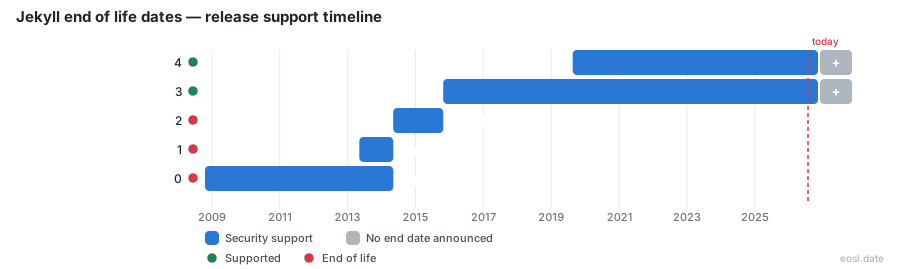
Currently Supported Jekyll Releases - Active EOS/EOSL Support (2)
Jekyll End of Life (EOL) Releases - No Longer Supported (3)
| Release | Min Ruby Version | Released | Active Maintenance | Active Development | Latest |
|---|---|---|---|---|---|
| 2 | 1.9.3+ | (12 years and 5 months ago) | (11 years ago) | — | 2.5.3 (11 years and 10 months ago) |
| 1 | 1.8+ | (13 years and 5 months ago) | (12 years and 5 months ago) | — | 1.5.1 (12 years and 7 months ago) |
| 0 | 1.8+ | (18 years ago) | (12 years and 5 months ago) | — | 0.9.0 (15 years and 10 months ago) |
Wondering about Jekyll end of life before you commit another year to your blog? The Jekyll project itself is not retired, but Jekyll 0, 1 and 2 have ended, and Jekyll 3 survives mainly because GitHub Pages still builds with it. This guide shows what each line receives, which Ruby you need and when moving to another static site generator makes sense.
Jekyll End of Life: Supported Release Status by Version
Jekyll is open source software under the MIT License that converts Markdown and templates into a static website. Tom Preston-Werner first published it in 2008, and Wikipedia notes it was the most popular static site generator by 2017. The table below follows the endoflife.date tracker, last updated on 7 August 2026.
| Release | Active Development | Active Maintenance | Latest |
|---|---|---|---|
| 4 (20 Aug 2019) | Yes | Yes | 4.4.1 (29 Jan 2025) |
| 3 (26 Oct 2015) | No | Yes | 3.10.0 (24 Jun 2024) |
| 2 (6 May 2014) | No | Ended 27 Oct 2015 | 2.5.3 (22 Dec 2014) |
| 1 (6 May 2013) | No | Ended 7 May 2014 | 1.5.1 (28 Mar 2014) |
| 0 (19 Oct 2008) | No | Ended 7 May 2014 | 0.9.0 (15 Dec 2010) |
Lines 1 and 2 stopped getting patches a day after their successors shipped, so the old branches are long gone.
Jekyll 4 and the Latest Version
Jekyll 4.0 arrived in August 2019, and the latest version is 4.4.1 from January 2025. It is the only line the tracker marks as still being built. The tracker publishes a JSON API, an RSS feed and a talk page, and its API documentation lets you script a check against your own installed copy.
Jekyll 3 and Older Releases
This line is the awkward middle. Nobody builds new features for it, yet it stays patched because GitHub Pages runs it, and 3.10.0 from June 2024 is the last stop. Anything on 3 or earlier outside that path is unsupported in practice.
Support Policy and Ruby Compatibility
Jekyll states no fixed schedule and no clearly defined support policy. Instead you infer your risk from the number and from the Ruby your machine runs, which is why checking compatibility early saves pain. The Ruby each Jekyll line needs:
- Line 4: 2.5 or newer
- Line 3: 2.0 or newer
- Line 2: 1.9.3 or newer
- Lines 1 and 0: 1.8 or newer
Semantic Versioning in Practice
The project follows semantic versioning: a major number signals breaking changes, so jumping from 3 to 4 deserves a staging build, while a patch within 4.x should be safe. Read the changelog in the project documentation before you move up, because a plugin written for the older line may refuse to load. Because patches follow the major number, staying on an ended line means no fixes will ever arrive.
GitHub Pages and Jekyll: Bug Fixes and Security Updates
GitHub documents Jekyll as a static site generator with built-in support for GitHub Pages, offering free hosting for a static website from a public repository. The unusual part of its support story is that limited bug fixes and security updates always reach the line GitHub Pages uses, currently 3.10.x. GitHub also notes that the github-pages gem remains supported for some workflows but that GitHub Actions is now the recommended way to deploy.
That recommendation changes your exposure. With a custom GitHub Actions workflow you choose the Jekyll you install, so your Jekyll website is no longer tied to the 3.x line. Some settings cannot change on the classic setup, including safe mode, and GitHub Pages cannot build sites that use unsupported plugins; you build locally and push the static files instead.
Plugins, Themes and Front Matter
You tune most behavior in _config.yml. Plugins extend Jekyll, and you enable extra ones by adding the plugin's gem to the plugins setting. Themes supply layouts you can override file by file, and you write posts in Markdown while the templates pull them in. Each page or post starts with front matter, a block of YAML above the Markdown or HTML that sets the title, layout and other variables. Keep all of this in plain files, because an unsupported plugin is the first thing that blocks an upgrade or a move.
Syntax Highlighting with Rouge
Jekyll highlights code with Rouge by default, and it accepts only lower-case language identifiers in fenced blocks. If you prefer another highlighter, disable the built-in syntax highlighting in your configuration first. Note which highlighter you rely on, since it is one more thing to match when you leave.
Active Maintenance and Why Some Teams Replace Jekyll
Ending support is not the only reason people leave. On 4 October 2026 the author of the nullprogram blog described how, after 15 years of blogging on it, he swapped Jekyll for a custom generator written in C++20. His complaint was not missing patches. Fixing 19 years of tolerated bugs in his blog content took most of the time, and he argued that a site-sized tool beats a one-size-fits-all package. Whether you follow that path, a project with only limited upkeep rewards a written exit plan.
Build and Deployment on Windows, macOS and Linux
GitHub says Jekyll is not officially supported for Windows. The same post calls the macOS setup farcical and says the Ruby deployment situation remains awful, while Linux was the smoother home for years. Jekyll offers an --incremental mode, but the author found it a little buggy compared with a full build. Treat these pain points as the usual triggers for leaving rather than reasons to stay.
Templating, Liquid and Performance
Jekyll templating is built on Liquid, which originated at Shopify and runs untrusted templates safely, so templates contain no custom code. That keeps templating declarative. Anything beyond the built-in filters requires a plugin. Speed improved after 4.0, yet the author still measured about two seconds for a full build of his blog, against 150 milliseconds for his replacement. Liquid templates do not port directly to other tools, which is the main switching cost.
Active Development Elsewhere: Hugo, Middleman and Roots
A 2015 Smashing Magazine review compared Jekyll with three rivals, and the picture is dated, so check each project's current status page before relying on it. Still, the comparison shows what you would gain or lose:
- Hugo is a fast Go-based generator, popular with large content sites and a common landing spot for people leaving Jekyll.
- Middleman is Ruby-based like Jekyll, so a Middleman move keeps your existing toolchain skills, while Hugo trades that for a single binary.
- Roots sits in the JavaScript world and suits front-end teams.
Jekyll lets any ordinary static website be a valid project, which makes starting easy. Hugo and Middleman ask for more upfront structure, and Middleman and Hugo both handle templates differently from Liquid. Compare Hugo against Middleman on your own content before committing, and remember that Hugo and Middleman each have their own static sites community for questions.
Content Model and Asset Pipeline
Before leaving Jekyll, inventory what your site depends on. Jekyll supports posts, collections since version 2.0 and data files in a _data folder as YAML, JSON or CSV. Its asset pipeline is deliberately simple, compiling Sass or CoffeeScript during the build. Hugo and Middleman ship richer pipelines, so audit your layouts and collections before you plan a move. Whichever tool you pick, the static website it produces is just files for a web server such as Apache or Nginx.
Migration Steps When a Release Policy Gives You No Dates
With no published dates, treat your own review calendar as the schedule. A practical sequence:
- Check which Jekyll your repository builds with, and note the Ruby it needs.
- Move the build to a custom workflow so you control the install.
- Run the old generator and a candidate side by side on the same source, as the nullprogram author did, and compare the HTML.
- Replace plugin-dependent features with static equivalents before switching.
- Switch the publishing source once the output matches, then keep Jekyll available for a rollback.
Done early, this turns Jekyll end of life from a deadline into a routine chore for developers who own a blog or documentation site.