Commvault End of Life (EOL) Dates and End of Support (EOS) Dates
Commvault end of life (EOL) and end of support (EOS) dates: 2 Commvault versions have reached EOL, including Commvault 11.38 (EOL date: Jul 18, 2025) — no longer receiving security updates or patches. Commvault 11.46.40 is the current supported release — 5 versions in active support. Also see Chef InSpec end of support life for related end-of-life information.
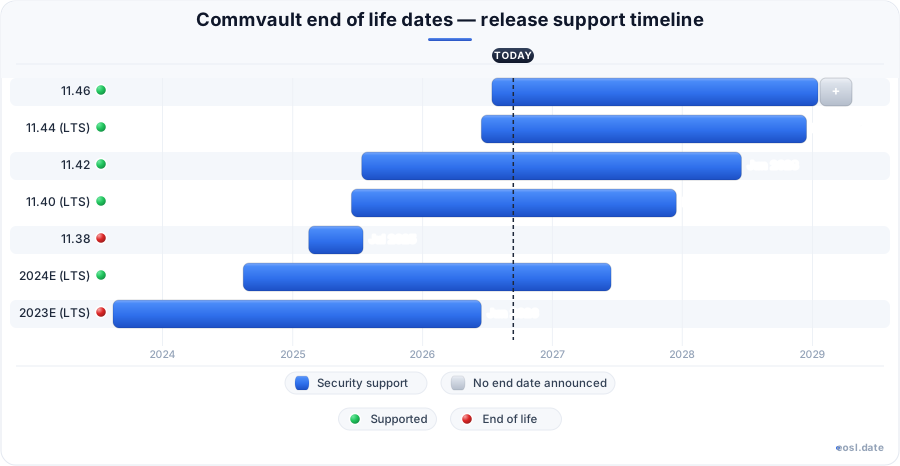
Currently Supported Commvault Releases - Active EOS/EOSL Support (5)
| Release | Released | Security Support | Latest | LTS |
|---|---|---|---|---|
| 11.46 | (3 months ago) | Active | 11.46.40 (2 weeks and 5 days ago) | - |
| 11.44 (LTS) | (4 months ago) | (in 2 years and 1 month) | 11.44.25 (4 weeks ago) | LTS |
| 11.42 | (1 year and 3 months ago) | (in 1 year and 7 months) | 11.42.122 (4 months ago) | - |
| 11.40 (LTS) | (1 year and 4 months ago) | (in 1 year and 1 month) | 11.40.78 (4 weeks ago) | LTS |
| 2024E (LTS) | (2 years and 2 months ago) | (in 7 months) | 11.36.127 (4 weeks ago) | LTS |
Commvault End of Life (EOL) Releases - No Longer Supported (2)
Every release has a fixed cutoff after which fixes and security updates stop, and your Commvault end of life calendar tells you when. That matters for the data protection software behind your backup jobs, whether it serves ransomware recovery, disaster recovery or hybrid cloud and on-premises workloads. This guide shows where each platform cutoff sits and what an EOL release means for your customers.
Commvault End of Life Dates for Each Maintenance Release
Commvault software releases follow a fixed rhythm, and critical updates reach every one of the supported releases. Find your version in the table, because a release past its cutoff no longer receives fixes.
| Release | Type | Initial release date | Latest maintenance release | End-of-life date |
|---|---|---|---|---|
| Commvault 11.46 | Innovation | July 15, 2026 | 11.46.30 | Replaced monthly |
| Commvault 11.44 | Long-term support (LTS) | June 15, 2026 | 11.44.25 | December 15, 2028 |
| Commvault 11.40 | Long-term support (LTS) | June 15, 2025 | 11.40.78 | December 15, 2027 |
| Commvault 11.36 | Long-term support (LTS) | August 15, 2024 | 11.36.127 | June 15, 2027 |
Once a release reaches end of life, you must upgrade to the newest release in the stability track to keep getting help. Security support stops with the release, so every product in that deployment is affected.
LTS and Innovation Release End of Support Rules
Long-term support releases arrive once a year and have a lifespan of 2.5 years. They get monthly bug fixes for the first two years, then fixes as needed, and they never gain new features. Their maintenance releases are cumulative, so you can install any one at any time. Pick LTS when stability and minimal changes matter more than new capabilities in your version.
Innovation releases ship monthly and last two months. To stay supported you must adopt the most recent innovation release, and end of support follows about two months after each one lands. Access comes through a release request form and carries operational requirements such as uploading anonymized usage data, yet the two-month clock still runs. Both release types differ in release frequency and in support lifetime, which is the main trade-off when you choose.
Release Tracks and the Path to EOL
You choose a release track based on how much change you accept. The steady LTS track suits mature deployments, with an upgrade frequency of once every one to two years and maintenance releases on a quarterly cadence. The innovation track suits MSPs and partners who want newer features, with a mandatory monthly move.
You can switch to another track once a year, in the June release window. Whichever you pick, Commvault advises applying the latest patch within two weeks, in line with NIST SP 800-40 guidance on vulnerability management, which also helps compliance reviews, because a release past its cutoff stops receiving those fixes.
Platform Release Lifecycle and End-of-Life Support Policy
New platform releases, formerly called feature releases, appear every six months, and the four most recent platform releases are fully supported. When a platform release ages out, Commvault stops shipping updates for it and offers limited support instead:
- Limited break/fix support incidents go through customer support.
- A hotfix, a security update or escalation to development means moving to a fully supported release.
- Technical workarounds may be limited or impossible, and critical updates are not backported.
Long-term releases are supported for up to three years, which is why Commvault recommends installing the newest one rather than an older Commvault platform release.
Obsolescence Policy for Products and Features
The obsolescence policy separates three states for every Commvault product and feature, and each one describes a different way coverage ends. A deprecated feature is missing from the current media kit, though you can often reuse an older kit on an as-is basis. Extended support applies after a third-party vendor drops its own backing, so help is possible but narrower.
When a third-party vendor ends mainstream support for an operating system, database or hardware, engineering help ends immediately. Customer teams still get commercially reasonable assistance at tier one support level, with no hotfixes. The CommServe, MediaAgent, CommCell and virtualization roles, plus SQL Server agents, lose engineering help once their underlying third-party platform reaches end of life.
Extended Support and Deprecated Platforms
Deprecated platforms keep running, but fixes and new capabilities stop. The installation package version for each entry records the last Commvault build that supported it, and the table below samples the cutoffs.
| Platform or feature | Last supported Commvault release |
|---|---|
| Windows Server 2003 | Commvault Feature Release 11.20 |
| Windows Server 2008 R2 | Commvault Feature Release 11.28 |
| Windows Server 2012 and 2012 R2 | Commvault Feature Release 11.28 |
| Microsoft SQL Server 2012 | Commvault Feature Release 11.26 |
| Oracle agentless backup | Commvault Platform Release 2024 (11.34) |
| Solaris 10.x | Commvault Platform Release 2024E (11.36) |
| AIX 6.1 | Commvault Platform Release 2024E (11.36) |
| PostgreSQL version 10.x | Commvault Platform Release 2024E (11.36) |
| PostgreSQL versions 9.2 to 9.6 | Commvault Platform Release 2023E (11.32) |
| Microsoft 365 express configuration | Commvault Platform Release 2024E (11.36) |
| Exchange public folder agent | Commvault Platform Release 2023E (11.32) |
| SharePoint Server 2010 | Commvault Platform Release 2023E (11.32) |
| VMware snapshot replication | Commvault Platform Release 2025E (11.40) |
| Hybrid File Store | Commvault Platform Release 2024E (11.36) |
Windows Server 2012 and 2008 R2 Support
Microsoft ended mainstream support for Windows 2012 and 2012 R2, so new installs and upgrades are blocked for the CommServe, MediaAgent, Web Console and workflow roles. Upgrade the operating system soon.
Red Hat Enterprise Linux 7 Support
RHEL7-based clusters keep receiving updates until December 2026, so schedule the move to a newer Red Hat Enterprise Linux build before then.