Apple iPadOS End of Life (EOL) Dates and End of Support (EOS) Dates
Apple iPadOS end of life (EOL) and end of support (EOS) dates: 3 Apple iPadOS versions have reached EOL, including Apple iPadOS 14 (EOL date: Oct 01, 2021) — no longer receiving security updates or patches. Apple iPadOS 27.2.1 is the current supported release — 6 versions in active support. Also see Apple tvOS EOSL dates for related end-of-life information.
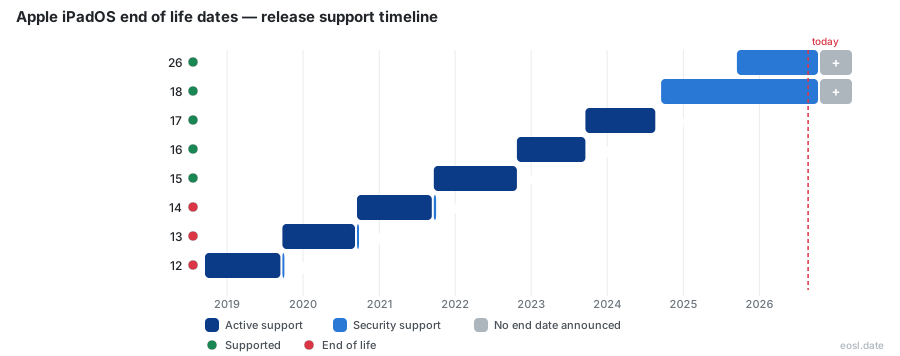
Currently Supported Apple iPadOS Releases - Active EOS/EOSL Support (6)
| Release | Released | Security Support | Active Support | Latest |
|---|---|---|---|---|
| 27 | (1 month and 4 weeks ago) | Active | Active | 27.2.1 (4 days ago) |
| 26 | (1 year and 1 month ago) | Active | (1 month and 4 weeks ago) | 26.7.3 (4 days ago) |
| 18 | (2 years and 1 month ago) | Active | (1 year and 1 month ago) | 18.7.12 (4 days ago) |
| 17 | (3 years and 1 month ago) | Active | (2 years and 2 months ago) | 17.7.11 (6 months ago) |
| 16 | (4 years ago) | Active | (3 years and 1 month ago) | 16.7.16 (6 months ago) |
| 15 | (5 years and 1 month ago) | Active | (4 years ago) | 15.8.8 (6 months ago) |
Apple iPadOS End of Life (EOL) Releases - No Longer Supported (3)
| Release | Released | Security Support | Active Support | Latest |
|---|---|---|---|---|
| 14 | (6 years and 1 month ago) | (5 years and 1 month ago) | (5 years and 1 month ago) | 14.8.1 (5 years ago) |
| 13 | (7 years and 1 month ago) | (6 years and 1 month ago) | (6 years and 1 month ago) | 13.6 (6 years and 3 months ago) |
| 12 | (8 years and 1 month ago) | (7 years and 1 month ago) | (7 years and 1 month ago) | 12.5.8 (9 months ago) |
Wondering whether your tablet is about to be left behind? Apple iPadOS End of Life decides how long your iPad keeps getting protection, so this guide explains which versions are still supported, which iPad models have lost support, and what the operating system lifecycle means for you.
Apple iPadOS End of Life: How Support Works
Apple publishes no fixed timetable, but iPad models historically get six to eight years of new software. Every device then moves into a quieter stage where only fixes arrive, and eventually even those stop. iPadOS began in 2019 as a rebranded variant of iOS, so it follows the iPhone schedule closely, and macOS and watchOS use the same yearly rhythm. Lifecycle trackers describe four stages: testing, active, phasing out and end of life, which is a handy way to read any support timeframe.
Major Version Releases Each Year
Apple ships a new major version annually, mirroring iOS on the iPhone and macOS on the Mac, normally announced at WWDC and released in September alongside iOS, tvOS and watchOS. Each one adds a feature set such as multitasking, Split View or dark mode, and the oldest hardware is dropped when requirements rise.
Security Updates After Active Support
When active support ends, Apple often keeps shipping security patches for the older branch. These security fixes cover vulnerabilities in Safari, Siri and other system parts, though Apple never promises how long they last. Apple also backports critical fixes from the latest release to older iOS and iPadOS versions, and those updates reach devices as an ordinary software update. The latest release always gets the fastest security updates, while devices on older versions wait longer for updates, sometimes for years.
iPadOS Lifecycle and Version History Timeline
This timeline condenses the Wikipedia version history and the community tracker data into a single end of life and support status view. A version whose status reads ended can still be in the security stage.
| Version | Released | Status | Latest build |
|---|---|---|---|
| iPadOS 27 | 14 Sep 2026 | Active | 27.0.1 |
| iPadOS 26 | 15 Sep 2025 | Ended, still patched | 26.7.1 |
| iPadOS 18 | 16 Sep 2024 | Ended, patched | 18.7.10 |
| iPadOS 17 | 18 Sep 2023 | Ended, patched | 17.7.11 |
| iPadOS 16 | 24 Oct 2022 | Ended, patched | 16.7.16 |
| iPadOS 15 | 20 Sep 2021 | Ended, patched | 15.8.8 |
| iPadOS 14 | 16 Sep 2020 | Unsupported | 14.8.1 |
| iPadOS 13 | 24 Sep 2019 | Ended | 13.7 |
iPadOS 27 and iPadOS 26: Latest Version and Release Date
The latest version, iPadOS 27, had its release date on September 14, 2026, and a preview version of 27.2 is already in beta. iPadOS 26 remains supported through 26.7.1 for iPads that cannot move up.
iPadOS 18, iPadOS 17 and iPadOS 16 Security Fixes
Apple released iPadOS 18.7.10 in August 2026 and patched iPadOS 17 and iPadOS 16 in May 2026. Treat these as a courtesy: the support timeframe is never guaranteed, and EOL can arrive without warning.
iPadOS 15, iPadOS 14 and iPadOS 13 Unsupported Versions
iPadOS 15 got a last patch in May 2026, but iPadOS 14 and iPadOS 13 sit completely outside support. The original iPadOS 13 introduced the tablet-focused split from iOS, with Files app support for USB-C and Lightning drives, while iPadOS 14 added widgets, an App Library-style layout and a Spotlight overhaul. Many other Apple devices, including every iPhone, follow similar iOS rules, so an iOS support notice often predicts the iPadOS one, and iOS patches usually land the same day.
iPadOS Support and Hardware Support for Compatible iPad Models
Apple's iPadOS 27 list includes the iPad mini (6th generation), iPad (9th generation and A16), iPad Air (4th generation onward) and iPad Pro models from 2020 up to M4 and M5. Hardware support depends on the chip, so new features such as Apple Pencil tools may need an M2 or newer.
Which iPads Cannot Run the Newest Version
iPadOS 27 dropped five models: the iPad Pro 12.9-inch (3rd generation), iPad Pro 11-inch (1st generation), iPad Air (3rd generation), iPad (8th generation) and iPad mini (5th generation). They are supported through iPadOS 26 patches, while the iPad (7th generation) depends on the iPadOS 18 security stream, so each of these devices has its own branch of versions, and Apple decides the cutoff year by year.
Oldest Supported iPad Pro, iPad Air and iPad Mini Generations
The oldest supported Pro is the 2020 11-inch 2nd generation. Among hardware, the Air and mini follow the 4th and 6th generation cutoff, and anything older is on borrowed time.
Unsupported iPad Risks When Security Updates Stop
An out-of-date iPad keeps working, but the risk grows each month. Without security updates, newly discovered vulnerabilities stay open on a device that holds your data. Typical security risks include:
- Unpatched flaws that expose your personal data
- Banking apps and app compatibility problems with the App Store
- Lost FaceTime and iMessage services, plus trouble restoring the device
- Slower performance, shorter battery life and no mouse or trackpad improvements
If your carrier plan or work data touches the tablet, plan an upgrade before support ends, because apps and services stop working years before the hardware fails.
End-of-Life Repair Support for Vintage and Obsolete iPads
Software and repair support run on separate clocks. Apple labels vintage products as hardware it stopped distributing five to seven years ago, with repairs subject to parts. Obsolete products passed seven years, so Apple ends hardware repair entirely and service providers cannot order parts.
- Vintage: iPad (6th generation), iPad Pro 10.5-inch and the Air (3rd generation)
- Obsolete: the original iPad, iPad 2, iPad Air 2 and early mini models
A vintage iPad can still receive software patches, so these labels describe repairs, not the operating system.
Check Your iPad Software Update and Support Status
Open Settings, tap General, then About to identify your iPad model and the installed iPadOS. Next, go to General and tap Software Update. If a newer version is offered, upgrade it; if not, compare your model with the compatibility list on the Apple Support page. An iPad stuck on an old release has likely dropped support for the latest features, so repeat this check once a year.
Buying an Older iPad: Check Security Support First
Before you buy a refurbished iPad, confirm it still runs a version with security support, since a bargain with an ended patch stream is a poor deal. Prefer a model that supports the newest release, and note the years remaining before the device hits obsolete status.