Apple iOS End of Life (EOL) Dates and End of Support (EOS) Dates
Apple iOS end of life (EOL) and end of support (EOS) dates: 11 Apple iOS versions have reached EOL, including Apple iOS 17 (EOL date: May 13, 2025) — no longer receiving security updates or patches. Apple iOS 27.2 is the current supported release — 5 versions in active support. Also see Apple tvOS end of support dates for related end-of-life information.
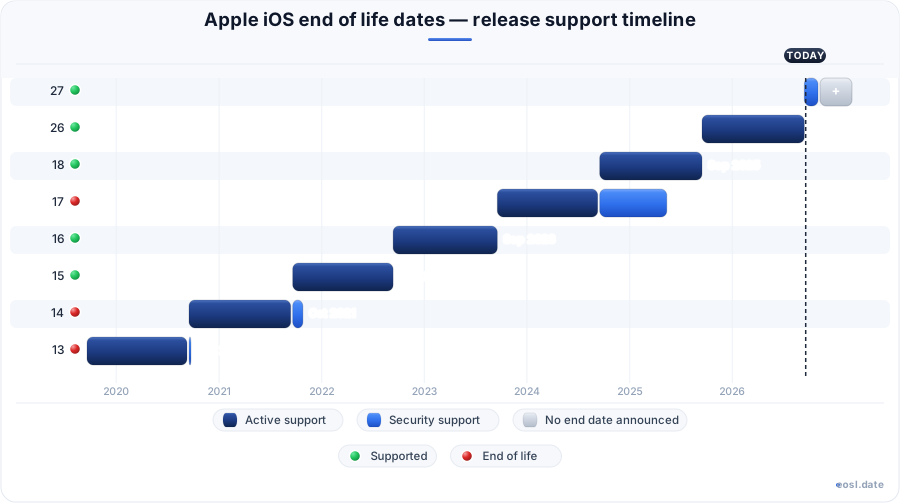
Currently Supported Apple iOS Releases - Active EOS/EOSL Support (5)
| Release | Released | Security Support | Active Support | Latest |
|---|---|---|---|---|
| 27 | (1 month and 3 weeks ago) | Active | Active | 27.2 (1 week and 5 days ago) |
| 26 | (1 year and 1 month ago) | Active | (1 month and 3 weeks ago) | 26.7.2 (1 week and 5 days ago) |
| 18 | (2 years and 1 month ago) | Active | (1 year and 1 month ago) | 18.7.11 (1 week and 5 days ago) |
| 16 | (4 years and 1 month ago) | Active | (3 years and 1 month ago) | 16.7.16 (5 months ago) |
| 15 | (5 years and 1 month ago) | Active | (4 years and 1 month ago) | 15.8.8 (5 months ago) |
Apple iOS End of Life (EOL) Releases - No Longer Supported (11)
| Release | Released | Security Support | Active Support | Latest |
|---|---|---|---|---|
| 17 | (3 years and 1 month ago) | (1 year and 5 months ago) | (2 years and 1 month ago) | 17.7.7 (1 year and 5 months ago) |
| 14 | (6 years and 1 month ago) | (5 years ago) | (5 years and 1 month ago) | 14.8.1 (5 years ago) |
| 13 | (7 years and 1 month ago) | (6 years and 1 month ago) | (6 years and 1 month ago) | 13.7 (6 years and 2 months ago) |
| 12 | (8 years and 1 month ago) | (9 months ago) | (7 years and 1 month ago) | 12.5.8 (9 months ago) |
| 11 | (9 years and 1 month ago) | (8 years ago) | (8 years and 1 month ago) | 11.4.1 (8 years and 3 months ago) |
| 10 | (10 years and 1 month ago) | (7 years and 3 months ago) | (9 years and 1 month ago) | 10.3.4 (7 years and 3 months ago) |
| 9 | (11 years and 1 month ago) | (7 years and 3 months ago) | (10 years and 1 month ago) | 9.3.6 (7 years and 3 months ago) |
| 8 | (12 years and 1 month ago) | (11 years and 1 month ago) | (11 years and 1 month ago) | 8.4.1 (11 years and 2 months ago) |
| 7 | (13 years and 1 month ago) | (12 years ago) | (12 years and 1 month ago) | 7.1.2 (12 years and 4 months ago) |
| 6 | (14 years and 1 month ago) | (13 years and 1 month ago) | (13 years and 1 month ago) | 6.1.6 (12 years and 8 months ago) |
| 5 | (15 years ago) | (14 years ago) | (14 years and 1 month ago) | 5.1.1 (14 years and 6 months ago) |
Wondering whether your iPhone is still protected? Apple iOS end of life is the point where Apple stops shipping security updates for a release of its mobile operating system, and right now only iOS 15, 16, 18, 26 and 27 are still listed with security support. This guide covers every iOS generation, its launch date, its support status and the iPhone models it runs on, so you can decide whether to update, upgrade or replace your phone.
Apple iOS End of Life: What Is Still Supported
Apple does not publish a fixed support calendar for the iPhone. Apple Inc. builds iOS, a mobile operating system that is released annually, and the newest release gets the most attention. It is the world's second-most widely installed operating system after Android, so the software is a long-lived target for attackers. Older releases fall into three states: fully supported, security-only, or unsupported once the last build has shipped. The table below shows where each major iOS release stands as of 26 October 2026, and the same pattern of security updates applies to all iOS devices Apple sells.
| iOS | Launched | Feature updates | Security cover | Latest build |
|---|---|---|---|---|
| iOS 27 | 14 Sep 2026 | Yes | Yes | 27.1 |
| iOS 26 | 15 Sep 2025 | Ended 14 Sep 2026 | Yes | 26.7.1 |
| iOS 18 | 16 Sep 2024 | Ended 15 Sep 2025 | Yes | 18.7.10 |
| iOS 17 | 18 Sep 2023 | Ended 16 Sep 2024 | Ended 13 May 2025 | 17.7.7 |
| iOS 16 | 12 Sep 2022 | Ended 18 Sep 2023 | Yes | 16.7.16 |
| iOS 15 | 20 Sep 2021 | Ended 12 Sep 2022 | Yes | 15.8.8 |
| iOS 14 | 16 Sep 2020 | Ended 20 Sep 2021 | Ended 26 Oct 2021 | 14.8.1 |
| iOS 13 | 19 Sep 2019 | Ended 16 Sep 2020 | Same day | 13.7 |
| iOS 12 | 17 Sep 2018 | Ended 19 Sep 2019 | Ended 26 Jan 2026 | 12.5.8 |
You should run one of the releases that still shows "Yes" under security cover. That list changes whenever Apple posts an update, so check it again after each September launch.
Major Version and Latest Version Policy
Apple ships a new major version every year, usually in September alongside new iPhone models. The latest version is the only one that reliably gets every fix, and it is the one Apple's own security page recommends. Apple occasionally backports critical fixes to older releases, but nothing guarantees it. On a new launch day the previous release stays supported for a few months as a stop-gap, giving people time to move. A compatible phone should therefore install the newest major iOS release within that window.
Supported Release and Security Fixes
A supported release is one that still receives fixes for newly found flaws. Once Apple publishes a final build, the code stays frozen and any later discovery leaves it exposed. An iOS release whose final build has shipped has lost its security cover, so find its row in the table above, for example iOS 17, which ended on 13 May 2025. Treat the final build number as the date your protection stopped, and use the Software Update screen to confirm that the newest build is installed.
iOS Version History and Release Date by Version
Apple's iOS version history began with the first iPhone in June 2007, and twenty major releases have followed. The system was called iPhone OS until the iPad arrived with iOS 4, and from iOS 13 Apple split the tablet software off as iPadOS. Wikipedia keeps a detailed version history of every build, and the summary below pairs each launch with the last update it ever received. The launch pattern is steady: only iOS 5, in October 2011, missed a September window after the iPhone 4 era.
- iPhone OS 1 launched on 29 June 2007, and its last update was 1.1.5.
- iOS 4 renamed the platform in June 2010, and iOS 5 arrived in October 2011.
- Every release from iOS 6 to iOS 27 launched in September.
- The newest release, iOS 27, was released on 14 September 2026.
iPhone OS 1 to iOS 11 Releases
The earliest releases are long unsupported. iOS 5 ended with 5.1.1 in May 2012, iOS 7 with 7.1.2 in June 2014, and iOS 9 with 9.3.6 in July 2019, the last of the older builds to get an update for years. iOS 10 closed with 10.3.4 on the same July 2019 date, and iOS 11 stopped at 11.4.1 on 9 July 2018. If a phone is stuck on one of these, treat it as offline-only gear.
iOS 12, iOS 15, iOS 16 and iOS 17 Releases
The middle of the history shows how far Apple will stretch a release. iOS 12 shipped on 17 September 2018, yet its last build, iOS 12.5.8, came out on 26 January 2026, more than seven years later. iOS 15 and iOS 16 reached iOS 15.8.8 and iOS 16.7.16 in May 2026. By contrast, Apple no longer issues iOS 17 builds for iPhone, since every phone that runs iOS 17 can also run iOS 18, and the final one was iOS 17.7.2 in November 2024.
iOS 18, iOS 26 and iOS 27 Releases
iOS 18 arrived on 16 September 2024 and now exists mainly for older phones, with iOS 18.7.10 released on 17 August 2026. iOS 26 followed on 15 September 2025, and Apple released iOS 26.7 alongside iOS 27 so that people who had not upgraded still received fixes. Apple later added 26.7.1. The newest build, iOS 27.1, shipped on 23 October 2026 for iPhone Duo only.
Security Support and Active Support for iOS
Two different clocks run for every release. Active support covers new features and general bug fixes, and it normally ends when the next major release lands. The security track covers vulnerability fixes only, and it can continue for years. In the table above, iOS 18 stopped receiving feature updates on 15 September 2025 yet still gets fixes, a gap of more than a year.
You will also see end of support used loosely, but Apple itself never labels a release that way. The signal is silence: an iOS release is finished when Apple ships no more security updates for it, which is what the unsupported rows in the table above mean. For decisions about software support, rely on the final build date, not on a press statement, and install security updates the day they appear. Support for a phone ends quietly, so the support page for your model is worth a look each autumn.
Backported Security Patches for Older iPhones
Apple has increasingly limited old-release builds to phones that cannot install a newer one. The iPhone XR, XS and XS Max cannot run iOS 26 or iOS 27, so they keep receiving iOS 18 security patches. Owners of newer phones are expected to move to the latest release. This is the clearest case of backported work tied to the model, not the calendar, and it explains why critical security fixes reached the iPhone 6s and iPhone 7 in May 2026.
Certificate Updates for iMessage and FaceTime
Not every update to an old release fixes a vulnerability. In January 2026, Apple pushed a certificate refresh to several older builds so that iMessage, FaceTime and device activation keep working beyond January 2027. That is how iOS 12.5.8 reached the iPhone 5s, iPhone 6 and iPhone 6 Plus. Apple withdrew some of those builds after connectivity reports, then reissued corrected versions. Installing such an update keeps services alive, but it does not make an old phone safe. Keep every phone current with iOS updates so that services and software remain protected.
iPhone Support and iOS Support by Device
The release you can run depends on the iPhone models you own, so the list below pairs each phone with the newest iOS it accepts. Apple's track record shows that most phones receive major upgrades for five to seven years and protection for longer, though Apple makes no promise for any single model. A "Yes" means the phone's final iOS still receives updates; a date is when that stopped.
| iPhone model | Newest iOS | Launched | Discontinued | Still receiving updates |
|---|---|---|---|---|
| iPhone Duo | 27 | 23 Oct 2026 | In production | Yes |
| iPhone 18 Pro, 18 Pro Max | 27 | 18 Sep 2026 | In production | Yes |
| iPhone 17, 17 Air, 17e | 27 | 2025 - 2026 | In production | Yes |
| iPhone 16, 16 Plus, 16e | 27 | 2024 - 2025 | In production | Yes |
| iPhone 15, 15 Plus | 27 | 22 Sep 2023 | 09 Sep 2025 | Yes |
| iPhone 14, 14 Plus | 27 | 2022 | 19 Feb 2025 | Yes |
| iPhone SE (3rd generation) | 27 | 18 Mar 2022 | 19 Feb 2025 | Yes |
| iPhone 13, 13 Mini | 27 | 24 Sep 2021 | 2023 - 2024 | Yes |
| iPhone 12, 12 Mini | 27 | 2020 | 2022 - 2023 | Yes |
| iPhone SE (2nd generation) | 27 | 24 Apr 2020 | 08 Mar 2022 | Yes |
| iPhone 11, 11 Pro, 11 Pro Max | 27 | 20 Sep 2019 | 2020 - 2022 | Yes |
| iPhone XS, XS Max, XR | 18 | 2018 | 2019 - 2021 | No, since 22 Apr 2026 |
| iPhone X, 8, 8 Plus | 16 | 2017 | 2018 - 2020 | No, since 31 Mar 2025 |
| iPhone 7, 7 Plus | 15 | 16 Sep 2016 | 10 Sep 2019 | No, since 31 Mar 2025 |
| iPhone SE (1st generation), 6S, 6S Plus | 15 | 2015 - 2016 | 12 Sep 2018 | No, since 31 Mar 2025 |
| iPhone 6, 6 Plus, 5S | 12 | 2013 - 2014 | 2016 - 2018 | No, since 23 Jan 2023 |
For the full current list, Apple Support publishes a guide to every supported iPhone, and the rows above follow the discontinued and ended dates tracked for each model.
Oldest iPhone Still Supported: iPhone 11
The oldest iPhone that can still run iOS 27 is the iPhone 11, released in 2019 and now close to seven years old. It runs the new system, though not every new feature reaches older phones. The iPhone 11 Pro and iPhone 11 Pro Max have already joined Apple's vintage list, which suggests the standard iPhone 11 may not be far behind.
iPhone XS, iPhone XR, iPhone 8 and iPhone 7
These phones sit at the edge. The iPhone XS and iPhone XR launched in 2018 and cannot run iOS 26, yet the iPhone XS, XS Max and XR all received iOS 18.7.10 in August 2026. The iPhone 8, along with the iPhone X, topped out at iOS 16, while the iPhone 7 and iPhone 6S stopped at iOS 15. Every iPhone SE from the first generation onward follows its own cutoff. Any of these still handles calls and messages, but plan a replacement because future fixes are uncertain.
| Older iPhone | Newest build | Posted |
|---|---|---|
| iPhone XS | 18.7.10 | 17 Aug 2026 |
| iPhone XS Max | 18.7.10 | 17 Aug 2026 |
| iPhone XR | 18.7.10 | 17 Aug 2026 |
| iPhone X | 16.7.16 | 11 May 2026 |
| iPhone 8 | 16.7.16 | 11 May 2026 |
| iPhone 8 Plus | 16.7.16 | 11 May 2026 |
| iPhone 7 | 15.8.8 | 11 May 2026 |
| iPhone 7 Plus | 15.8.8 | 11 May 2026 |
| iPhone 6S | 15.8.8 | 11 May 2026 |
| iPhone 6S Plus | 15.8.8 | 11 May 2026 |
| iPhone SE (1st generation) | 15.8.8 | 11 May 2026 |
Each iPhone XS, iPhone XS Max and iPhone XR is on iOS 18, the last family these phones accept, so the numbers above are their ceiling. The iPhone X and iPhone 8 are one step behind.
iPadOS, iPad and iPod Touch Hardware Support
iPad models follow a separate track under iPadOS, which has matched the iOS number since iOS 13. Each iPad family has its own cutoff, so check the iPad you own, not the iPhone in your pocket. The newest iPadOS 27 runs on a narrower set than iPadOS 26.7.1, and the iPad 7th generation is the one tablet still getting iPadOS 18.7.10.
| iPad model | Newest iPadOS | What to do |
|---|---|---|
| iPad Pro 12.9-inch 3rd generation | iPadOS 26.7.1 | Update this iPad now; if the iPad is stuck, replace the iPad |
| iPad Pro 12.9-inch 4th generation and later | iPadOS 27 | Update this iPad now; if the iPad is stuck, replace the iPad |
| iPad Pro 11-inch 1st generation | iPadOS 26.7.1 | Update this iPad now; if the iPad is stuck, replace the iPad |
| iPad Pro 11-inch 2nd generation and later | iPadOS 27 | Update this iPad now; if the iPad is stuck, replace the iPad |
| iPad Air 3rd generation | iPadOS 26.7.1 | Update this iPad now; if the iPad is stuck, replace the iPad |
| iPad Air 4th generation and later | iPadOS 27 | Update this iPad now; if the iPad is stuck, replace the iPad |
| iPad 7th generation | iPadOS 18.7.10 | Update this iPad now; if the iPad is stuck, replace the iPad |
| iPad 8th generation | iPadOS 26.7.1 | Update this iPad now; if the iPad is stuck, replace the iPad |
| iPad 9th generation and later | iPadOS 27 | Update this iPad now; if the iPad is stuck, replace the iPad |
| iPad mini 5th generation | iPadOS 26.7.1 | Update this iPad now; if the iPad is stuck, replace the iPad |
| iPad mini 6th generation and later | iPadOS 27 | Update this iPad now; if the iPad is stuck, replace the iPad |
| Older hardware | Last iOS | Group |
|---|---|---|
| iPad (1st generation) | 5 | iPad |
| iPad 2 | 9 | iPad |
| iPad (3rd generation) | 9 | iPad |
| iPad mini (1st generation) | 9 | iPad mini |
| iPad (4th generation) | 10 | iPad |
| iPad Air (1st generation) | 12 | iPad Air |
| iPad mini 2 and iPad mini 3 | 12 | iPad mini |
| iPod Touch (3rd generation) | 5 | iPod Touch |
| iPod Touch (4th generation) | 6 | iPod Touch |
| iPod Touch (5th generation) | 9 | iPod Touch |
| iPod Touch (6th generation) | 12 | iPod Touch |
| iPod Touch (7th generation) | 15 | iPod Touch |
An iPad usually outlasts an iPhone: an iPad Pro, iPad Air, iPad mini or base iPad often keeps getting updates for years, and every iPad that runs iPadOS 27 also runs iPadOS 26.7.1. Check the iPad generation printed on the back, because an iPad Air 3rd generation and an iPad Air 4th generation sit on different sides of the iPadOS 27 line, and an iPad mini 5th generation is in the same position as an iPad 8th generation. The iPod Touch ended its run earlier. Each iPod Touch generation reached a final iOS release, as the older-hardware table shows, and the iPod Touch 7th generation stopped at iOS 15. If you manage mixed fleets, use hardware support per model family rather than assuming one rule fits every iPad or iPod Touch.
Apple Security Releases and Security Updates by Platform
Apple documents every patch on its Apple security releases page, listing the name, the devices covered and the release date, with CVE identifiers when a flaw was fixed. These advisories are the authoritative record. After an update installs on iOS, iPadOS, tvOS, watchOS or visionOS, it cannot be downgraded, so test first on a spare phone. A security update with no published CVE entries is simply a bug fix, while one with a CVE names the flaw it closes.
| Platform | Newest release | Posted | CVE entries |
|---|---|---|---|
| iOS and iPadOS 27 | 27.0.1 | 28 Sep 2026 | No published CVE entries |
| iOS and iPadOS 26 | 26.7.1 | 28 Sep 2026 | See CVE advisory |
| macOS Golden Gate 27 | 27.0.1 | 28 Sep 2026 | No published CVE entries |
| macOS Tahoe 26 | 26.7.1 | 28 Sep 2026 | See CVE advisory |
| macOS Sequoia 15 | 15.8.1 | 28 Sep 2026 | See CVE advisory |
| macOS Sonoma 14 | 14.8.9 | 6 Aug 2026 | See CVE advisory |
| watchOS 27 for Apple Watch | 27.0.1 | 28 Sep 2026 | No published CVE entries |
| tvOS 27 for Apple TV | 27 | 14 Sep 2026 | See CVE advisory |
| visionOS 27 for Apple Vision Pro | 27.0.1 | 28 Sep 2026 | No published CVE entries |
| macOS release | macOS family | Posted |
|---|---|---|
| macOS Golden Gate 27.0.1 | macOS Golden Gate | 28 Sep 2026 |
| macOS Golden Gate 27 | macOS Golden Gate | 14 Sep 2026 |
| macOS Tahoe 26.7.1 | macOS Tahoe | 28 Sep 2026 |
| macOS Tahoe 26.7 | macOS Tahoe | 14 Sep 2026 |
| macOS Tahoe 26.6.2 | macOS Tahoe | 17 Aug 2026 |
| macOS Tahoe 26.6.1 | macOS Tahoe | 06 Aug 2026 |
| macOS Tahoe 26.6 | macOS Tahoe | 27 Jul 2026 |
| macOS Sequoia 15.8.1 | macOS Sequoia | 28 Sep 2026 |
| macOS Sequoia 15.8 | macOS Sequoia | 14 Sep 2026 |
| macOS Sequoia 15.7.9 | macOS Sequoia | 06 Aug 2026 |
| macOS Sequoia 15.7.8 | macOS Sequoia | 27 Jul 2026 |
| macOS Sonoma 14.8.9 | macOS Sonoma | 06 Aug 2026 |
| macOS Sonoma 14.8.8 | macOS Sonoma | 27 Jul 2026 |
Only the iOS and iPadOS rows decide whether your iPhone is protected; an iOS release missing from the advisories page has no current security cover. The other rows show how Apple ships the same September wave across its platforms. The same page notes that the newest macOS is 27.0.1, with watchOS at 27.0.1, tvOS at 27 and visionOS at 27.0.1. On 14 September 2026 Apple also released macOS Golden Gate 27 for Apple silicon Macs, tvOS 27 for the Apple TV 4K 2nd generation and later, watchOS 27 for Apple Watch Series 9 and later, and visionOS 27 for every Apple Vision Pro. In September, Apple publishes software for all of these platforms at once, so an Apple Watch or Apple TV can lose protection the same way an iPhone does. The Apple Watch and Apple TV releases arrive on the same day as iOS, and Apple Watch models older than Series 9 or an Apple TV older than the 4K 2nd generation stop receiving new versions. The Apple TV and macOS lines follow the same rhythm, so an Apple TV owner checks the tvOS version just as a Mac owner checks macOS, and the watchOS and visionOS builds follow the same cycle. Apple devices of every kind follow this September rhythm, and Apple support pages list which versions were released for each.
End-of-Life Status: Vintage and Obsolete Apple Devices
Apple's service pages split hardware into current, vintage and obsolete, and support for each iPhone changes as the version of iOS it runs ages. Versions released years ago keep working, but the support behind them thins out, and a phone released in 2016 gets less support than one released in 2024. The iPhone you carry, the iPhone you plan to buy and the iPhone in a drawer each sit in a different place on that line.
Software support and hardware service are not the same thing. Once a phone reaches end-of-life for service, Apple moves it onto one of two lists, and the label tells you what remains. Both lists are measured from the date Apple discontinued the model.
Vintage iPhones
A phone becomes vintage when Apple stopped distributing it more than five and fewer than seven years ago. Apple may still service these devices, depending on parts, but nothing is guaranteed. The vintage products list is also a useful early warning, because models that land there rarely stay supported for long.
Obsolete iPhones
Phones discontinued more than seven years ago are obsolete, and Apple stops all hardware service. That is why some newer phones are listed as vintage while a few older ones are already obsolete: the rule follows the date a model was discontinued, not the iOS it runs. The iPhone 7 family, for example, is obsolete for service even though it received iOS 15 updates.
Repairs and Battery Replacements
Servicing and battery replacements are often available for five to seven years after a phone's release, and servicing for vintage models depends on parts. When a phone is both unsupported and obsolete, Apple can neither fix it nor service it, so the sensible next step is a trade-in or an upgrade to a newer iPhone. A repair on a phone whose iOS is no longer patched is a weak use of money, so ask Apple whether a repair is even offered before paying.
- Open Settings, then General, then About, and note your model name.
- Find it in the iPhone table above and read the newest iOS it can run.
- Check Settings, General, Software Update and install the newest build offered.
- If the model is unsupported, retire it from banking, email and work accounts first.