IBM MQ End of Life (EOL) Dates and End of Support (EOS) Dates
IBM MQ end of life (EOL) and end of support (EOS) dates: 10 IBM MQ versions have reached EOL, including IBM MQ IBM MQ 9.2 LTS (EOL date: Sep 30, 2025) — no longer receiving security updates or patches. IBM MQ IBM MQ 10.0 LTS is the current supported release — 3 versions in active support. Also see IBM Db2 EOSL information for related end-of-life information.
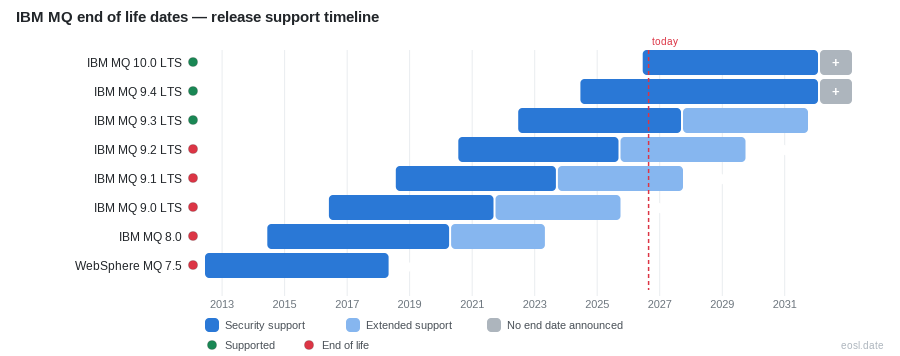
Currently Supported IBM MQ Releases - Active EOS/EOSL Support (3)
| Release | Released | Support | Extended Support |
|---|---|---|---|
| IBM MQ 10.0 LTS | (5 months ago) | Active | Active |
| IBM MQ 9.4 LTS | (2 years and 5 months ago) | Active | Active |
| IBM MQ 9.3 LTS | (4 years and 4 months ago) | (in 10 months) | (in 4 years and 10 months) |
IBM MQ End of Life (EOL) Releases - No Longer Supported (10)
| Release | Released | Support | Extended Support |
|---|---|---|---|
| IBM MQ 9.2 LTS | (6 years and 3 months ago) | (1 year and 1 month ago) | (in 2 years and 10 months) |
| IBM MQ 9.1 LTS | (8 years and 3 months ago) | (3 years and 1 month ago) | (in 10 months) |
| IBM MQ 9.0 LTS | (10 years and 5 months ago) | (5 years and 1 month ago) | (1 year and 1 month ago) |
| IBM MQ 8.0 | (12 years and 5 months ago) | (6 years and 6 months ago) | (3 years and 6 months ago) |
| WebSphere MQ 7.5 | (14 years and 5 months ago) | (8 years and 6 months ago) | Active |
| WebSphere MQ 7.1 | (15 years ago) | (9 years and 6 months ago) | Active |
| WebSphere MQ 7.0 | (18 years and 6 months ago) | (11 years and 1 month ago) | Active |
| WebSphere MQ 6.X | (21 years and 6 months ago) | (14 years and 1 month ago) | Active |
| WebSphere MQ 5.3 | (24 years and 5 months ago) | (19 years and 1 month ago) | Active |
| MQ Series 5.2 | (25 years and 11 months ago) | (22 years and 10 months ago) | Active |
Planning around IBM MQ end of life comes down to a handful of dates: IBM MQ 9.2 lost support on 30 September 2025, and IBM MQ 9.3 follows on 30 September 2027. This guide lists the end of support for every IBM MQ version, explains how the IBM support policy works, and shows how to check your version and plan an upgrade before your commercial software stops receiving fixes.
IBM MQ Lifecycle Dates for Every Version
IBM publishes one end of service date per release. The table below collects them for IBM MQ across platforms such as Linux, Windows, AIX, Solaris, HP-UX, IBM i and z/OS, and marks which releases have ended and which are still in the supported window.
| Version | General availability | End of support | Extended support ends |
|---|---|---|---|
| IBM MQ 10.0 LTS | 16 June 2026 | Supported, no date set | Not yet published |
| IBM MQ 9.4 LTS | 18 June 2024 | Supported, no date set | Not yet published |
| IBM MQ 9.3 LTS | 23 June 2022 | 30 September 2027 | 30 September 2031 |
| IBM MQ 9.2 LTS | 23 July 2020 | 30 September 2025 (ended) | 30 September 2029 |
| IBM MQ 9.1 LTS | 23 July 2018 | 30 September 2023 (ended) | 30 September 2027 |
| IBM MQ 9.0 LTS | 2 June 2016 | 30 September 2021 (ended) | 30 September 2025 (ended) |
| IBM MQ 8.0 | 13 June 2014 | 30 April 2020 (ended) | 30 April 2023 (ended) |
| WebSphere MQ 7.5 | June 2012 | 30 April 2018 (ended) | Unavailable |
| WebSphere MQ 7.1 | November 2011 | 30 April 2017 (ended) | Unavailable |
| MQSeries 5.2 | December 2000 | 31 December 2003 (ended) | Unavailable |
Because support for 9.3 ends in about eleven months, any estate still on 9.2 or earlier is already running without standard fixes. MQSeries and WebSphere MQ releases ended years ago, and any queue manager still on them is a priority for retirement.
Release Dates and General Availability
General availability is the day a release can first be installed. IBM MQ 10.0 reached it on 16 June 2026, after 9.4 in June 2024 and 9.3 in June 2022, so a new LTS release arrives roughly every two years. End of marketing comes earlier: IBM MQ 9.1 left sale on 15 September 2023, two weeks before its end of support. IBM then posts an announcement confirming it withdrew support on all platforms. IBM MQ for z/OS, including IBM MQ Advanced for z/OS and the Value Unit Edition, ended 9.1 support on the same day, 30 September 2023, so mainframe teams follow the same calendar. To track release dates automatically, endoflife.date exposes a JSON API, an RSS feed and an iCalendar feed.
IBM MQ Support Lifecycle Policy Explained
IBM's support lifecycle policy states how long a product stays supported, from the day it goes on sale to the day support is withdrawn, so a customer can plan spending and avoid gaps in cover. Each LTS release gets five years of bug and security fixes, and nothing ships in the supported software beyond those defect fixes. Support past that point is a paid add-on, which means an additional fee.
Long Term Support (LTS) vs Continuous Delivery (CD)
Starting with IBM MQ 9.0, the product follows a continuous delivery model with regular update packages, each update delivering incremental capability. Long Term Support (LTS) packages receive only security and defect fixes through fix packs and individual fixes. CD and LTS releases of 9.1 had the same support lifespan, but interim fixes were limited to the latest CD release. If you want predictable maintenance, run LTS; the CD stream suits teams that adopt new features quickly.
IBM MQ End of Support: Replacement Products and Migration Paths
When IBM withdrew IBM MQ 9.1, it named 9.3 and 9.2 as the replacement products; today the sensible target is 9.4 or 10.0. Each existing 9.1 queue manager can be updated directly to the latest version, but review the migration paths for IBM MQ for Multiplatforms and IBM MQ for z/OS first, because some jumps carry restrictions. Plan migrating as an upgrade project that covers every application and the services connecting to your queue managers. On z/OS, the 9.1 replacements were IBM MQ for z/OS 9.3 and 9.2, with IBM MQ Advanced for z/OS as the route for managed file transfer.
The IBM MQ Appliance follows its own lifecycle for firmware and hardware. Plan hardware and firmware together: an MQ Appliance on 9.1.x CD lost support on 31 October 2023, and model M2001 support ended on 10 July 2023, and the M2002 and M2003 models carry on with 9.3 firmware.
How to Check Your IBM MQ Version Against End of Marketing and Support Dates
Identify the running version, then match it to the table above. On each host running a queue manager:
- On Linux, Windows, AIX and other UNIX systems, run
dspmqver; if it is missing, runmqver. - On IBM i, run
DSPMQMVER. - On z/OS, find message
CSQY000Iin the MSTR job log. - For managed file transfer, run
fteDisplayVersion; on the MQ Appliance, open the web UI and choose About.
Record each result alongside its API clients, data files and message volumes, because queue data from a forgotten instance is easy to lose when the support deadline passes.
Support Extension and Extended Support in the IBM MQ Product Lifecycle
A support extension buys time after standard cover ends. Extended support runs for up to four years for an extra fee: 9.3 to 30 September 2031, 9.2 to 30 September 2029, and 9.1 to 30 September 2027. Ask your IBM sales representative whether an extension is available for your release, and weigh that fee against the cost of moving the software to a current LTS.
Bundled Clients, Managed File Transfer and Resource Adapters After IBM MQ End of Service
IBM MQ clients and managed file transfer agents lose support on the same date as the server. When another IBM product licenses IBM MQ as a supporting program, the end of support date still applies, though that product usually includes entitlement to later versions. The Resource Adapter bundled with WebSphere Application Server is supported for as long as that application server version is, but a copy you install yourself on a third-party Java EE server is not.
IBM MQ End of Life Fix Packs, Documentation and Installation Images
Fix packs for an out-of-support release remain downloadable from IBM's Recommended Fixes page, but no new ones appear. IBM Documentation and downloadable PDFs stay online. Installation images may remain on Passport Advantage or IBM Shopz for a while, and a trial version of a current release is available if you want to test an upgrade, including how message flows and persistent queue data behave after it.
WebSphere MQ and MQSeries: IBM MQ History and Core Components
IBM launched the product in December 1993 as MQSeries, renamed it WebSphere MQ in 2002 and shortened it to IBM MQ in April 2014, which is why the oldest rows in the table above carry the earlier names and have long since ended. It is message-oriented middleware, a kind of messaging middleware in which independent applications exchange each message through a queue, with point-to-point and publish–subscribe messaging, APIs such as MQI and JMS, and clustering, where a cluster of queue managers shares message processing. It runs on z/OS mainframes, UNIX, Linux and Windows, plus containerised deployments and IBM Cloud, and each of these platforms follows the support dates above.
Queue Managers, Queues and Channels
A queue manager is a logical container for queues and the service that moves each message to other queue managers over channels. A message is binary or character data, and each queue holds it until the receiving application retrieves it, in first-in, first-out order within priority. If the receiver is not running, the queue keeps the message. A channel is one-directional, so a reply needs a second channel. All of this matters at upgrade time: every queue manager, queue and channel in scope must move to a supported release before its support date passes.