IBM Db2 End of Life (EOL) Dates and End of Support (EOS) Dates
IBM Db2 end of life (EOL) and end of support (EOS) dates: 6 IBM Db2 versions have reached EOL, including IBM Db2 11.1 (EOL date: Apr 30, 2022) — no longer receiving security updates or patches. IBM Db2 12.1 is the current supported release — 2 versions in active support. Also see IBM AIX end of life dates for related end-of-life information.
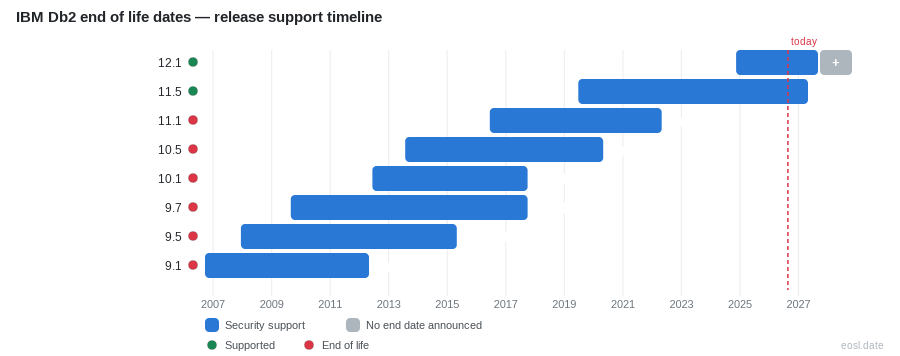
Currently Supported IBM Db2 Releases - Active EOS/EOSL Support (2)
| Release | Released | Security Support |
|---|---|---|
| 12.1 | (2 years ago) | Active |
| 11.5 | (7 years and 4 months ago) | (in 5 months) |
IBM Db2 End of Life (EOL) Releases - No Longer Supported (6)
| Release | Released | Security Support |
|---|---|---|
| 11.1 | (10 years and 5 months ago) | (4 years and 6 months ago) |
| 10.5 | (13 years and 3 months ago) | (6 years and 6 months ago) |
| 10.1 | (14 years and 5 months ago) | (9 years and 1 month ago) |
| 9.7 | (17 years and 2 months ago) | (9 years and 1 month ago) |
| 9.5 | (18 years and 11 months ago) | (11 years and 6 months ago) |
| 9.1 | (20 years and 2 months ago) | (14 years and 6 months ago) |
If your team still runs Db2, the IBM Db2 end of life calendar decides how long you keep getting fixes and help from IBM. This guide lists the Db2 end of support dates for every version, explains what Db2 EOS changes for your enterprise relational database, and shows how to plan your move to a supported version before the clock runs out.
IBM Db2 End of Life Dates by Version
IBM publishes one lifecycle table for Db2 Distributed, the family that covers the IBM database server on Linux, UNIX, and Windows plus Db2 Connect. The base date is when IBM stops standard help for a version; the extended column shows how far a paid arrangement can stretch it. The EOS dates below come from IBM's published schedule and the endoflife.date tracker, and they are worth re-checking on IBM's page before you commit to a plan.
| Db2 release | End of support (base) | End of support (extended) |
|---|---|---|
| 12.1 (Linux, UNIX, Windows and Db2 Connect) | Not yet announced | Four years after base support |
| 11.5, other editions | 30 April 2027 | 30 April 2031 |
| 11.5 Base Edition | 30 September 2025 | Not available |
| 11.1 | 30 April 2022 | 30 April 2026 |
| 10.5 | 30 April 2020 | 30 April 2025 |
| 10.1 and 9.7 | 30 September 2017 | 30 April 2025 |
| 9.5 | 30 April 2015 | 30 April 2018 |
| 9.1 | 30 April 2012 | 30 April 2015 |
Anything older than these versions is not covered at all, and IBM lists no path back to coverage for them.
Db2 11.5 EOS Dates
Db2 11.5 is the version most teams are still running, and its main end date is 30 April 2027. The entry-level Base Edition ended earlier, on 30 September 2025, so check which edition you actually installed. The Standard Edition, Advanced Edition and Enterprise Edition share the later date, and IBM's published schedule carries a withdrawal announcement for each older version.
Db2 12.1 and Db2 for z/OS Support
Db2 12.1, launched on 14 November 2024, is the latest version of the database for Linux, UNIX and Windows and has no base end date yet. On the mainframe, IBM ended program services for Db2 12 for z/OS on 31 December 2025, with help continuing only for customers holding extended contracts. Db2 13 on z/OS is the target to plan toward on that operating system.
Db2 11.1, 10.5 and 9.7 Support Ends
Db2 11.1 reached base end of support on 30 April 2022, and Db2 10.5 followed on 30 April 2020. Db2 10.1 and Db2 9.7 both ended on 30 September 2017, and the pureScale feature for 9.8 ended in April 2016. Teams still on these versions, including the old Db2 Universal Database branding, are outside IBM's coverage entirely.
What Db2 EOS Means for Your Database
Once a version passes EOS, IBM stops shipping security updates, defect fixes and patches for it, and you lose technical support unless you buy more time. The database keeps running, but every new flaw found in the DBMS or its SQL engine stays open. A fix pack applied along the way stays inside the same rules, so fix packs never move the end date.
- No new security fixes for the version once the base end date passes.
- No defect fixes for newly reported problems in the database engine or its SQL parser.
- No help from IBM with troubleshooting unless you pay for an extension.
EOL vs EOS: What Each Term Covers
Administrators often use the two terms interchangeably. In strict usage, EOL means a version stops receiving improvements and performance work, while EOS means IBM stops answering requests for it. IBM itself publishes product lifecycle dates for the support cutoff, so treat that date as the one that matters. Known issues found afterward will not be fixed for your version.
Db2 Distributed Support Types: Extended, Base and Continuing Support
IBM sells three levels of coverage, and mixing them up is the commonest mistake.
- Base support is included with your licences and runs to the base end date.
- Extended support adds time for a fee. For versions 9.7 to 10.5 it covered only usage and known defect help until 30 April 2025, and for 11.1 it covers full defect help until 30 April 2025 and usage help until 30 April 2026.
- Continuing support offered non-defect help for known issues past the end date, but IBM withdrew the program on 30 April 2024.
To arrange a service extension, contact your IBM representative. If Db2 is bundled inside another IBM product, no further coverage is available, so you must move that product to its latest level instead. Your application vendor, such as SAP, can set its own support policy for Db2, so confirm theirs too. Db2 Connect follows the same dates as the server.
Db2 11.5 Editions and the Db2 Lifecycle
The Db2 lifecycle is tracked per edition, which is why 11.5 deserves its own look. The editions of Db2 11.5 other than the entry tier are covered to 30 April 2027, and Db2 11.5 end of support for the lowest tier arrived on 30 September 2025 (PID 5737-N20). The support lifecycle applies on every platform the version runs on, including AIX, Linux and Windows, so every Db2 LUW system shares a single date. IBM does not follow a fixed schedule, which makes each published date the only reliable guide for an enterprise.
Run db2level on each server to confirm the version and fix pack, then match it to the table above. Because Db2 is a relational database, you can also ask the engine directly with an SQL query such as SELECT SERVICE_LEVEL, FIXPACK_NUM FROM TABLE(SYSPROC.ENV_GET_INST_INFO()). Run that SQL statement against each instance, and keep the output with your inventory of every database.
Security and Compliance Risks of Unsupported Db2 LUW
Running Db2 LUW after the base end date exposes the business in several ways, and the exposure grows each month because attackers read the same advisories you do.
- Security vulnerabilities stay unpatched, making old servers an easy target for cyberattacks and weakening data security.
- Compliance risks appear because regulatory standards often require supported software, and an unsupported database can fail an audit.
- Downtime becomes harder to recover from when IBM cannot help diagnose a failure.
- Performance can degrade as newer applications, drivers and SQL workloads assume newer versions.
Database administrators carry most of this risk in practice, so a lapsed date belongs on the risk register of anyone responsible for business continuity and reliability, not only on a DBA's task list.
Planning a Db2 Upgrade Before Support Ends
Start planning well before the cutoff, because testing and moving a production database take longer than most teams expect. Work through the steps in order:
- Inventory every Db2 LUW instance and record its version, edition and operating system.
- Compare each against the table and flag anything within 24 months of its end date.
- Choose the upgrade path, usually straight to the latest version rather than a stop on the way.
- Confirm your IBM subscription and support coverage so you stay eligible for updates until the end date.
- Write a migration strategy that covers data migration, drivers and SQL application checks.
Every new version also brings security improvements, better performance and compatibility gains, so the change is more than a box-ticking chore for your IBM estate. If a deadline cannot be met, buy extended support for the shortest period that covers your cutover.
Back Up and Test Before You Upgrade
Take a full backup first, then rehearse the move in a test environment that mirrors production, well ahead of the version's end of support date. Validation should compare query results and measure performance against the old system, since an SQL plan can change between versions. Testing also tells you how long the outage window really is, so you can plan downtime honestly and finish the cutover before the end date. Move to production only when the rehearsal passes, and keep the backup of the database until the new version has run cleanly through a full business cycle.