Heroku Postgres End of Life (EOL) Dates and End of Support (EOS) Dates
Heroku Postgres end of life (EOL) and end of support (EOS) dates: 4 Heroku Postgres versions have reached EOL, including Heroku Postgres 14 (EOL date: Nov 28, 2025) — no longer receiving security updates or patches. Heroku Postgres 15 reaches its End of Support date on Feb 28, 2027 — plan your upgrade path now. Heroku Postgres 18 is the current supported release — 3 versions in active support. Also see Azure Kubernetes Service lifecycle dates for related end-of-life information.
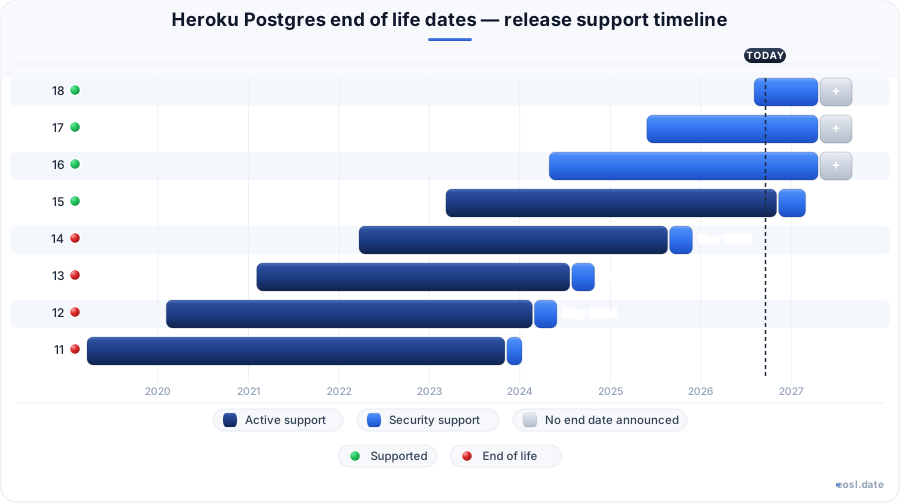
Currently Supported Heroku Postgres Releases - Active EOS/EOSL Support (3)
| Release | Released | Forced upgrades | Provisionable |
|---|---|---|---|
| 18 | (3 months ago) | Active | Active |
| 17 | (1 year and 5 months ago) | Active | Active |
| 16 | (2 years and 6 months ago) | Active | Active |
Heroku Postgres Releases Nearing End of Life - Support Ending Soon (1)
| Release | Released | Forced upgrades | Provisionable |
|---|---|---|---|
| 15 | (3 years and 8 months ago) | (in 3 months) | (1 week and 4 days ago) |
Heroku Postgres End of Life (EOL) Releases - No Longer Supported (4)
| Release | Released | Forced upgrades | Provisionable |
|---|---|---|---|
| 14 | (4 years and 7 months ago) | (11 months ago) | (1 year and 2 months ago) |
| 13 | (5 years and 9 months ago) | (2 years ago) | (2 years and 3 months ago) |
| 12 | (6 years and 9 months ago) | (2 years and 5 months ago) | (2 years and 8 months ago) |
| 11 | (7 years and 8 months ago) | (2 years and 10 months ago) | (3 years ago) |
Your Heroku Postgres end of life date arrives about three years after each release, and Heroku forces an upgrade once a database falls behind. Heroku Postgres is a cloud database (DBaaS) built on PostgreSQL, so every Heroku Postgres database behind your application carries a version clock. This guide explains the policy, the dates and the safest way to move your app.
Heroku Postgres End of Life and Version Support Policy
The PostgreSQL project publishes a new major version yearly and supports each one for five years upstream. Heroku supports major versions for three years, so Heroku Postgres version support is shorter than the community window. Heroku tests every release for compatibility first, and Postgres 18 is the default version for new databases, which means the database your app uses today may already sit close to its limit.
Minor versions arrive shortly after the upstream minor version. You can't apply a minor version yourself; on Standard-tier and higher plans, Heroku installs it automatically after maintenance. Moving to the latest version every few years brings security fixes and performance enhancements, and it leaves room for testing the upgrade before an unsupported major version becomes a problem for your app. Review each database yearly, because every database in a team can age differently.
Deprecated Postgres Versions and Each End-of-Life Date
The table lists when each Postgres version ends. The deprecated versions, 13 and 14, are past support, Postgres 15 is deprecating now, and Postgres 16 and Postgres 17 are still available. The Heroku Postgres 14 deprecation notice shows how a single date is set, and your database must leave the old version before then.
| Version | Status | Ends |
|---|---|---|
| 13 | Retired | October 29, 2024 |
| 14 | Retired | November 28, 2025 |
| 15 | Deprecating | February 28, 2027 |
| 16 | Available | Q3 2027 |
| 17 | Available | Q3 2028 |
| 18 | Available (default) | Q3 2029 |
Enterprise accounts and Salesforce customers follow the same dates, even though Heroku has moved to a sustaining engineering model.
Deprecation Timeline Before Forced Upgrades Begin
A deprecation date starts a fixed countdown. When a newer release ships, Heroku retires the third version before it, and end of support follows six months later. Heroku announces each change in the changelog and sends a deprecation notification, so the first sign you see is usually a message in your inbox.
- Deprecation date: Heroku sends an email notification to affected owners.
- Three months later: you can't provision new databases on the old version, though forks and followers of existing databases still work.
- Five months later: Heroku schedules forced upgrades for deprecated databases still running it.
- Six months later: the cutoff arrives, and Heroku starts restricting database access and deleting databases, followers included, for non-compliance.
Postgres 14 followed this pattern: notice on May 28, 2025, mandatory upgrades from October 28 and the cutoff on November 28. Whatever PostgreSQL version you run, plan your upgrade well before the fifth month.
Which Database Runs a Retiring Version? Check With the Heroku CLI
An email names one database, but your team may run more. Use the pg:info command from the Heroku CLI against each app and read which Postgres version that database runs in the PG Version line, for example heroku pg:info -a my-app. Repeat that command for every app, since the dashboard shows no summary, and note which app needs an upgrade soonest. Then check how DATABASE_URL is set: run heroku addons and confirm DATABASE_URL appears as an attachment rather than a config var someone typed by hand, because a hand-typed DATABASE_URL keeps pointing at the old database after a promotion, so your app would stay on the retiring version past the cutoff.
If the Postgres version in your email differs from the table above, trust the earlier date and plan the migration before that deadline. You can migrate on your terms now, or after the cutoff Heroku picks the moment and your app goes down on its schedule instead, so schedule the upgrade of each app yourself.
Beat the Forced Upgrade: Choosing an Upgrade Method by Downtime
Heroku documents three upgrade methods, and none avoids app downtime. Pick a low-traffic window, and try the upgrade on a fork of the database or on a non-production app first so you can measure the real downtime per GB for your schema.
| Method | Typical downtime | Plans |
|---|---|---|
| Direct upgrade | About 10 minutes | All tiers |
| Follower failover | 20 to 30 minutes | Standard to Shield |
| Data copy | About 3 minutes per GB | Under 10 GB |
The data copy is the only method that leaves the old primary untouched, which gives you a rollback path. For everything else the direct route is recommended, and each Heroku Postgres database has a maintenance window you can reuse.
Direct Upgrade Method for a Deprecated Database
A direct upgrade changes the version in place and keeps your add-on. Heroku restricts access while it runs, so writes cannot be lost. Use Heroku CLI v10.8.0 or later, and add the --version flag to pick a target version; otherwise the latest supported version is used. Heroku runs ANALYZE afterward so query planning stays accurate, and the upgrade can fail on a database with more than 1,000 schemas, so rehearse it first and restrict access to the database only when you are ready.
Essential and Advanced Tier Upgrades
On an Essential-tier database, pg:upgrade:run starts the upgrade right away, and pg:upgrade:wait tracks it until the database is available again. Advanced-tier databases use data:pg:upgrade:run, then pg:upgrade:wait equivalents, and the database stays unavailable until it finishes.
Standard-Tier and Higher: Prepare, Then Run
On these higher tiers, first run pg:upgrade:prepare, which can take up to a day, so start it well before the cutoff, and schedules the work for the next maintenance window. Check compatibility with pg:upgrade:dryrun, then let the window start or call pg:upgrade:run yourself; it relies on the pg_upgrade utility. Followers are replaced afterward and show replication lag until they catch up. Pause Heroku Connect first, because it can't reach a database mid-upgrade. Credentials rotate on the follower, so recheck your high availability setup and continuous protection when it ends.
Follower Failover Method Ahead of Deprecation
With the follower failover method you upgrade a copy and promote it, so the old database stays available. Create the follower about a day early with addons:create and its --follow option, then wait until it is behind by 0 commits. This command works on every tier above Essential, but plan for 20 to 30 minutes offline.
Enter Maintenance Mode and Promote the Follower
Put the app into maintenance mode with maintenance:on, and use ps:scale to stop the dynos, because maintenance mode does not scale them down. Run pg:upgrade:run on the follower, then use pg:promote to make it the new DATABASE_URL. If your config var uses another name, attach the database with addons:attach; do the same for any other app sharing that attachment. Heroku reattaches default connection pooling on its own, while a custom alias needs DATABASE_URL-style attach commands of its own. Finish with maintenance:off, then create new followers and rescale the dynos. Premium, Private and Shield tiers work the same way, and a private plan keeps its disk settings.
Data Copy Method for a Deprecated Version and pg:copy Fallbacks
The data copy method provisions a new database on the target version and moves rows with pg:copy. Provisioning takes a few minutes. The copy also trims bloat and may save disk. Expect about three minutes offline per GB, so choose it for small databases. Only the data the default credential can reach is copied from the database, and a hand-set DATABASE_URL must be unset before you promote.
If pg:copy fails, use pg:backups to capture a backup, then pg:backups:restore to restore it into the new database. Pass the app name to confirm it, not the database name. Sensitive data needs care: a support ticket is better than moving personal data off Heroku. Run each command from a shell where the right app is selected, and do not start another migrate step until it finishes.
Falling Back to pg_dump and pg_restore
As a last resort for leaving a retiring version before the cutoff, run pg_dump and pg_restore from your own machine, remembering that a full copy of production lands there. Heroku gives you no superuser, so skip owner and privilege statements when you restore. Test on a fork first and delete the dump afterward. Your CI should also pin the new version so tests stop running on the old one.
Verify the Upgrade and Deprovision the Old Database After Deprecation
After promotion, run pg:info and confirm the version, row counts and sequences before you relax. Keep the old Heroku Postgres database for a few days as a rollback option, then remove it with addons:destroy, since the follower failover and data copy methods leave the old add-on behind and still billing. Reassign any dataclips (data clips) from the old database to the new one. Watch the next releases so you are never surprised twice: a clean upgrade keeps your application on a supported PostgreSQL version well past the cutoff. Confirm that every app attached to the database still connects, and that each app reads and writes through the new database.