Azure Kubernetes Service End of Life (EOL) Dates and End of Support (EOS) Dates
Azure Kubernetes Service end of life (EOL) and end of support (EOS) dates: 13 Azure Kubernetes Service versions have reached EOL, including Azure Kubernetes Service 1.33 (EOL date: Jul 31, 2026) — no longer receiving security updates or patches. Azure Kubernetes Service 1.37 is the current supported release, with support through Oct 31, 2027 — 4 versions in active support. Also see Alibaba ACK lifecycle dates for related end-of-life information.
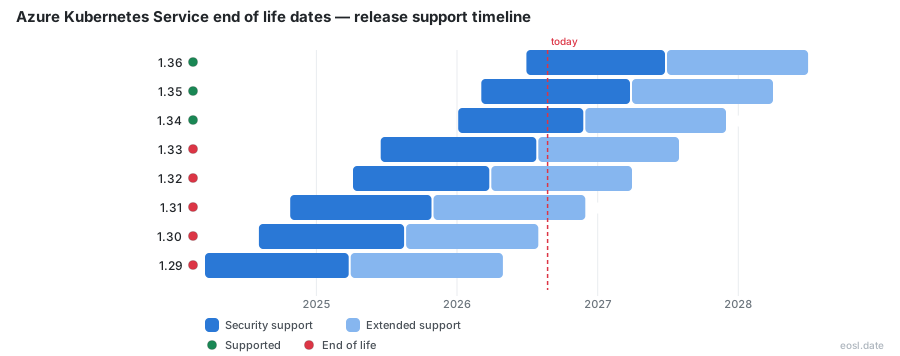
Currently Supported Azure Kubernetes Service Releases - Active EOS/EOSL Support (4)
| Release | Released | Support | LTS Support |
|---|---|---|---|
| 1.37 | (4 weeks ago) | (in 11 months) | (in 1 year and 11 months) |
| 1.36 | (4 months ago) | (in 7 months) | (in 1 year and 7 months) |
| 1.35 | (8 months ago) | (in 4 months) | (in 1 year and 4 months) |
| 1.34 | (10 months ago) | (in 1 week and 1 day) | (in 1 year) |
Azure Kubernetes Service End of Life (EOL) Releases - No Longer Supported (13)
| Release | Released | Support | LTS Support |
|---|---|---|---|
| 1.33 | (1 year and 5 months ago) | (3 months ago) | (in 8 months) |
| 1.32 | (1 year and 7 months ago) | (7 months ago) | (in 4 months) |
| 1.31 | (2 years ago) | (1 year ago) | (in 1 week and 1 day) |
| 1.30 | (2 years and 3 months ago) | (1 year and 3 months ago) | (3 months ago) |
| 1.29 | (2 years and 8 months ago) | (1 year and 7 months ago) | (6 months ago) |
| 1.28 | (3 years ago) | (1 year and 9 months ago) | (8 months ago) |
| 1.27 | (3 years and 3 months ago) | (2 years and 3 months ago) | (1 year and 3 months ago) |
| 1.26 | (3 years and 7 months ago) | (2 years and 7 months ago) | Active |
| 1.25 | (3 years and 11 months ago) | (2 years and 10 months ago) | Active |
| 1.24 | (4 years and 3 months ago) | (3 years and 3 months ago) | Active |
| 1.23 | (4 years and 6 months ago) | (3 years and 7 months ago) | Active |
| 1.22 | (4 years and 10 months ago) | (3 years and 11 months ago) | Active |
| 1.21 | (5 years and 3 months ago) | (4 years and 3 months ago) | Active |
Every cluster you run on this managed service has a clock on it, and the Azure Kubernetes Service end of life date for your version tells you when the control plane stops getting fixes. This guide shows the dates, explains how Microsoft handles an Azure Kubernetes release after support ends, and covers when LTS is worth turning on.
Azure Kubernetes Service End of Life: How the Support Window Works
AKS follows a 12-month support policy for each generally available (GA) Kubernetes release. The upstream Kubernetes project ships a new minor version roughly every four months, and Microsoft makes it available in AKS about a month later after testing. At any moment AKS supports three GA minor versions: the latest release (N) and the two before it (N-1 and N-2). When a new minor version arrives, the oldest one leaves community support about 30 days later.
Think of the lifecycle as three stages. First comes the preview, then GA, then a year of full support. After that a version is either retired, kept alive by LTS, or left in a short reduced-support stage. The rest of this guide walks through each stage so you can plan your next cluster upgrade with real dates.
On Azure, the managed Kubernetes service runs the API server, etcd and scheduler for you, but the Kubernetes version your cluster uses is still your decision. The Azure portal shows the Kubernetes version of each cluster, and the Azure documentation publishes the Kubernetes support policy that sets the deadline. Container platforms in any cloud need this discipline, and Azure is no exception: a cluster nobody upgrades turns into a liability for the whole container estate.
Kubernetes Version Numbers and Patch Version Rules
Kubernetes uses semantic versioning in the form major.minor.patch. A minor release adds features and can remove APIs that were already deprecated, while a patch release carries bug fixes and security updates for one minor line. AKS can support several patches at once, but it reserves the right to pull a patch if a critical CVE or vulnerability appears. Always run the newest patch for your minor line, because a patch that lags behind leaves your workloads exposed to a known CVE. The Kubernetes community tracks each CVE publicly, and every unpatched CVE becomes an easy target once details are out. A routine patch is the cheapest defense against a CVE, and skipping the habit is how a minor flaw becomes a major incident when the next CVE is announced.
Community Support and the N-2 Rule
Under community support, AKS ships fixes it receives from the upstream project, plus its own platform updates. The support window for a minor version closes roughly 12 months after its AKS release. If you run N-2 today, the next minor release moves you out of the standard window. This is why even a stable production cluster needs an upgrade plan at least once a year, and why the support policy matters before you pick a version for a new project. Each Azure region receives a Kubernetes release at its own pace, so the policy gives a window, not a promise. In Kubernetes terms, support means Microsoft will take a ticket and ship fixes for that Kubernetes line. The long-term support option extends this, while the official support policy describes the baseline for every Azure customer.
End of Support Dates for Every Kubernetes Version
Dates change as new releases land, so treat the table below as a snapshot taken in October 2026 and confirm against the official page before you act. Unless an exact day is given, the end date is the last day of the month listed.
| Kubernetes version | AKS GA | Community support ends | LTS ends |
|---|---|---|---|
| 1.31 | Nov 2024 | Nov 1, 2025 | Nov 2026 |
| 1.32 | Apr 2025 | Mar 2026 | Mar 2027 |
| 1.33 | Jun 2025 | Jul 2026 | Jul 2027 |
| 1.34 | Nov 2025 | Nov 2026 | Nov 2027 |
| 1.35 | Mar 2026 | Mar 2027 | Mar 2028 |
| 1.36 | Jun 2026 | Jun 2027 | Jun 2028 |
| 1.37 | Oct 2026 | Oct 2027 | Oct 2028 |
Version 1.38 is in preview and is due to reach GA in February 2027, with its end dates still to be announced.
Reading the AKS Release Calendar
The release calendar lists the upstream release month, the AKS preview, the GA month, the end date and a column for platform-initiated upgrades. A Gantt chart on the same page draws these as bars, which is the quickest way to see how the windows overlap. Because the platform rolls out gradually and rate-limits each region, a new version can take up to 10 business days to appear everywhere, so a GA month in the table does not mean your region has it that day.
Versions That Have Already Ended
As of this writing, 1.31 and 1.32 are past community support, and 1.33 left community support in July 2026. If your Azure cluster still runs one of them without LTS, it is already outside of support or inside the short reduced-support stage described next. Treat any cluster on those versions as a priority upgrade. Kubernetes teams on Azure often discover the problem only when a Kubernetes API behaves differently after a platform change, so check the Kubernetes version of every Azure subscription you own, not only the clusters you built recently.
Versions Still Receiving Fixes
Version 1.34 is the oldest release still in the community window, ending in November 2026. Versions 1.35, 1.36 and 1.37 follow it. If your release is 1.34, your upgrade deadline is weeks away, so either schedule the move now or enroll in LTS before the date passes. Newer lines give you the longest runway, and 1.37 is covered through October 2027 under community support. A Kubernetes release that has just reached GA is generally the best pick for a new Azure project, since it delivers the most stability and the longest period before you need another Kubernetes upgrade. Enterprise teams that standardize on one Kubernetes release per quarter find their Azure estate much easier to audit.
What an Unsupported Version Still Gets From Platform Support
When a version drops out of the three-version window, it does not vanish immediately. AKS provides platform support for exactly one more minor version, called N-3. During that stage Microsoft helps only with Azure and AKS platform issues. Anything tied to Kubernetes functionality, such as an upstream bug or a failing add-on, is not covered. An unsupported version in this stage gets a 60-day grace period, which AKS calls the platform support grace period, to upgrade on your own terms.
| Support area | Community support (N-2) | Platform support (N-3) |
|---|---|---|
| Node pool scaling and creation | Supported | Supported |
| Node image upgrade | Supported | Supported |
| Infrastructure and control plane SLA | Supported | Supported |
| Bug fixes and security patches | Supported | Not supported |
| Kubernetes API support | Supported | Not supported |
| New cluster creation | Supported | Not supported |
| Kubernetes components and add-ons | Supported | Not supported |
Services Still Covered in the N-3 Window
You can still scale a cluster, add a node pool, rotate certificates, start or stop it and apply a node image upgrade. The control plane keeps its SLA, and storage and networking issues are handled except where a fix needs a bug patch or a retired component. In short, the platform keeps running, and nobody will fix Kubernetes itself. Creating a brand new cluster on the version is no longer allowed. Container workloads keep running, and the Azure platform keeps the Kubernetes nodes healthy, but nobody will answer a Kubernetes question about the cluster behavior.
Everything Left Unsupported After the Cutoff
Without upstream patches there is nothing to backport, so AKS cannot ship security updates, bug fixes or component hotfixes for the version. That makes a cluster here a growing security risk, since each new CVE stays open. Upgrades remain supported: moving from N-3 to a supported release is exactly what this stage is for, and Microsoft supports that path fully. Think of platform support as a cloud safety net for your Kubernetes estate: Azure keeps the lights on while you finish your own testing, and your container workloads stay online.
Forced Upgrades When Version Support Lapses
After the grace period, AKS moves the cluster for you. Starting June 1, 2027, a platform-initiated upgrade applies to any cluster still on an unsupported release. Version support ends in practice the day that upgrade runs, so it is better to move on your own schedule. A community-support cluster goes to the lowest supported minor version, and an LTS cluster goes to the applicable LTS release. AKS never enrolls anyone in LTS automatically and never changes the billing tier.
How the 60-Day Grace Period Works
The grace period starts when the version reaches N-3, or, for an LTS cluster, after its LTS end date. It lasts 60 days. Inside it you keep full control: pick a maintenance window, test your workloads and upgrade a node pool at a time. Once it ends, the planning month in the release calendar gives a rough rollout month, but the exact day is not fixed because rollouts are rate-limited by region, subscription and version.
What a Platform-Initiated Upgrade Overrides
Unlike a manual upgrade or an auto-upgrade channel, a forced move ignores your maintenance window. It also skips the deprecated API check, so a removed API in the target version can break a workload without warning, and it can override a pod disruption budget that would otherwise block a node drain. Expect possible downtime. Fix removed APIs and self-managed add-ons first, and your migration will be uneventful.
AKS Long Term Support: 24 Months Instead of 12
AKS Long Term Support adds a second year to the community year, giving about 24 months of total support from GA. During the LTS year Microsoft backports security fixes from the upstream community and keeps patching the managed components. Every supported Kubernetes version is eligible, whereas earlier LTS releases were limited to a few chosen versions. It is a support plan you opt into, never an automatic status. For Azure customers it means a Kubernetes version can stay in service for two years, and the Kubernetes security fixes keep arriving through the same Azure channels.
Who Benefits From Premium Tier LTS
LTS requires the Premium tier, so it carries extra cost, and it suits teams that cannot validate a new Kubernetes version every year. An enterprise with change-freeze rules, strict compliance reviews or a long certification cycle gets predictable planning and a smaller upgrade count. Teams that keep up with upstream release cadence get little from it. Weigh the added stability and governance against the bill before you commit; an enterprise that values stability more than novelty usually decides quickly. For current rates, see the AKS pricing page.
How LTS Patches Work
The LTS plan supports only the two most recent patch versions of a minor line, so a cluster that falls behind can lose support. Turn on the patch auto-upgrade channel to avoid this. LTS covers core components such as the API server, etcd and kubelet, and most managed add-ons, but some add-ons keep their own lifecycle. Because the upstream project has stopped producing fixes for old releases, AKS does the backporting itself, and a few add-ons are not covered. Each patch for an LTS Kubernetes version ships through the usual Azure release process, so Azure customers see no new tooling, only a longer supported lifetime for the Kubernetes version they chose.
Enable or Disable LTS Before a Version's Retirement
You can opt in at any time, even while a cluster is still in community support, and you can enable LTS on a version after its community window closed. Doing it earlier is easier, since long-term support is simplest to manage on a cluster you still fully control in the cloud, because a disabled plan cannot be restored on a version whose community support has ended. The commands below use the Azure CLI and assume you already know your resource group and cluster name.
Enable Long-Term Support on a New Cluster
Create the cluster on the Premium tier with the LTS support plan and the patch channel:
az aks create --resource-group myGroup --name myCluster --tier premium --k8s-support-plan AKSLongTermSupport --auto-upgrade-channel patch --generate-ssh-keysThe patch auto-upgrade channel keeps the cluster on a supported patch while staying on the same minor version.
Switch LTS On for an Existing Cluster
For a running cluster, use az aks update with the same tier and plan flags. Enabling LTS does not disrupt workloads, because it changes the support plan, not the nodes, so your container workloads and Kubernetes services keep serving traffic. Check the available upgrade targets first with az aks get-upgrades, then confirm the cluster shows the Premium tier.
Turn LTS Off Again
To go back, move the cluster to the Free or Standard tier and select the KubernetesOfficial plan. This only works while the version is still in community support. If the version already left it, upgrade the cluster to a community-supported release first, then switch the plan.
Upgrade Planning Ahead of Deprecation
Treat the deprecation date as a deadline for your change process, not just for your admin. A solid upgrade plan lists the target version, the add-ons that must be updated first and the window in which you will run it. Test each workload against removed APIs, since the biggest upgrade surprises come from APIs dropped between minor versions. Run az aks get-upgrades to see valid targets and az aks upgrade to start the move.
- Pick the target minor version from the release notes.
- Check add-ons and extensions for compatibility.
- Upgrade a non-production cluster first.
- Run the upgrade for production inside a maintenance window.
Skipping a Minor Version During an Upgrade
A cluster that missed a release can often jump over a minor version, as long as the version skew rules and validation checks pass. An LTS cluster can do the same when it upgrades to a higher LTS release. During a full in-place move, AKS upgrades the control plane first and then each node pool in order. Do not assume the jump is safe: test the larger gap in staging.
Control Plane and Node Pool Version Skew
The control plane and its node pools may differ in version, but only within the allowed version skew. If a node pool falls outside a supported version, the control plane keeps working, yet you should bring the pool back in line before the next scale operation. A freshly deprecated version can still add node pools during platform support, but upgrading is the safer choice.
Supported kubectl Versions
Your kubectl client may be one minor version older or newer than the kube-apiserver. If the API server is at 1.34, kubectl 1.33 through 1.35 works. Update it with az aks install-cli so tooling does not drift from your cluster. After you move off an unsupported version, update kubectl again so the client stays within one minor version of the new API server.
Azure Linux 2.0 Retirement and Node Image Removal
Operating system lifecycles end too, and they can bite earlier than Kubernetes does. AKS stopped providing security updates for Azure Linux 2.0 on November 30, 2025, and the node image is frozen. This cloud-side retirement is the one many teams miss because their Kubernetes version looks healthy.
Dates That Matter for Azure Linux 2.0
Starting October 31, 2026, the Azure Linux 2.0 node images are removed, and you will be unable to scale a node pool that still uses one. Move to a supported Azure Linux release by upgrading the pool to a newer Kubernetes version or by switching the OS SKU to AzureLinux3. For clusters on LTS lines 1.28 to 1.31, the Azure Linux 2.0 end of life lands inside the LTS period, so plan the OS migration separately from the version upgrade.
Windows Server and Ubuntu Changes
Windows Server 2022 is not supported in Kubernetes 1.37 and later, so Windows pools must move to Windows Server 2025 before you upgrade to that version. The OS SKU migration for this is available in preview. Ubuntu 26.04 is also in preview on 1.36 and later, and Ubuntu images follow their own retirement schedule. Both are preview features, so test the Ubuntu and Windows Server pools away from production first.
Add-On Retirement Dates to Watch
Supporting Kubernetes does not mean supporting every piece you bolt on. Add-ons and extensions can keep a separate lifecycle, and each one has a Kubernetes compatibility list. Review them before you move any cluster onto LTS or a newer minor version. An Azure add-on that drifts out of its Kubernetes compatibility range is a common cause of upgrade failures, and a container networking or ingress add-on is the usual culprit.
| Add-on or feature | What to know |
|---|---|
| Open Service Mesh | AKS support ends September 30, 2027; migrate to the Istio add-on |
| Microsoft Entra pod-managed identity | Support ended in September 2025; use Workload ID |
| Application Gateway Ingress Controller | Still available; begin moving to Application Gateway for Containers |
| Key Management Service | Existing experience marked legacy for 1.33 and later |
Add-Ons With Their Own Lifecycle
Dapr, Calico and the confidential compute add-on each follow their own support terms, so confirm each one supports your target Kubernetes version before leaving community support, and ask the add-on vendor about its Azure lifecycle. Release notes for each Kubernetes line also list breaking component changes, such as a new add-on build, that you should read before upgrade day.
AKS Release Notes: Recent Deprecation Announcements
The GitHub release feed is the best place to catch a deprecation early. Each release posts the date, the announcements of upcoming changes and retirements, the features, the behavioral changes, bug fixes and component updates. The September 25, 2026 release is a good example of the kind of announcement that affects planning.
Reading the Latest Release Notes
That release listed GA identity bindings for workload identity, a Windows Server OS SKU migration in preview and updated Cilium, CoreDNS and Azure CSI components. It also removed Flatcar Container Linux node images, which makes scaling and remediation fail on pools still using them. Skim the announcements section first, then the behavioral changes. Each Azure Kubernetes release note is also where Microsoft explains a change to workloads, such as a stricter load balancer validation on Kubernetes 1.37.
VMAS Cluster Migration
Availability Set (VMAS) clusters are deprecated, and AKS ends support for them by migrating them automatically. Starting September 30, 2026, AKS began automatically migrating deprecated Availability Set (VMAS) clusters to Virtual Machines node pools through the auto-upgrader. If you wanted control over timing, you needed to run the migration earlier with az aks update --migrate-vmas-to-vms. Clusters that have not been checked since should be reviewed now.
Retirement of Flatcar and OS Guard Images
Flatcar Container Linux preview images are gone, and Azure Linux with OS Guard, also in preview, is set to retire on December 10, 2026. Node pools on those images lose support the same way an old Kubernetes version does, so move them to a generally available OS before the cutoff. Preview features carry no long-term commitment, which is the main reason to keep production on GA components.
Where to Track Retirement Notices
Microsoft announces new Kubernetes versions and retirements through the AKS release notes, Azure Updates and the portal. Follow all three, because a retirement notice for an add-on rarely shows up on the version page. Subscribing to the feeds is cheaper than a surprise outage. Enterprise teams often route Azure Updates into a shared channel so every Kubernetes owner sees a cloud retirement at the same time.
Using the AKS Release Tracker
The release tracker shows which regions have received a release and which patches are current. Check it before you pick an upgrade target, because a new release rolls out region by region and your region may not have it yet.
Security Risks After a Version's Retirement
Once a version leaves community support, AKS ships no more security patches for it, LTS is the only way to keep receiving backported fixes, and the platform upgrades the cluster after the 60-day grace period anyway. Running past retirement is a security and compliance problem before it is an availability problem. Once the community stops publishing patches, every new vulnerability stays open on your cluster, and audit teams usually flag an unsupported Kubernetes release. Production environments under regulatory review should treat the end date as a hard stop, and an outdated cluster is one more reason a compliance scan fails.
Preview and GA Version Deprecation Exceptions
AKS may support a version in preview, but preview builds fall under preview terms and carry no SLA. A GA release can also be deprecated sooner than its calendar date if a critical CVE appears. Microsoft documents a few policy exceptions, so check the notes for your version rather than assuming the table is final. The generally available label also matters: a version counts as generally available only once it is enabled in every region and in all SLA measurements, so the GA date is the real start of the clock. A version that is generally available in one region may still be rolling out elsewhere.
Pricing Impact of Deprecation Planning
Staying supported has a cost either way, and the support end date sets when you must pay it. Upgrading often costs engineering time, while LTS adds Premium tier fees on top of the normal control plane charge. For an enterprise with dozens of clusters, a yearly upgrade cycle on the free tier may cost less than Premium on every cluster. Run the numbers against your own cloud bill and keep LTS for the clusters that truly cannot move. Many Azure teams reserve it for a handful of container platforms that carry strict change controls, and upgrade everything else on the normal Kubernetes cadence.
Deprecation Readiness Checklist for Your Clusters
Use this short list each quarter to keep every cluster safe from surprise retirement.
- List each cluster and its Kubernetes version against the release calendar.
- Flag any version within 90 days of its end date.
- Decide per cluster: upgrade, or enable LTS on the Premium tier.
- Check node images, including Azure Linux, Ubuntu and Windows Server pools, and note which Kubernetes workloads run on each.
- Replace removed APIs and review add-on lifecycle notes.
- Set the patch auto-upgrade channel and a maintenance window.
Handled on a schedule, end of life is a calendar item, not an emergency.