Hashicorp Packer End of Life (EOL) Dates and End of Support (EOS) Dates
Hashicorp Packer end of life (EOL) and end of support (EOS) dates: 6 Hashicorp Packer versions have reached EOL, including Hashicorp Packer 1.13 (EOL date: Jul 24, 2026) — no longer receiving security updates or patches. Hashicorp Packer 1.16.2 is the current supported release — 3 versions in active support. Also see Hashicorp Boundary EOSL information for related end-of-life information.
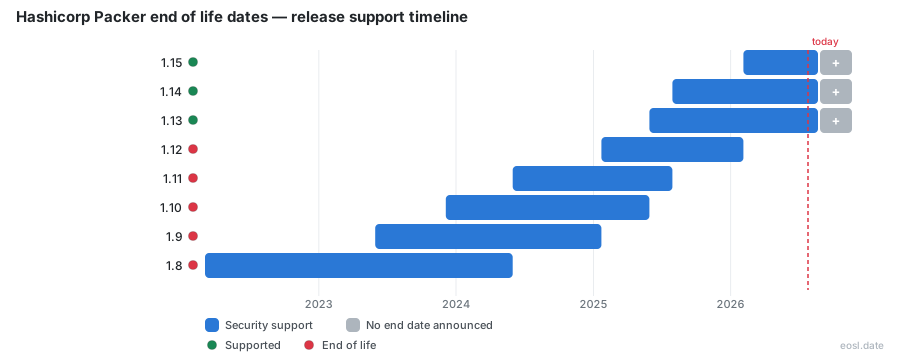
Currently Supported Hashicorp Packer Releases - Active EOS/EOSL Support (3)
Hashicorp Packer End of Life (EOL) Releases - No Longer Supported (6)
| Release | Released | Standard Maintenance | Latest |
|---|---|---|---|
| 1.13 | (1 year and 5 months ago) | (3 months ago) | 1.13.1 (1 year and 5 months ago) |
| 1.12 | (1 year and 10 months ago) | (9 months ago) | 1.12.0 (1 year and 10 months ago) |
| 1.11 | (2 years and 5 months ago) | (1 year and 3 months ago) | 1.11.2 (2 years and 3 months ago) |
| 1.10 | (2 years and 11 months ago) | (1 year and 5 months ago) | 1.10.3 (2 years and 7 months ago) |
| 1.9 | (3 years and 5 months ago) | (1 year and 10 months ago) | 1.9.5 (2 years and 11 months ago) |
| 1.8 | (4 years and 8 months ago) | (2 years and 5 months ago) | 1.8.7 (3 years and 6 months ago) |
Running an old build and wondering when it stops getting fixes? Hashicorp Packer end of life follows a simple rule: only the three newest minor versions are supported. Packer is a community tool that turns a single source configuration into a machine image for every target, and Hashicorp retires older lines on a fixed schedule, so each image you bake depends on knowing where you sit.
Hashicorp Packer End of Life Dates by Version
The table below lists every recent line. Support for a version ends on the day the version three newer ships, so the schedule moves forward each time a new minor version appears. The dates reflect the schedule published on 23 October 2026.
| Version | Released | Standard maintenance | Latest patch |
|---|---|---|---|
| 1.16 | 24 Jul 2026 | Supported | 1.16.2 |
| 1.15 | 4 Feb 2026 | Supported | 1.15.4 |
| 1.14 | 30 Jul 2025 | Supported, last in the window | 1.14.3 |
| 1.13 | 30 May 2025 | Ended 24 Jul 2026 | 1.13.1 |
| 1.12 | 22 Jan 2025 | Ended 4 Feb 2026 | 1.12.0 |
| 1.11 | 31 May 2024 | Ended 30 Jul 2025 | 1.11.2 |
| 1.10 | 5 Dec 2023 | Ended 30 May 2025 | 1.10.3 |
| 1.9 | 31 May 2023 | Ended 22 Jan 2025 | 1.9.5 |
| 1.8 | 4 Mar 2022 | Ended 31 May 2024 | 1.8.7 |
Supported Versus Ended Versions
A line in the first three rows is a supported release that still gets patches. Anything below it is out of the window, so a team pinned to 1.12 has been unsupported for more than eight months. Each ended line also stopped at its final patch, which is why 1.12.0 never received a follow-up. The next line to fall out is 1.14, and it ends the day a 1.17 ships.
Packer EOL Policy: Release Cadence and Versioning
A new major release is flagged by a change in the first or second digit of the X.Y.Z scheme, so 1.15 to 1.16 counts as one. Patch numbers only add fixes inside a line. Packer is open-source, and this versioning pattern, together with the observed release cadence of roughly one new line every few months, sets your retirement clock.
Standard Support Period and the N-2 Rule
Under the standard support rule, generally available releases, also called GA releases, stay maintained while they are the current line (N) or one of the two before it (N-2). In practice the support period for a line has run from roughly 12 to 18 months. Some third-party databases quote up to two years, so treat the dated table as the authority and re-check it before you plan an upgrade. This support policy keeps planning predictable, and your machine image builds follow whichever version runs on the build host.
Written Notice Before End of Support
Hashicorp states that it gives at least twelve months of written notice before discontinuing a product. For Packer itself, the practical warning is the N-2 table, because a line ends when a newer one ships. The HCP Vagrant deprecation shows the same phased pattern in a sister product: new boxes stopped on 1 October 2026, and the process ends with a formal end of support.
Packer Lifecycle Security Risks After Support Ends
Once a line is retired, Hashicorp stops shipping fixes, which makes security the main cost of staying put, since every missed security patch lands in your cloud build pipeline. Packer helps you codify hardening and compliance baselines inside golden images, and it supports immutable infrastructure that reduces configuration drift, but the tool itself can only protect your pipeline while it is maintained.
Vulnerabilities and CVE Exposure
Known vulnerabilities pile up on retired lines, because fixes land only in supported ones. A past CVE involved an insecure sudoers setup on Linux, so anyone left on an old line stays exposed to that class of bug. Older Docker images of Packer can also carry outdated libraries such as curl. Run security scanning during every build so a stale tool never ships inside your golden images or other machine images unnoticed.
HCP Packer Registry Lifecycle and Release Channel Dates
The HCP Packer registry is a separate cloud service that stores each build so you can track, govern and revoke machine images as a central image registry. It has its own retirement layer: you can set end dates on an image version, and anything past it is blocked from downstream use. HCP Packer is not the CLI, and Hashicorp publishes its dates separately, so the CLI schedule above does not govern its dates.
A typical team links the HCP Packer registry to Terraform and assigns a build to a staging or production channel. Revoking a bad image there is how the registry enforces an image's own end date.
Image Iterations and Channel Assignment
In HCP Packer, every build makes a new iteration, and the first one lands in the latest channel by default. To control rollout, create a channel per environment and assign an iteration to it. That gives you a clean audit trail of which image reached production, plus an automation hook for your CI/CD pipeline. Replacing or revoking the assigned iteration is how you retire an image, so the channel pointer doubles as its end date. The template stays unchanged, and a short Terraform apply moves only the pointer.
Packer EOL Check: Latest Version and Stable Version
To see where you stand, run packer --version on the machine that builds your images, then compare the result against the table Hashicorp keeps current. The latest version is the newest patch of the newest line, while the stable version for production is whichever supported line you have already validated. The Packer CLI tool is lightweight, so the check is cheap to add to a DevOps dashboard or to your asset management inventory.
Plugin Compatibility Across Platforms
Packer uses a plugin model, and Hashicorp and the community both ship plugins for cloud and on-premises targets, so builders and provisioners come from separate plugins you install per platform. That covers AWS, Azure, Docker, VMware and VirtualBox, and the CLI runs on Windows, Linux and macOS. Add-ons on an unsupported Packer line stop receiving fixes too, so check each one against the version you are upgrading to. Always retest after a move, because an upgrade can change how the image gets built and provisioned on the target platform.
Upgrade Planning Before Packer End-of-Life Gaps
Pick a target at least one line newer than the oldest supported one, so the move buys you a full cycle. Rebuild a non-critical image first, compare the output, then roll it through staging. Treat an unsupported version as technical debt with a date attached, and put the upgrade on the same calendar as your next image refresh. Hashicorp publishes the dates, so your security team and infrastructure owners can plan the work, and the HCP Packer channels can be repointed once the new images pass review.