GitHub Actions Runner Images End of Life (EOL) Dates and End of Support (EOS) Dates
GitHub Actions Runner Images end of life (EOL) and end of support (EOS) dates: 5 GitHub Actions Runner Images versions have reached EOL, including GitHub Actions Runner Images macOS 14 (EOL date: Nov 02, 2026) — no longer receiving security updates or patches. GitHub Actions Runner Images Xcode 27 is the current supported release — 17 versions in active support. Also see Azure Kubernetes Service end of life dates for related end-of-life information.
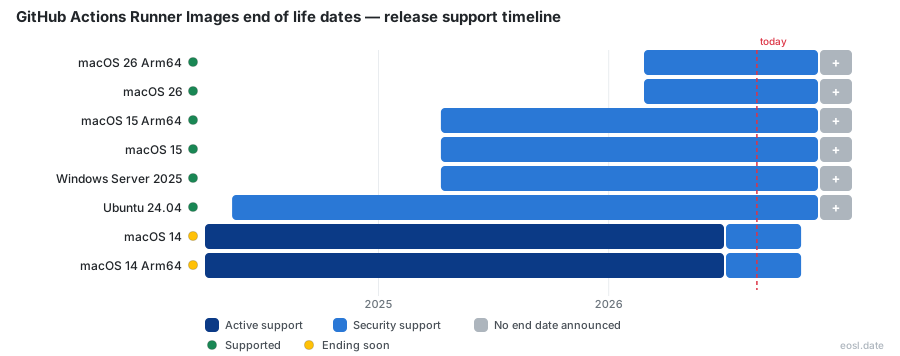
Currently Supported GitHub Actions Runner Images Releases - Active EOS/EOSL Support (17)
| Release | Released | Deprecated support | Active support |
|---|---|---|---|
| Xcode 27 | (1 month and 6 days ago) | Active | Active |
| Ubuntu 26.04 | (2 months ago) | Active | Active |
| Ubuntu 26.04 Arm64 | (2 months ago) | Active | Active |
| Windows 11 Arm64 | (3 months ago) | Active | Active |
| Windows 11 Arm64 with Visual Studio 2026 | (3 months ago) | Active | Active |
| Windows Server 2025 | (6 months ago) | Active | Active |
| macOS 26 Arm64 | (8 months ago) | Active | Active |
| macOS 26 | (8 months ago) | Active | Active |
| Ubuntu Slim | (9 months ago) | Active | Active |
| macOS 15 Arm64 | (1 year and 7 months ago) | Active | Active |
| macOS 15 | (1 year and 7 months ago) | Active | Active |
| Windows Server 2025 | (1 year and 7 months ago) | Active | Active |
| Ubuntu 22.04 Arm64 | (2 years and 2 months ago) | (in 4 months) | (2 months ago) |
| Ubuntu 24.04 Arm64 | (2 years and 4 months ago) | Active | Active |
| Ubuntu 24.04 | (2 years and 6 months ago) | Active | Active |
| Ubuntu 22.04 | (4 years and 3 months ago) | (in 4 months) | (2 months ago) |
| Windows Server 2022 | (5 years ago) | Active | Active |
GitHub Actions Runner Images End of Life (EOL) Releases - No Longer Supported (5)
| Release | Released | Deprecated support | Active support |
|---|---|---|---|
| macOS 14 | (2 years and 7 months ago) | (2 weeks and 5 days ago) | (4 months ago) |
| macOS 14 Arm64 | (2 years and 7 months ago) | (2 weeks and 5 days ago) | (4 months ago) |
| macOS 13 | (3 years and 6 months ago) | (11 months ago) | (1 year and 2 months ago) |
| macOS 12 | (4 years and 5 months ago) | (1 year and 11 months ago) | (2 years and 1 month ago) |
| Ubuntu 20.04 | (6 years and 5 months ago) | (1 year and 7 months ago) | (1 year and 10 months ago) |
Does your build suddenly queue forever or fail on a label that worked last month? GitHub Actions runner images end of life follows a rolling schedule, not one big date, and every GitHub-hosted runner image you pick gets a retirement date once a newer operating system reaches general availability. This guide shows what is already unsupported, what is next, and how to move your workflow without surprises.
GitHub Actions Runner Images End of Life Status
GitHub keeps the runner images behind its standard virtual machine fleet in the actions/runner-images repository. Each image moves through beta, general availability, deprecation and finally removal. The table below lists the older Ubuntu, Windows and macOS versions that matter most right now, with dates drawn from the public lifecycle tracker (last refreshed 24 September 2026).
| Image | Standard support ended | Final removal |
|---|---|---|
| Ubuntu 20.04 | 15 Jan 2025 | 15 Apr 2025 |
| Ubuntu 22.04 (x64 and Arm64) | 17 Sep 2026 | 17 Apr 2027 |
| Ubuntu 24.04 (x64 and Arm64) | Still supported | Not announced |
| Windows Server 2019 | 1 Jun 2025 | 30 Jun 2025 |
| Windows Server 2022 | Still supported | Not announced |
| Windows Server 2025 and Windows 11 Arm64 | Still supported | Not announced |
| macOS 12 | 7 Oct 2024 | 3 Dec 2024 |
| macOS 13 (Intel and Arm64) | 19 Sep 2025 | 4 Dec 2025 |
| macOS 14 (x64 and Arm64) | 6 Jul 2026 | 2 Nov 2026 |
| macOS 15 (x64 and Arm64) | Still supported | Not announced |
The nearest cliff is macOS 14, which disappears on 2 November 2026, so any job still pinned to it needs attention this week.
Deprecation Rules for GitHub-Hosted Runners
Every GitHub-hosted runners image is a fresh virtual machine that Microsoft Azure hosts in the cloud, so the operator, not you, decides when an old operating system is retired. The same policy covers Azure DevOps and Azure Pipelines agents, because both consume the images built from one repository, so each Azure DevOps pipeline needs the same label audit.
Support Policy: Two Supported Images at a Time
The published support policy is simple: GitHub maintains at most two GA images for each operating system family, plus one beta. The deprecation process for the oldest label starts the day the newest operating system reaches general availability. Tools and versions are typically removed six months after they reach end-of-life, and Ubuntu images follow each LTS release from Canonical, so an LTS version is the one that matters for planning.
Image Deprecation Policy and Brownout Windows
Under the image deprecation policy, an outgoing image is not switched off in one step. GitHub schedules brownout windows, temporary 24-hour or shorter outages during which jobs on the old label are rejected on purpose. A brownout is a rehearsal for the real shutdown, and it is also the moment most teams discover an overlooked workflow.
Retirement Timeline and Final Retirement Date
The Windows Server 2019 retirement is the clearest recent example of how the schedule plays out. The announcement set deprecation to begin on 1 June 2025, with a final retirement date of 30 June 2025. During the deprecation window you may notice longer queue times in peak hours, because capacity for the old image shrinks first. Four brownouts followed on 3, 10, 17 and 24 June, each running from 13:00 to 21:00 UTC.
Breaking Changes You Should Expect
Once an image is unsupported, a runner can no longer pick it up and any GitHub Actions workflow that targets its label will fail jobs immediately. Newer images can also ship different compilers, SDKs and legacy components, so a green build on the old image may break on the replacement. Community reports on the Windows move mention missing .NET Framework 4.0 support and Visual Studio build tools that had to be installed manually.
Mitigation Steps Before Retirement
- Search every repository for the old
runs-onlabel, including reusable workflows and composite actions, and open an issue to track each one. - Run a test branch on the replacement image before the first brownout, and upgrade one repository at a time.
- Pin each tool version you need through setup actions in GitHub Actions instead of relying on whatever the image happens to include, because a tool you assumed was there may vanish with the old version.
Latest Label Migration for Unsupported Images
Many teams never name an operating system at all. They use the ubuntu-latest, windows-latest or macos-latest YAML label and let GitHub decide. The latest label always points at the newest stable operating system, and the move is gradual, spread over one to two months, so a workflow can land on a different version without any commit from you.
Beta Versus GA Images
A beta image exists to collect feedback and is updated on a weekly cadence, but jobs running on it fall outside the customer SLA. A GA image has passed a beta period, has compatible major software and carries the SLA, which makes it the safer target for production jobs and the right destination when an older label is retired.
Label Scheme and Migration Process
The migration process is announced in advance and gives lead time before the latest label moves. Suffixes such as -arm select Arm64 hardware, while -large and -xlarge are macOS options. To avoid an unplanned move, name the version in your YAML, for example ubuntu-22.04 or windows-2022. Arm64 images follow the same macOS and Ubuntu cycle, so macos-15 on Arm64 and the Arm64 build of Ubuntu 24.04 each need their own label check, and an Arm64 runner never inherits an x64 fix.
Tracking Deprecation Announcements and Releases
Retirements are posted as an announcement issue in the repository, usually weeks before anything changes, and high-impact breaking changes also appear in the GitHub Changelog. You can watch the repository for each release, since a pre-release appears as soon as an image deployment starts. The community lifecycle tracker also publishes a JSON endpoint, an RSS feed and an iCalendar feed, so a calendar reminder can warn you automatically.
Preinstalled Software and Custom Images After Retirement
Moving to a new image changes more than the operating system version, and each macOS or Windows runner may carry another tool set. The tools you counted on may have different defaults, so check the included software list before you flip the label.
Preinstalled Software on Each Image
Before the retirement date, compare the old and new software lists. The software in GitHub-owned images updates weekly, and each workflow log links to the exact list under the Set up job section. A software bill of materials is also published for Windows and Ubuntu. For Ubuntu, packages mostly come from Canonical repositories, and Node.js, Java and Python ship in several LTS or popular versions side by side.
Custom Images for Larger Runners
If you depend on Docker layers, certificates or legacy SDKs that a new base lacks, larger runners can use custom images that start from a GitHub base. They are a fallback when the retired image's toolchain cannot be rebuilt in time, and they bill at the same per-minute rate as the larger runner they use.
Retirement Migration Steps for Your Workflow
- List every label in use and compare it with the status table above, covering each Windows, macOS and Ubuntu runner.
- Choose the newest GA replacement and update the label in one branch.
- Fix failing steps, then merge before the first brownout, not after it.
- Subscribe to the repository issue feed so the next retirement does not catch you out, and note any macOS version that shares the schedule.
Pin an Explicit Label Instead of Latest
In GitHub Actions, pinning stops surprise label moves, but a pinned image that has been retired still fails after its final removal date. You decide when the move happens and you also own the calendar, so add that date to your CI documentation and a shared reminder.
Deprecation Triggers: Why Older Images Go Away
GitHub supports only the latest two stable versions of an operating system, and when the newest reaches GA the oldest becomes a security and maintenance liability. Windows Server 2019 and macOS 13 both left once their successors arrived, and Ubuntu 22.04 is on the same path now that 24.04 and 26.04 are available.