GeoServer End of Life (EOL) Dates and End of Support (EOS) Dates
GeoServer end of life (EOL) and end of support (EOS) dates: 11 GeoServer versions have reached EOL, including GeoServer 2.27 (EOL date: Jun 11, 2026) — no longer receiving security updates or patches. GeoServer 3.0.2 is the current supported release — 2 versions in active support. Also see Jenkins end of life dates for related end-of-life information.
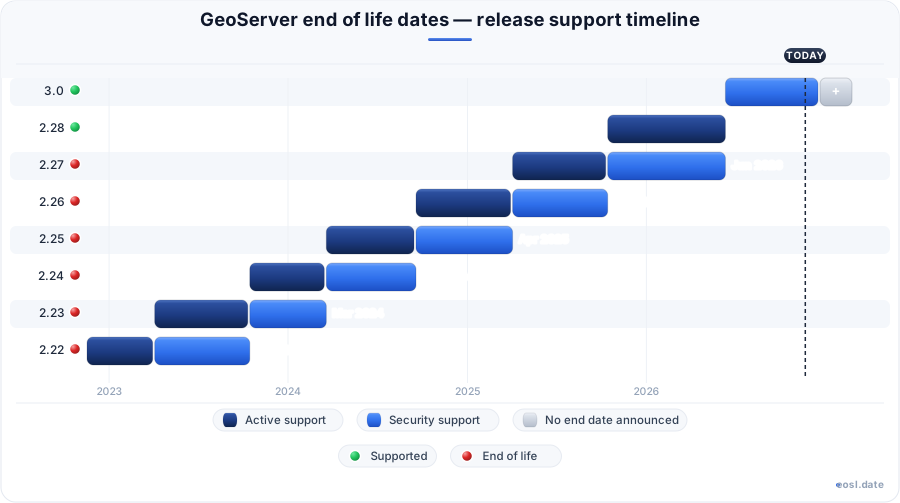
Currently Supported GeoServer Releases - Active EOS/EOSL Support (2)
GeoServer End of Life (EOL) Releases - No Longer Supported (11)
| Release | Released | Security Support | Active Support | Latest |
|---|---|---|---|---|
| 2.27 | (1 year and 7 months ago) | (5 months ago) | (1 year and 1 month ago) | 2.27.7 (1 month and 4 days ago) |
| 2.26 | (2 years and 2 months ago) | (1 year and 1 month ago) | (1 year and 7 months ago) | 2.26.4 (1 year and 2 months ago) |
| 2.25 | (2 years and 8 months ago) | (1 year and 7 months ago) | (2 years and 2 months ago) | 2.25.7 (1 year and 6 months ago) |
| 2.24 | (3 years and 1 month ago) | (2 years and 2 months ago) | (2 years and 8 months ago) | 2.24.5 (2 years and 3 months ago) |
| 2.23 | (3 years and 7 months ago) | (2 years and 8 months ago) | (3 years and 1 month ago) | 2.23.6 (2 years and 5 months ago) |
| 2.22 | (4 years ago) | (3 years and 1 month ago) | (3 years and 7 months ago) | 2.22.6 (1 year and 8 months ago) |
| 2.21 | (4 years and 6 months ago) | (3 years and 7 months ago) | (4 years ago) | 2.21.5 (3 years and 6 months ago) |
| 2.20 | (5 years and 1 month ago) | (4 years ago) | (4 years and 6 months ago) | 2.20.7 (3 years and 9 months ago) |
| 2.19 | (5 years and 8 months ago) | (4 years and 6 months ago) | (5 years and 1 month ago) | 2.19.7 (3 years and 9 months ago) |
| 2.18 | (6 years and 2 months ago) | (5 years and 1 month ago) | (5 years and 8 months ago) | 2.18.7 (3 years and 9 months ago) |
| 2.17 | (6 years and 7 months ago) | (5 years and 8 months ago) | (6 years and 2 months ago) | 2.17.5 (5 years and 9 months ago) |
Running a map server in production makes GeoServer end of life a planning question rather than a single date: every series moves from a stable release to a maintenance branch and then stops receiving fixes. With the first major version jump in years, GeoServer 3.0 arrives just as the long-running GeoServer 2.x line winds down. This guide explains the schedule, the platform changes behind it, and how to move your GIS and geospatial services, from WMS and WFS to WCS and other OGC standards, without surprises for the community that depends on your spatial data.
GeoServer End of Life and the Release Schedule
The open source project, hosted by the OSGeo foundation, does not publish one fixed retirement day for every download. Instead, the release schedule follows the lifecycle of each series, and the Project Steering Committee (PSC) decides what receives support. A series that was production ready on release day eventually becomes older software, so you should check the official documentation before you commit to a version.
| Series | Role described by project sources | What it means for support |
|---|---|---|
| GeoServer 2.27 | Stable series covered by the 2025 status report | Receives fixes until the next release replaces it |
| GeoServer 2.28 | Last 2.x series, with Java 17 as the minimum | Maintenance branch while teams migrate |
| GeoServer 3.0.x | Released June 11, 2026 after the Spring 6 overhaul | Current target for new deployments |
How a maintenance release differs from a stable release
A stable release carries the newest features and is recommended for production, while a maintenance release only receives bug fixes for an older series. Older announcements describe the pattern clearly: a maintenance release of the 2.14 series was recommended for all production systems, with downloads and extensions published together. Check the release notes for each point release before you upgrade, because they list the improvements and fixes you gain.
Security fixes and the CVE process
When security vulnerabilities appear, the team publishes stable and maintenance releases concurrently, as it did for 2.27.1 and 2.26.3 in 2025. GeoServer 3.0.0 also closes CVE-2025-23043, an XXE vulnerability in the features-templating extension, so anyone running that extension should treat the fix as urgent. Older series do not get every patch, which is why security is the strongest reason to leave a branch before support ends.
Reading release notes and the maintenance roadmap
The wiki page called Maintenance & Roadmap, edited by the PSC, lists upcoming cleanups such as restoring CITE certification, moving to Spring Framework 6 and upgrading the REST API. Pair it with the release notes of your own version, because together they show which series is nearing the end of support, and the schedule stops being guesswork.
GeoServer 3 Replaces the GeoServer 2.x Series
The 2.0 line launched in October 2009 and ran through 2.28.x, so GeoServer 3 is a genuine feature jump, not a point release. The first release of the new version lands on a different foundation: Java 17, Jakarta EE and Spring 6. That is why you cannot treat it as a drop-in upgrade. Planning for GeoServer 3 starts with understanding what the project's developers changed under the hood, and which of those changes touch your own configuration.
GeoServer 3 timeline and crowdfunding
The work was too large for volunteers alone, so a consortium of companies launched a crowdfunding campaign, and individual donations and sponsors helped close the funding gap. A May code sprint with four developers handled the hardest raster changes, and a later code sprint in autumn reported the accomplishments of the GeoServer 3 branch. The plan splits the work into three milestones, preparation, migration and delivery, so GeoServer 3 could reach users in stages rather than in one risky leap. Those milestones also set the pace at which the 2.x series stops being the recommended choice.
Modules that become extensions or plugins
To slim the codebase, WMS is decoupled from WFS, the H2 extension disappears from GeoWebCache, and KML, WCS 1.0 and WCS 1.1 move into extensions. Formats such as arcgrid and worldimage load as plugins, and several community modules, notably OAuth, are rewritten because their libraries cannot run on Spring Security 6. Smaller deployments benefit, since you install only what you need.
New features in 3.0: DuckDB, GeoParquet and OGC API
These capabilities exist only in 3.x, which gives you a concrete reason to migrate before support for 2.x ends.
- A refreshed web administration interface with OpenLayers 10.8.0 previews and a full-screen mode
- A DuckDB extension and GeoParquet support, including AWS credential configuration
- Improved OGC API processes with paginated queries and multi-part responses
- OIDC authentication promoted to an official extension
GeoServer 2.28 and 2.27 Maintenance Branch Upgrade Planning
If your services mostly deliver classic WMS tiles, you can stay on the maintenance branch of GeoServer 2.28 and schedule the migration later. Teams still on GeoServer 2.27 face a shorter runway, so prefer a nightly build or release candidate in a test environment first, and plan the move to a supported series before security fixes stop arriving.
Checking a GeoServer 2.27 Node Against GeoServer End of Life
Support for the 2.27 series is running out, which is why I am testing this node. The decision I am trying to make is simple: does our GeoServer 2.27 node move to GeoServer 3 this quarter, or do we hold on the maintenance branch? The answer is move, after one fix, and here is how I got there.
The node runs Tomcat 9 on Java 11 with 9 extensions and 212 layers. I first listed every extension against the 3.0 release notes: 2 sit on the module list that became plugins, and the OAuth module needs the rewrite, so those 3 get a manual retest. Then I rebuilt the server on a staging copy with Java 17, Jakarta EE packages and Tomcat 10, and replayed 1,240 logged WMS and WFS requests from a typical week against it.
| Replay run | Failed requests | Failure rate |
|---|---|---|
| First pass, defaults | 37 of 1,240 | 2.98% |
| After moving CORS headers out of web.xml | 6 of 1,240 | 0.48% |
Thirty-one of the 37 failures came from one cause, a hidden cost of leaving an old series: the Jetty-style CORS settings in web.xml that Tomcat 10 and the new Jakarta stack no longer honour. Fixing that one input cut the rate from 2.98% to 0.48%, and the remaining 6 were all large XML POST bodies from a legacy client. The number to watch is the second row, not the first: a 3% rate looks like a broken migration, but it is mostly one configuration file.
Caveat: a replay only tests requests you already log. It says nothing about rare WPS jobs or the nightly import, so I also ran those by hand before signing off. The next action is to move the staging build to production on the first quiet Sunday, keeping the 2.27 container for rollback until a week of clean logs, well before support for that series ends.
Why the Major Version Upgrade Forced a Java 17 Migration
Presenters from the project call it the Java upgrade avalanche: one framework change set off several others. Understanding the chain tells you why the jump is large, and why the end of support for 2.x forces this migration rather than letting it wait.
Java 17 and Spring 6 requirements
GeoServer 2.28 made Java 17 the minimum, because Spring 6 requires it, whereas earlier releases ran on Java 11 and the older Java 8 before that. Java 11 support itself arrived through a dedicated code sprint around the 2.15 series, and it remained the baseline for years. Java 11 users therefore face two steps: move the runtime to Java 17, then test every extension on it. Teams that still deploy on Java 11 should treat the runtime change as the first task, since a Java 11 container cannot start GeoServer 3. The Spring 5 framework, version 5.3, reached its own end of life in August 2024, so staying on it meant carrying an unsupported library. Moving to Spring 6 also meant leaving the Java EE namespace behind.
Jakarta EE, Wicket 10 and Jetty 12
Oracle dropped Java EE and donated it to the Eclipse Foundation as Jakarta EE, which uses new package names and breaks older libraries. The Wicket user interface framework had to jump from Wicket 7 through 8 and 9 to Wicket 10, and servers moved from Jetty 9 to Jetty 12 and from Tomcat 9 to Tomcat 10 or 11. Jetty 12 even ignores old CORS settings in web.xml, so check your cross-origin configuration.
JAI, JAI-EXT and ImageN
Java Advanced Imaging (JAI) is not open source and breaks on newer Java versions, so the project had Oracle donate its sources to the Eclipse Foundation, where it was rebranded ImageN. GeoTools and GeoServer actually use JAI-EXT, which also needed work. GeoWebCache and GeoTools releases follow in step with each GeoServer series, and this library change is one more reason 2.x deployments cannot stay on old runtimes indefinitely.
Spring Security and the OAuth rewrite
The popular OAuth and OpenID Connect modules were built on a library that cannot run on Spring Security 6, so they are rewritten instead of upgraded. Expect sign-in testing on any deployment that uses single sign-on, and ask your developers whether a custom authentication provider relies on the old classes. Plan extra time here, because this is the area where a quick upgrade most often turns into a project of its own.
Stable Release Upgrade Checklist Before Support Ends
A major version rewrite rewards a careful process. Work through these steps in order:
- Inventory every extension and community module in use.
- Confirm your Java runtime is Java 17 or newer.
- Copy the data directory and rehearse the migration on a copy.
- Switch traffic only after the checks pass.
Test your upgrade on a staging server
Run a full regression test on a staging node, paying attention to custom extensions, security authentication and tile caching, and ask your developers to sign off on each result. A request such as GetCapabilities for each service is a quick smoke test, and large XML POST requests over 8kB are worth replaying too.
Audit extensions and the H2 module
Deployments that rely on the H2 extension or older Jetty CORS settings need item-by-item review of their deployment scripts, because the 3.0 packaging removes them. Also confirm the version of every extension matches the server; these are the checks to finish before support for 2.x ends.