VMware ESXi End of Life (EOL) Dates and End of Support (EOS) Dates
VMware ESXi end of life (EOL) and end of support (EOS) dates: 7 VMware ESXi versions have reached EOL, including VMware ESXi 7.0 (EOL date: Oct 02, 2025) — no longer receiving security updates or patches. VMware ESXi 9.1.1.0 is the current supported release, with support through Aug 12, 2028 — 3 versions in active support. Also see VMware Cloud Foundation EOSL information for related end-of-life information.
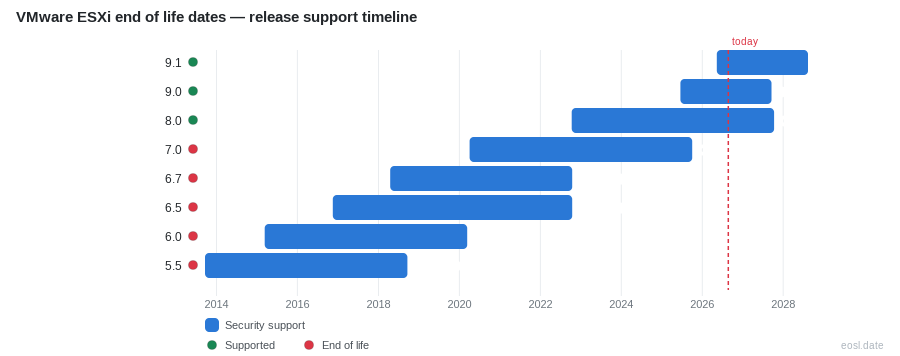
Currently Supported VMware ESXi Releases - Active EOS/EOSL Support (3)
| Release | Technical Guidance | Released | General Support | Latest |
|---|---|---|---|---|
| 9.1 | 2029-08-12 | (6 months ago) | (in 1 year and 8 months) | 9.1.1.0 (2 months ago) |
| 9.0 | 2028-09-17 | (1 year and 5 months ago) | (in 9 months) | 9.0.2.0100 (3 months ago) |
| 8.0 | 2029-10-11 | (4 years and 1 month ago) | (in 10 months) | 8.0 Update 3k (3 months ago) |
VMware ESXi End of Life (EOL) Releases - No Longer Supported (7)
| Release | Technical Guidance | Released | General Support | Latest |
|---|---|---|---|---|
| 7.0 | 2027-04-02 | (6 years and 7 months ago) | (1 year and 1 month ago) | 7.0 Update 3w (1 year and 4 months ago) |
| 6.7 | 2023-11-15 | (8 years and 7 months ago) | (4 years and 1 month ago) | 6.7 Update 3w (2 years ago) |
| 6.5 | 2023-11-15 | (10 years ago) | (4 years and 1 month ago) | 6.5 ESXi650-202403001 (2 years and 8 months ago) |
| 6.0 | 2022-03-12 | (11 years and 8 months ago) | (6 years and 8 months ago) | 6.0 EP 25 (6 years and 9 months ago) |
| 5.5 | 2020-09-19 | (13 years and 2 months ago) | (8 years and 2 months ago) | 5.5 Update 3k (8 years and 2 months ago) |
| 5.1 | 2018-08-24 | (14 years and 2 months ago) | (10 years and 2 months ago) | 5.1 Update 3d (10 years and 5 months ago) |
| 5.0 | 2018-08-24 | (15 years and 4 months ago) | (10 years and 2 months ago) | 5.0 Update 3g (10 years and 5 months ago) |
Checking VMware ESXi end of life tells you which release of the bare-metal hypervisor still receives fixes on your physical server. ESXi 7.x reached end of general support on October 2, 2025, so every vSphere 7 host now adds security risks for IT teams and customers, and Broadcom ties each release to a fixed schedule. Read the VMware end of life dates below, learn what each phase offers, and plan an upgrade before your virtual machines are exposed.
What VMware ESXi End of Life Means for a Host
ESXi is a type 1 hypervisor that runs straight on hardware and splits the CPU, memory, storage and networking of the host into virtual machines. Once a version passes its end of support date, VMware stops shipping security patches and fixes for it, so new vulnerabilities stay open on that operating system layer and on the whole network around it. Server virtualization concentrates risk here: an end-of-life ESXi release in your environment exposes more than an old guest application, and unlike a patched software package it cannot be fixed with a vendor update.
ESXi Support Lifecycle Policy: General Support and Technical Guidance
Every vSphere release falls under VMware's Enterprise Infrastructure Support Lifecycle Policy. It gives each major release 7 years of support counted from general availability, split into two support phases.
General Support phase
General support lasts 5 years. You get maintenance updates, bug fixes, security patches, technical support and new hardware support through the VMware Compatibility Guide. Each major release also gets at least three update releases, and patch releases for critical flaws arrive on top of them; neither extends the lifecycle.
Technical Guidance phase
Technical guidance covers the final 2 years. You can still open a support request for low-severity issues on supported configurations, but there are no new fixes, guest OS updates or hardware support, and you rely on the self-help portal. It suits stable environments only, and the version reaches its end of service life when this phase closes.
ESXi 7.x End of Life and vSphere 7 Dates
The end of general support for vSphere 7.0 was October 2, 2025, after Broadcom extended the original April 2025 date by six months. That covers ESXi 7.0, vCenter Server 7.x and vSAN 7.x. Customers can no longer engage Broadcom Support for these releases, though earlier service packs remain available through self-service support under the maintenance policy for the rest of the agreed term. The end of technical guidance for valid VMware contracts is April 2, 2027, and it does not apply to Broadcom contracts. Move every ESXi 7.0 installation to 8.0 or later; upgrade best practices start with updating vCenter first.
ESXi 6.5 and 6.7 End of Life and Extended Support
Both ESXi 6.5 and ESXi 6.7 left general support on October 15, 2022, and their technical guidance ended November 15, 2023. VMware sold two years of extended support for a fee, which had to be bought before general support ended; it limited security patches to one roll-up per year, with no performance improvements or third-party package updates. ESXi 6.0 ended even earlier, on March 12, 2020, so none of these versions should remain in production. Horizon desktops and any vSphere hypervisor 6 hosts under them need the same plan.
VMware EOSL Dates by Version
This VMware ESXi EOL table lists each major release with its general availability date.
| Version | General availability | End of general support | End of technical guidance |
|---|---|---|---|
| vSphere 8 / ESXi 8.0 | October 11, 2022 | October 11, 2027 | October 11, 2029 |
| vSphere 7 / ESXi 7.0 | April 2, 2020 | October 2, 2025 | April 2, 2027 |
| vCenter Server 7.x, vSAN 7.x | April 2, 2020 | October 2, 2025 | April 2, 2027 |
| vSphere ESXi 6.7 and 6.5 | 2018, 2016 | October 15, 2022 | November 15, 2023 |
| Horizon 8 server | n/a | EOSL August 11, 2027 | n/a |
Find Outdated ESXi Installations Before Support Ends
An accurate inventory of every ESXi installation shows which versions have passed their EOL date and which are still supported. An audit report from a discovery tool lists each host's version against the dates above, so you can see how long the remaining installations stay covered and which ones need an upgrade first. Set a budget for the outdated hosts and confirm hardware compatibility before the upgrade.