Craft CMS End of Life (EOL) Dates and End of Support (EOS) Dates
Craft CMS end of life (EOL) and end of support (EOS) dates: 3 Craft CMS versions have reached EOL, including Craft CMS 4 (EOL date: Apr 30, 2026) — no longer receiving security updates or patches. Craft CMS 5.12.2 is the current supported release, with support through Dec 31, 2031. Also see Backdrop EOSL information for related end-of-life information.
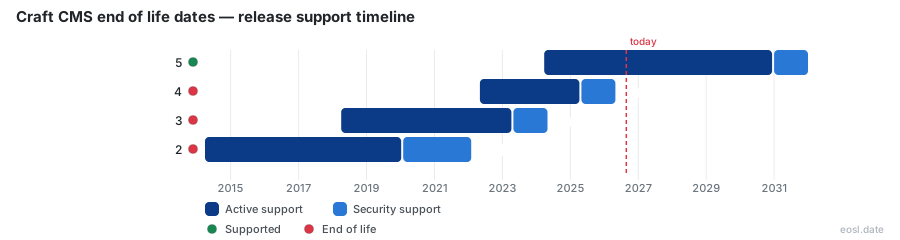
Currently Supported Craft CMS Releases - Active EOS/EOSL Support (1)
| Release | Released | Security Support | Active Support | Latest |
|---|---|---|---|---|
| 5 | (2 years and 7 months ago) | (in 5 years and 1 month) | (in 4 years and 1 month) | 5.12.2 (2 days ago) |
Craft CMS End of Life (EOL) Releases - No Longer Supported (3)
| Release | Released | Security Support | Active Support | Latest |
|---|---|---|---|---|
| 4 | (4 years and 6 months ago) | (6 months ago) | (1 year and 6 months ago) | 4.18.9 (2 months ago) |
| 3 | (8 years and 7 months ago) | (2 years and 6 months ago) | (3 years and 6 months ago) | 3.9.15 (1 year and 7 months ago) |
| 2 | (12 years and 7 months ago) | (4 years and 9 months ago) | (6 years and 9 months ago) | 2.9.2 (6 years and 8 months ago) |
Looking up Craft CMS end of life dates usually means one question: does your site still get fixes? This guide lists every cutoff, explains what an unsupported install risks, and shows how to move before the next deadline.
Craft CMS End of Life Dates by Version
Pixel & Tonic, the team behind this content management system, records every end-of-life cutoff in its knowledge base, and each change appears in the changelog and release notes. Every major line follows the same pattern, so you can read the table below at a glance.
| Line | Released | Active support ends | Security support ends |
|---|---|---|---|
| 2.x | 1 Apr 2014 | 31 Jan 2020 | 31 Jan 2022 |
| 3.x | 4 Apr 2018 | 30 Apr 2023 | 30 Apr 2024 |
| 4.x | 4 May 2022 | 30 Apr 2025 | 30 Apr 2026 |
| 5.x | 26 Mar 2024 | 31 Dec 2030 | 31 Dec 2031 |
Active Support and Security Support Windows
Each release gets two years of active development, with new features and routine maintenance. After that comes one year where only fixes for serious flaws ship.
Craft Commerce Support Dates
The store add-on, Commerce, follows its own schedule. Check its gateway plugins separately, and you can see what you run with composer show craftcms/cms.
What an Unsupported Craft CMS 4 Site Means: Security Patches and Plugins
Because Craft 4 is end of life as of 30 April 2026, a Craft CMS 4 site no longer gets security patches. Nothing breaks on the day, which is the trap: every new vulnerability found stays open, and later vulnerabilities pile up, and attackers can build exploits against a hole that will never be patched. That is a risk sitting on your website and the data it holds.
Teams in regulated industries face an extra problem: compliance rules expect maintained software. Meanwhile plugin developers move on, so plugins become abandoned, deprecated, or headed for sunset. A change in a third-party service then breaks something with no fix coming.
Security Fixes and Bug Fixes Stop
Both security fixes and bug fixes end together. Any defect you hit stays, hurting performance and the business that relies on the site.
Craft 3 and Craft 2 Long Past Support
Both older lines ended years ago, so treat them as urgent. The oldest one also depended on Yii 1, and its release for PHP 7.2 was the last notable step. Compare the figures above to see how far behind each sits.
Upgrade to Craft 5 Before Its EOL
The jump from 4 to 5 is one of the smoother ones. To upgrade to Craft 5, you get the latest version with a new feature set and better compatibility. Begin with an audit of what you run, and ask a developer for a quote once you have a list.
Check Your PHP Version and Plugins
Confirm the PHP level on your server early, since it sometimes needs a word with your host. Then list every plugin and see which have a replacement.
Plan the Major Version Jump
Treat the major version move as a project: apply security updates, take a backup, test in staging, then update production before the next maintenance window.
Why Staying on Supported Versions Matters
Running supported versions means a supported release with current documentation, and the community and official channels prioritise newer installs. Staying current keeps the CMS safe and your support requests answerable.