Cloud SQL Auth Proxy End of Life (EOL) Dates and End of Support (EOS) Dates
Cloud SQL Auth Proxy 2.28.0 is the current supported release — 2 versions currently in active support. Track Cloud SQL Auth Proxy end of life dates — EOL, EOS and EOSL dates — across all 2 releases. Also see Angular end of support life for related end-of-life information.
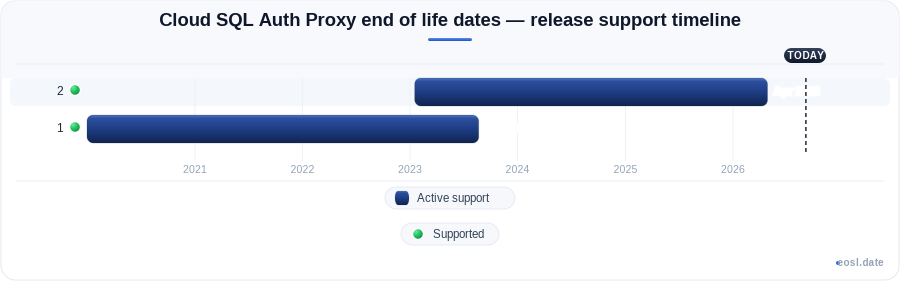
Currently Supported Cloud SQL Auth Proxy Releases - Active EOS/EOSL Support (2)
Looking for Cloud SQL Auth Proxy end of life dates? Neither major line of this Google Cloud tool has been retired, but the newer one has already left its active phase, and that changes how you should plan. This guide gives the published dates, explains the policy behind them, and shows what to change in your Cloud SQL setup so an aging build never leaves you without timely fixes.
How This Connection Helper Secures Google Cloud Databases
The Cloud SQL Auth Proxy is a small binary that sits between your application and a managed Cloud SQL database instance. Your app talks to the proxy on localhost, and the proxy opens an encrypted path to the database, so the instance never has to face the public internet. Think of it as a connection helper, not a gateway, not a database and not an access policy in itself. Google built the Cloud SQL Auth Proxy to replace three chores at once: allowlisting client addresses, managing client certificates and handing out database passwords.
Identity-Based Access Instead of Database Passwords
Rather than an IP allowlist and a shared password, the proxy lets IAM decide who connects. It reads credentials through Application Default Credentials, so a workload runs as a service account and a developer runs as their own Google identity. IAM sits in front of the database login, so revoking a role removes someone's path to the Cloud SQL instance without touching a single database password. Teams with many services usually create one service account per application, so the audit trail shows which workload opened each database session. That principal needs the Cloud SQL Client role (roles/cloudsql.client), which carries the cloudsql.instances.connect permission, and the project must have the SQL Admin API enabled. When the proxy runs under a VM's default service account, that account also needs the matching access scope, or the credentials it picks up are rejected.
Authorization has two layers. IAM permissions decide who can reach the instance, while database users decide what they can do once inside. For MySQL and Postgres you can add automatic IAM database authentication, which maps the same identity to a database login using short OAuth 2.0 tokens that expire after an hour. SQL Server does not support that mode, so it still relies on built-in users. This split keeps authentication simple at the network edge while the database enforces its own permissions, so treat both layers as one chain of IAM and identity controls.
How the Auth Proxy Encrypts Traffic
Clients reach the proxy over an unencrypted local connection, then the proxy secures the hop to Cloud SQL with TLS 1.3 and short-lived certificates it manages itself. That is why you can skip SSL certificates and authorized networks, and why Google recommends running the proxy on the same VM or pod as your app: unencrypted traffic never leaves the host, since the proxy accepts connections only on localhost by default. Because the encrypted hop is the only part that crosses the network, encryption does not depend on your driver settings, and there are no client certificates or stored database credentials to rotate. You point it at an instance with the instance connection name, written as project:region:instance, and the proxy resolves everything else from that connection name.
Two limits matter. The Cloud SQL Auth Proxy does no connection pooling, so a busy fleet needs a connection pooler such as pgbouncer or ProxySQL. It also configures no route: if a firewall blocks the outbound call, or a VM cannot reach a private instance, the connection fails while the database stays healthy. That is also why an unsupported build matters: this component sits on your trust boundary, so it should keep receiving fixes.
Support Policy Rules for Each Release Line
The project publishes a clear support policy in its GitHub README, and the endoflife.date tracker repeats it. It follows semantic versioning, so a breaking change means a new major line. Developers rarely notice the phases until a scanner flags an old build, so the documentation is worth reading before that happens.
Major Version Lifecycle: Active Support and Maintenance
Every major line moves through two phases:
- Active support: the line receives new features plus security fixes that do not introduce a breaking change. A new major line is guaranteed at least one year here.
- Maintenance: the line receives only security and critical bug fixes, with no new capabilities.
Maintenance is not the finish line. A line in that phase still gets fixes, so the practical risk is slowly falling behind on capabilities and tooling rather than losing protection overnight.
Supported Release Windows
Individual builds age as well. The project aims for a minimum monthly release cadence: when nothing new landed, it still ships a patch refreshing dependencies. Each build is supported for one year from its date, so a supported release is simply one shipped within the past twelve months. A build you installed last spring can sit outside that window even though its major line is still maintained.
Cloud SQL Auth Proxy End of Life Dates for v1 and v2
As of 24 October 2026, endoflife.date lists two major lines, and neither has a final end date. This is what it publishes:
| Major line | First shipped | Active support ended | Maintenance | Newest build |
|---|---|---|---|---|
| v2 | 17 Jan 2023 | 28 Apr 2026 | Yes | 2.26.3 (22 Oct 2026) |
| v1 | 1 Jan 2020 | 22 Aug 2023 | Yes | 1.38.4 (8 Oct 2026) |
Read it carefully. v2 had roughly three years and three months of active support, and v1 about three and a half years. Both are in maintenance, so the date that would count as true Cloud SQL Auth Proxy end of life for a line is the day those fixes stop, and no source has announced it for either one. These numbers describe only the client-side tool: the database engine behind your Cloud SQL instance, such as MySQL 8.4 or Postgres, follows its own schedule.
Latest Version Numbers
The newest builds are 2.26.3 and 1.38.4, and both lines still ship fixes. Confirm your own build with cloud-sql-proxy --version, then compare it with the table. If your number is a year or more old, you are outside the supported window described above no matter which line you run.
Release Cadence and Install Checks
Because builds age out quickly, check what you really run before trusting any date. Work through this short list for each host, image and pipeline:
- Run the command above on the host, or inside the container image, and note the number.
- Find the matching entry on the GitHub releases page and download the newer binary for your operating system and CPU.
- Verify the checksum, and on Windows note that binaries from v2.17.1 onward carry a Google LLC signature.
- Look up your instance connection name with
gcloud sql instances describeand start the proxy with an explicit--port, which shortens startup in production.
Two README warnings deserve attention. Go 1.25.2 and 1.24.8 break certificate name checks, so build from source with another toolchain. And a Unix domain socket connection to a MySQL 8.4 instance is not supported yet.
Reading Semantic Versioning
Numbers follow the MAJOR.MINOR.FIX pattern. A jump in the first number, such as 1.x to 2.x, can change flags and configuration. The middle number adds capabilities and the last carries fixes. In 2.26.3 the major version is 2, so moving to 2.27.0 is routine, while crossing to a new major version is a project with testing.
Migrating From v1 to v2 Across the Major Version Lifecycle
v1 is still patched, yet it has been out of active support since August 2023, so moving the older Cloud SQL Proxy binary to v2 is the standard cleanup. For each workload it is a deployment change rather than a code change, because your app still dials a local port.
Using the Migration Guide
The project keeps a migration guide and still links the old v1 README for comparison. In short, v2 takes instance connection names as plain arguments, uses POSIX-style double-dash flags, and exposes automatic IAM authentication as a flag. The defaults are unchanged: with no port given, the proxy detects the engine and listens on 3306 for MySQL, 5432 for Postgres or 1433 for SQL Server.
./cloud-sql-proxy --port 5432 acme-orders:europe-west1:billing-pgTest the new build in staging against a copy of your Cloud SQL database first, keep your IAM roles as they are, then roll it out. The Cloud SQL Auth Proxy itself needs no new permissions for the move. If you still call the Cloud SQL Proxy by its v1 name in scripts, search your repositories for it.
Switching to a Cloud SQL Connector
If your app is written in Go, Java, Python or Node.js, the matching Cloud SQL connector does everything the proxy does inside your process. The Cloud SQL Go connector, the Java connector and the Python connector all follow that model, as does the Node.js library. That removes a separate process to patch, though you now update a library with each application release.
Docker and Kubernetes Deployments of the Proxy
Container images are where old builds hide. Pin the image to an explicit v2 tag, never latest, and rebuild regularly so the proxy picks up refreshed dependencies. In Kubernetes, give each application its own proxy: the README advises one instance per process, because a shared one hides which IAM principal did what. Pair every deployment with its own service account and the logs stay readable.
Sidecar Containers on GKE and Cloud Run
When you roll the newer build out, the usual pattern on GKE is a sidecar in the same pod, with the app connecting to localhost, authenticated through the pod's IAM identity. Cloud Run follows the same idea with a second container, and on Compute Engine the proxy runs as a service on the VM. Large fleets can hit SQL Admin API request quotas, in which case Google suggests adding a pooler.
Private IP and Public IP Reachability
After an upgrade, the first suspect is the network. The proxy does not build a route, so a private IP instance needs the client inside a VPC that can reach it, while a public IP instance needs outbound access, including port 3307 behind an egress firewall. Timeouts and resets usually point here.
IAM Authentication Failures
If logins fail after you switch builds and the connection is reachable but rejected, check IAM authentication next. Run the proxy as the same identity that logs in, confirm the Cloud SQL Client role is granted, and for a service account drop the .gserviceaccount.com suffix from the database username.
Security Fixes Missing From the Proxy
The support window matters because the proxy sits on the trust boundary between your code and your data. It is not a complete network security design, and it shifts risk from perimeter exposure to identity and endpoint hygiene. A build outside support gets no vulnerability patches, so a flaw found next month stays in your environment until you upgrade, and the Cloud SQL database behind it is only as safe as the weakest host holding a service account key.
Governance teams usually map the proxy to access control, audit log management and network infrastructure controls, such as CIS Controls 6, 8 and 12. Log who opens proxy sessions, keep permissions to the Cloud SQL Client role, and record which builds run where. That inventory is what makes a support change a quick ticket instead of a scramble.
Critical Bug Fixes Versus New Features
Staying in the supported window buys both fix types, while only active lines add capabilities. Close your planning with these steps:
- List every proxy host, container image and CI job, with its build number and the Cloud SQL instance it reaches.
- Move anything on v1 to v2, or to a connector library where it fits.
- Pin builds and schedule a monthly refresh.
- Recheck the dates table each quarter.