cert-manager End of Life (EOL) Dates and End of Support (EOS) Dates
cert-manager end of life (EOL) and end of support (EOS) dates: 10 cert-manager versions have reached EOL, including cert-manager 1.19 (EOL date: Jul 08, 2026) — no longer receiving security updates or patches. cert-manager 1.21.3 is the current supported release — 2 versions in active support. Also see Argo CD end of support dates for related end-of-life information.
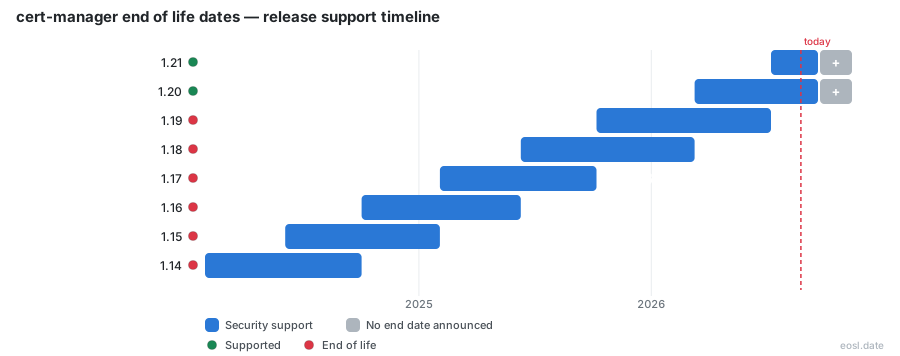
Currently Supported cert-manager Releases - Active EOS/EOSL Support (2)
cert-manager End of Life (EOL) Releases - No Longer Supported (10)
| Release | Released | Support | Latest | LTS |
|---|---|---|---|---|
| 1.19 | (1 year and 1 month ago) | (4 months ago) | 1.19.6 (4 months ago) | - |
| 1.18 | (1 year and 5 months ago) | (8 months ago) | 1.18.6 (8 months ago) | - |
| 1.17 | (1 year and 9 months ago) | (1 year and 1 month ago) | 1.17.4 (1 year and 4 months ago) | - |
| 1.16 | (2 years and 1 month ago) | (1 year and 5 months ago) | 1.16.5 (1 year and 6 months ago) | - |
| 1.15 | (2 years and 5 months ago) | (1 year and 9 months ago) | 1.15.5 (1 year and 10 months ago) | - |
| 1.14 | (2 years and 9 months ago) | (2 years and 1 month ago) | 1.14.7 (2 years and 5 months ago) | - |
| 1.13 | (3 years and 2 months ago) | (2 years and 5 months ago) | 1.13.6 (2 years and 6 months ago) | - |
| 1.12 (LTS) | (3 years and 6 months ago) | (1 year and 6 months ago) | 1.12.17 (1 year and 6 months ago) | LTS |
| 1.11 | (3 years and 10 months ago) | (3 years and 2 months ago) | 1.11.5 (3 years and 2 months ago) | - |
| 1.10 | (4 years and 1 month ago) | (3 years and 6 months ago) | 1.10.2 (3 years and 10 months ago) | - |
Planning around cert-manager end of life starts with one question: does the version in your cluster still get fixes? This guide shows which releases are supported today, the rule that retires each one, and what to do before your Kubernetes certificate controller falls out of support.
cert-manager End of Life: Support Status at a Glance
As of 26 October 2026, versions 1.21 and 1.20 are the only two supported versions of this open-source, cloud-native Kubernetes certificate controller, which sits in the CNCF landscape. Anything from 1.19 down no longer receives updates. A version stays supported until the project publishes the second subsequent version, so each line lives for roughly eight months. Check yours first, then read on for the exact dates.
Currently Supported Releases and Upcoming Releases
The table below lists the supported releases, the next planned one, and when each stops receiving fixes. Dates in the future are not firm commitments.
| Version | Status | Release date | Support ends when | Kubernetes / OpenShift |
|---|---|---|---|---|
| 1.22 | Upcoming | ~Nov 2026 | 1.24 ships | TBD |
| 1.21 | Supported | 8 Jul 2026 | 1.23 ships | 1.33 to 1.36 / OpenShift 4.20 to 4.22 |
| 1.20 | Supported | 10 Mar 2026 | 1.22 ships | 1.32 to 1.35 / OpenShift 4.19 to 4.21 |
Release Dates and Upcoming Releases
Each release date is a target, not a promise: holidays, conferences and maintainer availability move it. Watch the GitHub release page for the latest patch, which today is 1.21.3 on the newest line and 1.20.4 on the older one.
The cert-manager Support Policy
The support policy is simple: only the last patch release of each branch is covered, and every supported branch gets the same two kinds of help. The upstream project will not backport features, so staying current on patches matters.
Technical Support Explained
Technical support means contributors answer questions and triage reports from the community for versions still inside the window. Once a version is retired, reports against it are closed with advice to move to a supported line.
Security Fixes and Bug Fixes
Fixes are back-ported to a release branch in order of severity:
- Security issues and CVEs always qualify.
- Critical bugs that break issuance or renewal are next.
- Long-standing bugs and breaking changes are judged case by case.
- Other back-ports are rare and need a strong justification.
Support Window and the N+2 Rule
The support window follows an N+2 pattern: a version is supported until the second following version appears, which means there are always at least a pair of maintained versions. Because the project follows semantic versioning (semver), each minor release can carry breaking changes, so skipping several lines in one jump is riskier than moving one at a time.
Regular Releases Every Four Months
The maintainers aim to ship regular releases every 4 months, plus alpha releases that are stable enough to try early. Eight months of coverage therefore gives you two cycles to schedule an upgrade.
Supported Kubernetes Versions Across cert-manager Releases
Each line declares a range of compatible Kubernetes releases, and the range moves forward with every minor release. Running a cluster older than the range is the most common reason the move stalls, so confirm the pairing before you plan anything else.
Supported Versions vs Tested Versions
A Kubernetes release marked as tested gets regular end-to-end tests, run on Kind clusters, the kind of lightweight setup CI pipelines favor. One that is only supported still receives fixes for reports, but without automated runs. The tested Kubernetes versions are therefore the safer pairing for production.
OpenShift Compatibility
Every release also maps to OpenShift minor versions, shown in the table above. If you run OpenShift, check that mapping first, because OpenShift moves on its own schedule and its releases can leave the supported range sooner than plain Kubernetes ones do.
Long Term Support Releases Beyond the Release Cycle
The open-source maintainers publish no long term support release. Some vendors do, commercially, which can extend a version past its normal retirement.
The 1.12 and 1.17 LTS Lines
Version 1.12 carried an LTS label and its coverage ended on 19 May 2025. Palo Alto Networks lists a 1.17 LTS with support until 3 February 2027. Treat any such release as a vendor contract, not an upstream guarantee, and ask the vendor about its security fixes and Go toolchain updates.
Unsupported Versions That Already Reached EOL
These releases are unsupported: no updates and no further releases will follow.
| Version | Released | Support ended |
|---|---|---|
| 1.19 | 7 Oct 2025 | 8 Jul 2026 |
| 1.18 | 10 Jun 2025 | 10 Mar 2026 |
| 1.17 | 3 Feb 2025 | 7 Oct 2025 |
| 1.16 | 3 Oct 2024 | 10 Jun 2025 |
Any cluster still on one of these should treat EOL as already passed and move to 1.20 or 1.21 now.
Ingress-nginx Retirement and the cert-manager Lifecycle
The retirement of ingress-nginx in March 2026 pushes ingress users toward new TLS patterns, and that migration only works on a supported release, so it belongs in your lifecycle planning. Today most teams run a shared ingress controller where each team's annotation triggers a certificate per hostname; Gateway resources move that TLS configuration to a platform-owned object.
Gateway API and XListenerSet Support
Today the controller handles the Gateway API only when the Gateway itself carries the issuer annotation and an HTTPS listener that terminates TLS. Point that reference at a ClusterIssuer so every team shares one signer. Because the Gateway API puts TLS in platform-owned hands, certificates for each team now need a platform request, which is one more reason to stay on a release that still gets fixes. Experimental XListenerSet support, announced for version 1.20, aims to restore per-team control on a shared Gateway, so a retired version can never use it.
Migration Timeline
Plan the move from the deprecated Ingress path to the Gateway API alongside your upgrade, not after it. Check the roadmap in the project announcement and validate in a staging namespace before touching production.
Plan an Upgrade Before the Release of the Next Version
Start moving when the next minor appears, not when your version retires; an unplanned outage on renewal day is the price of waiting. Follow the upgrade instructions and read the release notes for removed Helm chart values first. Moving one line at a time keeps rollbacks simple.
Check Your Version with cmctl
This CLI is installed separately; run cmctl version to print the client and server version, then compare it with the table above.
Patch Releases and Security Vulnerabilities
Each patch release folds in Go and library dependencies updates that close vulnerabilities; Go 1.26.9 and 1.26.10 close CVEs in the TLS, HTTP and x509 packages, for example. Version 1.21.3 also fixes an ACME renewal loop. When the CA rate limit was hit, the controller repeated issuance. The fix tracks the ACME renewal information, so it no longer re-requests a certificate needlessly. All users should upgrade to the newest patch on their line.
Why End-of-Life Versions Put Your Certificates at Risk
Automation only helps while the software behind it is maintained. Once a line is retired, new problems stay open, and your renewal path depends on a controller nobody fixes. Certificates keep expiring on schedule, and security teams will ask why the issuing component is out of support. ACME clients are the sharpest example: a renewal bug in an ACME flow repeats until the CA throttles you, and fixes for it ship only on supported lines.
Expired TLS Certificates and Outages
Renewal is the job that support protects. cert-manager treats each certificate as a native resource, with Issuers and a ClusterIssuer defining who signs it, and watches expiration so it renews before a certificate can expire, writing the signed result into Kubernetes secrets, which prevents outages. Fixes to any of the issuers below arrive only on supported lines:
- Let's Encrypt over the ACME protocol, the most popular choice.
- Commercial ACME servers that issue certificates for internal domains.
- HashiCorp Vault for a private PKI.
- Any ACME-compatible certificate authority.
- Self-signed issuers for internal use.
A failure to renew means your workload serves an expired X.509 certificate, and clients refuse the TLS handshake. Running an unpatched retired version leaves that gap open, which undercuts machine identity, zero trust and compliance goals for DevSecOps teams.
Compromised Root Certificates
Security patches matter beyond bug fixes. Version 1.21.3 removes trust in the compromised eMudhra CA by dropping its root certificate from the distroless base images, and the updated Go toolchain rejects chains through it. A retired version never receives that change, and rotation of private keys and Kubernetes secrets stays your job. Review SSL expiry alerts across every namespace, and keep each cluster current.