Amazon RDS for MySQL End of Life (EOL) Dates and End of Support (EOS) Dates
Amazon RDS for MySQL end of life (EOL) and end of support (EOS) dates: 10 Amazon RDS for MySQL versions have reached EOL, including Amazon RDS for MySQL 8.0.46 (EOL date: Jul 31, 2026) — no longer receiving security updates or patches. Amazon RDS for MySQL 9.7.4 is the current supported release, with support through Jul 31, 2031 — 9 versions in active support. Also see Amazon CDK EOSL dates for related end-of-life information.
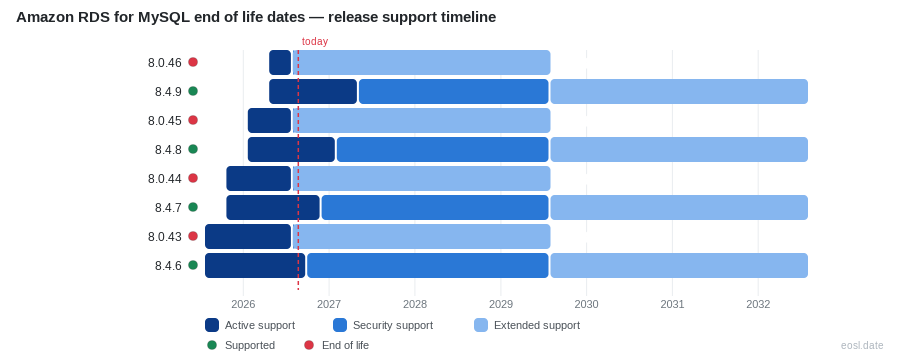
Currently Supported Amazon RDS for MySQL Releases - Active EOS/EOSL Support (9)
| Release | Released | Security Support | Minor Standard Support | Extended Support | Latest |
|---|---|---|---|---|---|
| 9.7 | (6 days ago) | (in 4 years and 8 months) | (in 4 years and 8 months) | (in 7 years and 8 months) | 9.7.4 (6 days ago) |
| 8.4.9 | (7 months ago) | (in 2 years and 8 months) | (in 5 months) | (in 5 years and 8 months) | 8.4.9 (6 months ago) |
| 8.4.8 | (10 months ago) | (in 2 years and 8 months) | (in 2 months) | (in 5 years and 8 months) | 8.4.8 (9 months ago) |
| 8.4.7 | (1 year and 1 month ago) | (in 2 years and 8 months) | (in 6 days) | (in 5 years and 8 months) | 8.4.7 (1 year ago) |
| 8.4.6 | (1 year and 4 months ago) | (in 2 years and 8 months) | (1 month and 3 weeks ago) | (in 5 years and 8 months) | 8.4.6 (1 year and 3 months ago) |
| 8.4.5 | (1 year and 7 months ago) | (in 2 years and 8 months) | (1 month and 3 weeks ago) | (in 5 years and 8 months) | 8.4.5 (1 year and 6 months ago) |
| 8.4.4 | (1 year and 10 months ago) | (in 2 years and 8 months) | (5 months ago) | (in 5 years and 8 months) | 8.4.4 (1 year and 9 months ago) |
| 8.4 | (2 years ago) | (in 2 years and 8 months) | (in 2 years and 8 months) | (in 5 years and 8 months) | 8.4.13 (1 week ago) |
| 8.4.3 | (2 years and 1 month ago) | (in 2 years and 8 months) | (5 months ago) | (in 5 years and 8 months) | 8.4.3 (2 years ago) |
Amazon RDS for MySQL End of Life (EOL) Releases - No Longer Supported (10)
| Release | Released | Security Support | Minor Standard Support | Extended Support | Latest |
|---|---|---|---|---|---|
| 8.0.46 | (7 months ago) | (3 months ago) | (3 months ago) | (in 2 years and 8 months) | 8.0.46 (4 months ago) |
| 8.0.45 | (10 months ago) | (3 months ago) | (3 months ago) | (in 2 years and 8 months) | 8.0.45 (9 months ago) |
| 8.0.44 | (1 year and 1 month ago) | (3 months ago) | (3 months ago) | (in 2 years and 8 months) | 8.0.44 (1 year ago) |
| 8.0.43 | (1 year and 4 months ago) | (3 months ago) | (3 months ago) | (in 2 years and 8 months) | 8.0.43 (1 year and 3 months ago) |
| 8.0.42 | (1 year and 7 months ago) | (3 months ago) | (3 months ago) | (in 2 years and 8 months) | 8.0.42 (1 year and 6 months ago) |
| 8.0.41 | (1 year and 10 months ago) | (3 months ago) | (5 months ago) | (in 2 years and 8 months) | 8.0.41 (1 year and 9 months ago) |
| 8.0.40 | (2 years and 1 month ago) | (3 months ago) | (5 months ago) | (in 2 years and 8 months) | 8.0.40 (2 years ago) |
| 8.0 | (8 years and 1 month ago) | (3 months ago) | (3 months ago) | (in 2 years and 8 months) | 8.0.46 (4 months ago) |
| 5.7 | (10 years and 9 months ago) | (2 years and 8 months ago) | (2 years and 8 months ago) | (in 2 years and 7 months) | 5.7.44 (1 year and 8 months ago) |
| 5.6 | (13 years and 4 months ago) | (4 years and 8 months ago) | (4 years and 8 months ago) | — | 5.6 (13 years and 4 months ago) |
Your Amazon RDS for MySQL end of life date depends on the release you run: MySQL 5.7 left standard support on February 29, 2024, and MySQL 8.0 followed on July 31, 2026. Both dates have passed, so any instance still on those releases is now billed for Extended Support until you upgrade. This guide lists each date, the Extended Support cost, and the upgrade options that move your databases onto a supported release.
Amazon RDS for MySQL End of Life Timeline by Major Version
Each major version follows its own end of life timeline. The MySQL community, run by Oracle, stops shipping bug fixes and security patches first. Amazon RDS then keeps the major version in standard support for a few more months before Extended Support starts. The table below shows these dates for the three major versions you are most likely to meet on AWS.
| Major version | Community end of life | RDS standard-support cutoff | Extended Support starts | RDS end of Extended Support |
|---|---|---|---|---|
| MySQL 5.7 | October 31, 2023 | February 29, 2024 | March 1, 2024 | June 30, 2029 |
| MySQL 8.0 | April 30, 2026 | July 31, 2026 | August 1, 2026 | July 31, 2029 |
| MySQL 8.4 | April 30, 2029 | July 31, 2029 | August 1, 2029 | July 31, 2032 |
MySQL 8.4 is the current long-term support release, and Amazon RDS added it on November 21, 2024. That gives it the longest runway of the three, so it is the version most teams target when they plan a move.
End of Standard Support Dates for MySQL Versions
On the end of standard support date, Amazon RDS stops treating a major version as a fully supported engine, but its minor releases run on a separate clock. The RDS for MySQL 8.0 end of standard support arrived on July 31, 2026, yet some 8.0 minors, such as 8.0.41, had already lost standard support on May 31, 2026. A database can therefore be out of date before the major version deadline, so always check the exact build you run.
Minor Version Support Dates
Amazon RDS publishes each new minor release within 30 days of the community release, and every minor stays supported for roughly a year. Minor versions never qualify for Extended Support, so you must move to a newer minor, normally during your maintenance window. The AWS release calendar lists every support date; the newest 8.4 builds look like this.
| MySQL engine version | RDS release date | RDS end of standard support |
|---|---|---|
| 8.4.11 | August 21, 2026 | August 21, 2027 |
| 8.4.10 | July 7, 2026 | July 7, 2027 |
| 8.4.9 | May 8, 2026 | May 8, 2027 |
| 8.4.8 | February 3, 2026 | February 3, 2027 |
| 8.4.7 | November 13, 2025 | November 30, 2026 |
To find your own engine version and every valid upgrade path, run the AWS CLI call below. The describe-db-engine-versions output lists each target your instance can reach directly.
aws rds describe-db-engine-versions --engine mysql --engine-version YOUR_VERSION --query 'DBEngineVersions[0].ValidUpgradeTarget[*].EngineVersion'Deprecation Notice: What Happens on August 1, 2026
If AWS emailed you about retiring your database version, this is the date behind it. When standard support ends, Amazon RDS automatically enrolls every instance still on the old major version in Extended Support. Nothing is switched off and no upgrade is forced, but charges start the next day. The same thing happened to MySQL 5.7 on March 1, 2024, and in June 2026 AWS extended that coverage to June 30, 2029 for both RDS and Aurora MySQL.
A deprecated minor version is different: it can be upgraded for you inside a scheduled maintenance window, usually after a notice period of about three months. As a managed cloud service, RDS sets that window for you unless you override it. These dates apply only to MySQL; other engines, such as MariaDB and PostgreSQL, follow their own lifecycle calendars.
RDS MySQL Extended Support Costs
RDS Extended Support is a paid program, announced in September 2023, that keeps delivering critical security fixes for a major version for up to three years after standard support ends. Extended Support charges are billed per vCPU per hour on top of your normal instance price, and the per-vcpu-hour rate doubles after two years. The charge also varies by AWS Region, so confirm your Region on the RDS for MySQL pricing page. At the us-east-1 list rates of $0.10 per vCPU-hour for Year 1 and Year 2, and $0.20 for Year 3, the monthly figure is:
\[ \text{Monthly cost} = \text{billed vCPUs} \times \text{rate per vCPU-hour} \times 730 \]
Each Multi-AZ db instance is billed twice, once for the primary and once for the standby, because both carry the same instance class and vCPU count. Picture a fleet of three db.m6g.xlarge instances, each with 4 vCPUs, all deployed Multi-AZ.
| Fleet | Billed vCPUs | Year 1 and Year 2 cost | Year 3 cost |
|---|---|---|---|
| 3 Multi-AZ instances, 4 vCPUs each | 24 | $1,752 per month ($21,024 per year) | $3,504 per month ($42,048 per year) |
| Same 3 instances as Single-AZ | 12 | $876 per month ($10,512 per year) | $1,752 per month ($21,024 per year) |
RDS Extended Support for RDS for MySQL 8.0
Extended Support for 8.0 began on August 1, 2026 at the lower rate. The doubled rate begins on August 1, 2028, and coverage ends on July 31, 2029. AWS ships it as dedicated engine versions named with an RDS suffix, such as 8.0.46-RDS.20260908, released on September 23, 2026. Check the vCPU count for your instance class in the hardware specifications before estimating the cost, because Single-AZ and Multi-AZ deployments land very far apart.
RDS Extended Support for RDS for MySQL 5.7
MySQL 5.7 entered Extended Support on March 1, 2024. Its three-year window was due to close on February 28, 2027, but Amazon RDS moved the end date to June 30, 2029 without a price increase, so those customers keep paying the higher rate until then. You still receive patches for critical and high CVEs plus bug fixes for critical operational issues.
Why Extended Support Is Only a Stopgap
Treat Extended Support as a stopgap, not a plan. It adds no new features or performance improvements, the cost doubles after two years, and a rushed emergency migration at the very end is the most expensive way to leave. Compare a one-off upgrade project with years of per-vCPU charges and the project usually wins.
End of Support Risks of Staying on an Old Release
The real end of support risk is exposure, not price. After April 30, 2026, Oracle no longer fixes vulnerabilities in 8.0, so only AWS's Extended Support releases carry security patches, and only for the most severe issues. Running an unsupported database in production also raises compliance questions: many frameworks expect vendor-supported software, and an audit can flag an outdated engine even when nothing has gone wrong. Application teams add a third risk, because the longer you wait, the larger the gap your code has to cross.
Upgrade Path for the MySQL 8.0 Deprecation
The upgrade path AWS recommends away from MySQL 8.0 is MySQL 8.4, which counts as a major version upgrade. A version upgrade of that size needs testing before it touches production, so choose among three upgrade strategies by how much downtime your application can tolerate. Migration costs are real, but they end once the project is done, while Extended Support charges never stop until you move.
Key Changes in MySQL 8.4
MySQL 8.4 changes behavior in ways that can break existing clients. The mysql_native_password plugin is disabled by default, and caching_sha2_password is now the default authentication method, so confirm that your drivers support it. Legacy MASTER and SLAVE keywords give way to SOURCE and REPLICA, the list of reserved keywords has grown, and several InnoDB defaults changed; for example, innodb_adaptive_hash_index now defaults to OFF. Review any custom compatibility settings you rely on for performance.
In-Place Upgrade
An in-place upgrade changes the engine on your existing instance and keeps the same endpoint. RDS takes a pre-upgrade snapshot automatically when automated backups are on, and it upgrades both nodes of a Multi-AZ pair at once. You cannot cancel it once it starts, and you should confirm every parameter group is valid for the target version first.
Blue/Green Deployment
A blue/green deployment builds an upgraded copy in a staging environment and keeps it in sync through binary log replication. When you are ready, the switchover usually finishes in under five seconds and the old environment stays available for a quick rollback. The trade-off is paying for two environments while both run, and it requires automated backups to be enabled.
Snapshot Restore
A snapshot restore applies the upgrade while recreating the instance from a manual snapshot. The original keeps running untouched, but the restored copy gets a new endpoint and any read replica must be rebuilt. Use this approach for development and test databases rather than a production cutover.
Upgrade Prechecks and Rollback for the Deprecation Deadline
When you start a major upgrade, RDS runs mandatory upgrade prechecks before it stops the instance, so the validation causes no downtime. If a precheck finds an incompatibility, RDS cancels the upgrade, sends an event notification, and leaves your original database unchanged. The details are in the PrePatchCompatibility.log file under Logs and events. These checks inspect database objects, such as a reserved word in a stored procedure, but never your application code. Run the MySQL community upgrade checker as a second opinion. Follow this order to meet the deadline:
- Audit your AWS account for every instance on MySQL 5.7 or 8.0, and note the owner of each application.
- Restore a snapshot into a staging environment and time the upgrade there.
- Fix every item in the precheck log, then repeat the test until it passes cleanly.
- Pick an upgrade strategy and schedule the change in a low-traffic slot.
- Keep the pre-upgrade snapshot or the blue environment until the new release has run cleanly for several days.
For rollback, an in-place upgrade means restoring the pre-upgrade snapshot to a new instance, while blue/green lets you switch back to the original. Reading the MySQL on Amazon RDS versions reference after each release keeps your plan current.