Amazon EKS End of Life (EOL) Dates and End of Support (EOS) Dates
Amazon EKS end of life (EOL) and end of support (EOS) dates: 16 Amazon EKS versions have reached EOL, including Amazon EKS 1.33 (EOL date: Jul 29, 2026) — no longer receiving security updates or patches. Amazon EKS 1.34 reaches its End of Support date on Dec 02, 2026 — plan your upgrade path now. Amazon EKS 1.37-eks-4 is the current supported release, with support through Dec 01, 2027 — 2 versions in active support. Also see Amazon CDK EOSL information for related end-of-life information.
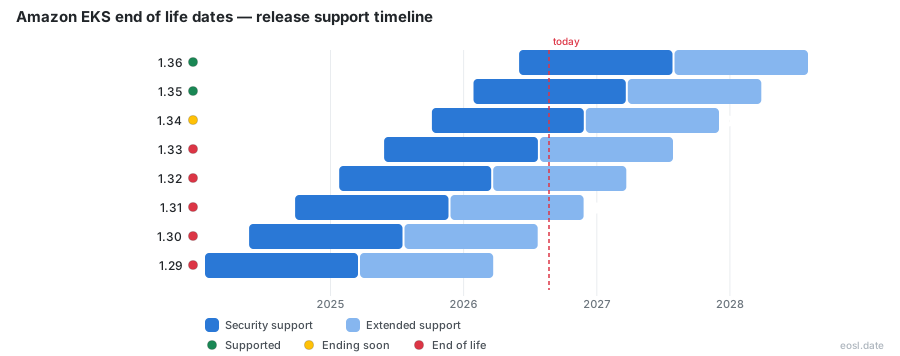
Currently Supported Amazon EKS Releases - Active EOS/EOSL Support (2)
| Release | Released | End of Support | Extended Support | Latest |
|---|---|---|---|---|
| 1.37 | (1 month and 3 weeks ago) | (in 1 year) | (in 2 years) | 1.37-eks-4 (1 month and 3 weeks ago) |
| 1.36 | (5 months ago) | (in 8 months) | (in 1 year and 8 months) | 1.36-eks-13 (2 months ago) |
Amazon EKS Releases Nearing End of Life - Support Ending Soon (2)
| Release | Released | End of Support | Extended Support | Latest |
|---|---|---|---|---|
| 1.34 | (1 year and 1 month ago) | (in 1 week and 3 days) | (in 1 year) | 1.34-eks-33 (2 months ago) |
| 1.35 | (9 months ago) | (in 4 months) | (in 1 year and 4 months) | 1.35-eks-23 (2 months ago) |
Amazon EKS End of Life (EOL) Releases - No Longer Supported (16)
| Release | Released | End of Support | Extended Support | Latest |
|---|---|---|---|---|
| 1.33 | (1 year and 5 months ago) | (3 months ago) | (in 8 months) | 1.33-eks-47 (2 months ago) |
| 1.32 | (1 year and 9 months ago) | (7 months ago) | (in 4 months) | 1.32-eks-54 (2 months ago) |
| 1.31 | (2 years and 1 month ago) | (11 months ago) | (in 4 days) | 1.31-eks-70 (2 months ago) |
| 1.30 | (2 years and 5 months ago) | (1 year and 3 months ago) | (3 months ago) | 1.30-eks-76 (3 months ago) |
| 1.29 | (2 years and 9 months ago) | (1 year and 7 months ago) | (7 months ago) | 1.29-eks-66 (8 months ago) |
| 1.28 | (3 years and 1 month ago) | (1 year and 11 months ago) | (11 months ago) | 1.28-eks-63 (1 year ago) |
| 1.27 | (3 years and 5 months ago) | (2 years and 3 months ago) | (1 year and 3 months ago) | 1.27-eks-53 (1 year and 3 months ago) |
| 1.26 | (3 years and 7 months ago) | (2 years and 5 months ago) | (1 year and 5 months ago) | 1.26-eks-51 (1 year and 5 months ago) |
| 1.25 | (3 years and 9 months ago) | (2 years and 6 months ago) | (1 year and 6 months ago) | 1.25-eks-48 (1 year and 6 months ago) |
| 1.24 | (4 years ago) | (2 years and 9 months ago) | (1 year and 9 months ago) | 1.24-eks-45 (1 year and 8 months ago) |
| 1.23 | (4 years and 3 months ago) | (3 years and 1 month ago) | (2 years and 1 month ago) | 1.23-eks-30 (2 years and 2 months ago) |
| 1.22 | (4 years and 7 months ago) | (3 years and 5 months ago) | (2 years and 2 months ago) | 1.22-eks-14 (3 years and 4 months ago) |
| 1.21 | (5 years and 4 months ago) | (3 years and 9 months ago) | (2 years and 4 months ago) | 1.21-eks-18 (3 years and 5 months ago) |
| 1.20 | (5 years and 6 months ago) | (4 years ago) | Active | 1.20-eks-14 (3 years and 6 months ago) |
| 1.19 | (5 years and 9 months ago) | (4 years and 3 months ago) | Active | 1.19-eks-11 (4 years and 3 months ago) |
| 1.18 | (6 years and 1 month ago) | (4 years and 3 months ago) | Active | 1.18-eks-13 (4 years and 3 months ago) |
Running a cluster past its expiry date costs money first and control later, so the Amazon EKS End of Life schedule is worth knowing before the calendar forces your hand. This guide shows when each Kubernetes release leaves support on this managed service, what the surcharge for staying put looks like, and how to move your workloads while Amazon still follows the upstream Kubernetes cycle for you.
Amazon EKS End of Life: Kubernetes Version Support Dates
Every Kubernetes minor version moves through two phases. Standard support covers the first 14 months after a version is released on Amazon EKS, and extended support follows for 12 more months, so a single minor version stays supported for up to 26 months. When the last month ends, the version is end-of-life and you can no longer stay on it. Your Kubernetes version therefore decides both your risk and your bill.
Upstream Kubernetes and the 14-Month Standard Support Window
The community ships a new minor version roughly every four months, and Amazon EKS tracks that upstream Kubernetes cadence. Each release gets 14 months of standard support, the same window the community gives minor versions, and receives patches throughout.
Extended Support Adds Another 12 Months
Under Amazon EKS extended support, a version keeps receiving security patches for the managed layer. Critical fixes also continue for the VPC CNI, kube-proxy and CoreDNS add-ons, plus the published AMIs for Amazon Linux and Bottlerocket. Technical support stays available in both phases, and it is offered in all regions where the service runs, including AWS GovCloud (US). It applies to Kubernetes 1.23 and higher.
Amazon EKS Release Calendar for Every Kubernetes Minor Version
The table below lists the supported Kubernetes versions alongside the date its standard phase ends and the date its extended phase ends. All dates use the UTC+0 timezone, and extended billing begins at the start of the day a version reaches end of standard support.
| Kubernetes version | Amazon EKS release | End of standard support | End of extended support |
|---|---|---|---|
| 1.37 | October 1, 2026 | December 1, 2027 | December 1, 2028 |
| 1.36 | June 2, 2026 | August 2, 2027 | August 2, 2028 |
| 1.35 | January 27, 2026 | March 27, 2027 | March 27, 2028 |
| 1.34 | October 2, 2025 | December 2, 2026 | December 2, 2027 |
| 1.33 | May 29, 2025 | July 29, 2026 | July 29, 2027 |
| 1.32 | January 23, 2025 | March 23, 2026 | March 23, 2027 |
| 1.31 | September 26, 2024 | November 26, 2025 | November 26, 2026 |
Read against today's date of October 27, 2026, version 1.37 is the latest and has the longest support window. Version 1.31 reaches the end of its extended phase on November 26, 2026, and 1.34 leaves standard support on December 2, 2026, so teams running containers on either should plan now. Not every upstream patch is published: Amazon EKS numbers its builds as a platform version (eks.1, eks.2 and so on) within each minor release, and those revisions never introduce breaking changes.
EOL Release Notes to Read Before You Upgrade
Every hop from an expiring version toward a supported one crosses the changes in the release notes, so read them for each version you pass. Kubernetes 1.37, for example, enables SELinux mount labeling by default, which can strand a pod when two pods share a volume with different labels. Before any hop, scan for these items:
- Deprecated APIs your manifests still call, and any API removals in the target version
- Breaking changes in the add-ons you manage yourself
- Worker nodes whose version trails the cluster, since a node can lag the cluster by at most two minor versions
- Helm charts that pin an old API group
Extended Support Pricing: $0.60 per Cluster per Hour
Your charge depends on the Kubernetes version of the cluster, not on how busy it is. The fee covers the managed control plane only; you still pay separately for EC2 instances, Fargate pods, EBS volumes or Outposts capacity.
| Support type | Duration | Price per cluster per hour |
|---|---|---|
| Standard | 14 months | $0.10 |
| Extended | 12 months | $0.60 |
Hourly Rates Compared
The extended rate of $0.60 is six times the $0.10 standard rate, a 500% surcharge on the control plane cost. Averaged over time, a cluster that spends 14 months in standard support and then 4 months in extended support costs about $0.21 per hour across those 18 months. Billing returns to the lower rate once the cluster moves to a version in standard support, so finance can treat the extra charge as a budget line that ends the day you upgrade.
Fleet Cost Example: Seven Clusters for 150 Days
Suppose a fleet of seven clusters lingers 150 days, or 3,600 hours, in extended support. Standard rates would have totalled $2,520; extended rates total $15,120. The difference is $12,600 of pure overhead for a delay, and no new cloud capability.
EOL Behavior: Control Plane Auto-Upgrade and Version Rollback
Clusters are enrolled in extended support by default, so an unplanned slip into the paid phase is easy to miss. Amazon posts upgrade notices to your Personal Health Dashboard at least 60 days before a date, which gives you time to react.
Auto-Upgrade When the Window Closes
If you do not update before extended support ends, the cluster is moved automatically to the oldest version still in extended support. These automatic updates can land at any time afterward, without a notice, and only the managed layer moves: add-ons and nodes stay yours to fix, with some downtime risk if they were not ready. The version also stops receiving community CVE fixes, so your security exposure grows each week you wait.
Rolling Back Within Seven Days
A cluster upgraded in place can return to the previous minor version within 7 days of the upgrade completing. To roll back onto a version in extended support, first change the upgrade policy to EXTENDED. A cluster that was upgraded automatically at the end of extended support cannot use version rollback at all.
Checking EKS EOL Dates with the AWS CLI
You do not have to read a calendar by eye. With the CLI installed, run aws eks describe-cluster-versions and it returns JSON listing each clusterVersion with its endOfStandardSupportDate, endOfExtendedSupportDate and current status. For a running cluster, eksctl get cluster --name=cluster-name shows what it is on today.
Platform Versions and Patch Releases
The cluster reports its build as an eks.n value. Moving to a new minor release hands you the current build for that release automatically, but platform versions never change the end-of-support dates, which attach to the minor version.
Upgrade Steps Before the End of Support Date
Because you can update only one minor version at a time, a cluster on 1.31 needs three hops to reach 1.34. Work backwards from the deadline:
- Audit every cluster for control plane, node and add-on versions.
- Rank clusters by Kubernetes versions and how soon their extended window closes, and set upgrade deadlines for each.
- Test each hop against your IAM roles, Helm charts and admission webhooks in a staging cluster.
- Upgrade the managed layer first, then add-ons, then nodes.
Treat these dates as a rolling commitment rather than a one-time project, and the Amazon EKS End of Life calendar becomes a planning tool instead of an emergency.