Unity End of Life (EOL) Dates and End of Support (EOS) Dates
Unity end of life (EOL) and end of support (EOS) dates: 20 Unity versions have reached EOL, including Unity 6.5 (EOL date: Aug 31, 2026) — no longer receiving security updates or patches. Unity 6000.6.7f1 is the current supported release — 4 versions in active support. Also see Chef InSpec EOSL information for related end-of-life information.
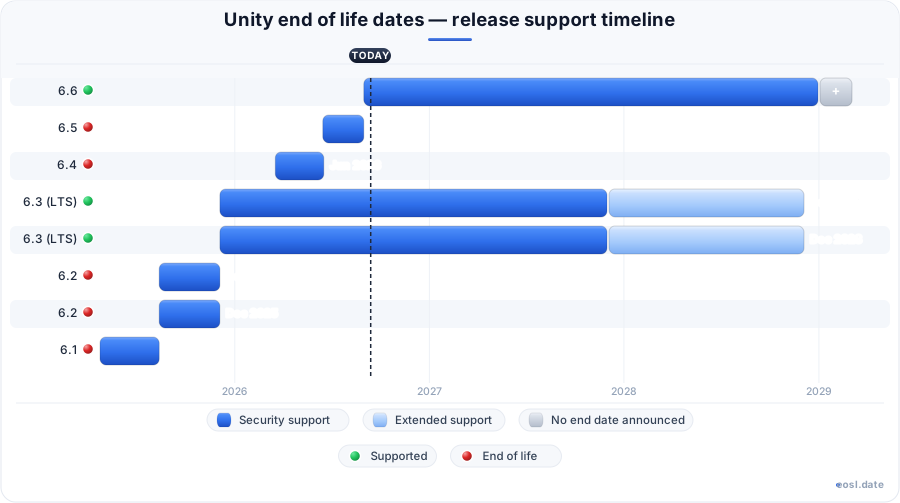
Currently Supported Unity Releases - Active EOS/EOSL Support (4)
| Release | Released | Security Support | Extended Long Term Support | Latest | LTS |
|---|---|---|---|---|---|
| 6.6 | (2 months ago) | Active | Active | 6000.6.7f1 (1 week and 6 days ago) | - |
| 6.3 (LTS) | (10 months ago) | (in 1 year and 1 month) | (in 2 years and 1 month) | 6000.3.27f2 (4 days ago) | LTS |
| 6.3 (LTS) | (10 months ago) | (in 1 year and 1 month) | (in 2 years and 1 month) | 6000.3.8f1 (8 months ago) | LTS |
| 6.0 (LTS) | (2 years and 6 months ago) | (2 weeks and 4 days ago) | (in 11 months) | 6000.0.67f1 (8 months ago) | LTS |
Unity End of Life (EOL) Releases - No Longer Supported (20)
| Release | Released | Security Support | Extended Long Term Support | Latest | LTS |
|---|---|---|---|---|---|
| 6.5 | (4 months ago) | (2 months ago) | Active | 6000.5.11f1 (2 months ago) | - |
| 6.4 | (7 months ago) | (4 months ago) | Active | 6000.4.12f1 (4 months ago) | - |
| 6.2 | (1 year and 2 months ago) | (10 months ago) | Active | 6000.2.15f1 (11 months ago) | - |
| 6.2 | (1 year and 2 months ago) | (10 months ago) | Active | 6000.2.15f1 (11 months ago) | - |
| 6.1 | (1 year and 6 months ago) | (1 year and 2 months ago) | Active | 6000.1.17f1 (1 year and 1 month ago) | - |
| 6.1 | (1 year and 6 months ago) | (1 year and 2 months ago) | Active | 6000.1.17f1 (1 year and 1 month ago) | - |
| 6.0 (LTS) | (2 years and 6 months ago) | (2 weeks and 4 days ago) | (in 11 months) | 6000.0.85f1 (2 weeks and 5 days ago) | LTS |
| 2023.2 | (2 years and 11 months ago) | (2 years and 6 months ago) | Active | 2023.2.22f1 (1 year and 1 month ago) | - |
| 2023.1 | (3 years and 4 months ago) | (2 years and 11 months ago) | Active | 2023.1.22f1 (1 year and 1 month ago) | - |
| 2022.3 (LTS) | (3 years and 5 months ago) | (1 year and 5 months ago) | Active | 2022.3.62f3 (1 year ago) | LTS |
| 2022.2 | (3 years and 10 months ago) | (3 years and 4 months ago) | Active | 2022.2.23f1 (1 year and 1 month ago) | - |
| 2022.1 | (4 years and 5 months ago) | (3 years and 10 months ago) | Active | 2022.1.25f1 (1 year and 1 month ago) | - |
| 2021.3 | (4 years and 6 months ago) | (1 year and 8 months ago) | Active | 2021.3.45f2 (1 year and 1 month ago) | - |
| 2021 (LTS) | (4 years and 6 months ago) | (1 year and 8 months ago) | Active | 2021.3.45f2 (1 year and 1 month ago) | LTS |
| 2021.2 | (5 years ago) | (4 years and 6 months ago) | Active | 2021.2.20f1 (1 year and 1 month ago) | - |
| 2021.1 | (5 years and 7 months ago) | (3 years and 11 months ago) | Active | 2021.1.29f1 (1 year and 1 month ago) | - |
| 2020 (LTS) | (6 years and 3 months ago) | (3 years and 5 months ago) | Active | 2020.3.49f1 (1 year and 1 month ago) | LTS |
| 2019 (LTS) | (7 years and 6 months ago) | (4 years and 4 months ago) | Active | 2019.4.41f2 (1 year ago) | LTS |
| 2018 (LTS) | (8 years and 6 months ago) | (5 years and 4 months ago) | Active | 2018.4.36f1 (5 years and 4 months ago) | LTS |
| 2017 (LTS) | (9 years and 4 months ago) | (6 years and 5 months ago) | Active | 2017.4.40f1 (6 years and 5 months ago) | LTS |
Planning around Unity end of life dates means knowing which editor builds still get fixes today. Unity Technologies retired Unity 6.0 LTS on 16 October 2026, so the current long-term pick is 6.3. This guide gives you the cutoff dates for every game engine build, explains how each rule works, and shows what to do when your engine falls out of support.
Unity End of Life: Which Versions Still Get Support
The table lists the editor builds you are most likely to meet, using the schedule that endoflife.date tracks. The dates are correct as of 27 October 2026, and the engine keeps the same rules for every build in the 6.x line.
| Version | Released | Security support ends | Extended LTS ends |
|---|---|---|---|
| 6.6 | 31 Aug 2026 | Still active | Not offered |
| 6.5 | 15 Jun 2026 | 31 Aug 2026 | Not offered |
| 6.4 | 18 Mar 2026 | 17 Jun 2026 | Not offered |
| 6.3 (LTS) | 4 Dec 2025 | 4 Dec 2027 | 4 Dec 2028 |
| 6.0 (LTS) | 29 Apr 2024 | 16 Oct 2026 | 16 Oct 2027 |
| 2022.3 (LTS) | 30 May 2023 | 7 May 2025 | Not offered |
| 2021.3 (LTS) | 11 Apr 2022 | 18 Feb 2025 | Not offered |
| 2020 (LTS) | 20 Jul 2020 | 5 May 2023 | Not offered |
| 2019 (LTS) | 8 Apr 2019 | 16 Jun 2022 | Not offered |
| 2018 (LTS) | 26 Apr 2018 | 17 Jun 2021 | Not offered |
Unity 6.3 LTS Is the Current Long-Term Release
Unity 6.3 LTS arrived on 4 December 2025 and stays supported until 4 December 2027, which makes it the safest LTS release to start from today. Every LTS build gets two years of regular fixes, and the long term support label is just Unity's name for that fixed schedule. Unity 6.0 LTS, released on 29 April 2024, left its standard window on 16 October 2026. The mainline stable release is now 6.6, but it follows the shorter cycle described next.
Each Update Release Retires When the Next One Ships
An update release is supported until the next release, update or LTS, is published. Unity Technologies replaced the old Tech Stream model for the engine with these builds, and they receive weekly patches, bug fixes and critical platform updates. Because each of them goes through the same quality assurance and stability testing as an LTS build, the result is production-ready code with a shorter shelf life. That is why 6.4 ended on 17 June 2026 and 6.5 on 31 August 2026.
Support Window for Unity 6 Releases
The support window for a Unity 6 build depends on its type. An LTS build runs for two years, while an update build runs until the next one ships. Official support means fixes plus platform support for new operating systems and consoles, which matters because this cross-platform game engine targets dozens of platforms. Once a build leaves its window you can keep working in it, but nothing new will be patched.
Tracking Changes with Unity Hub, Release Notes and Documentation
Unity Hub shows which Unity Editor version each project uses and flags outdated installs. The release notes for every build list fixes and known issues, the documentation hosts the user manual and an upgrade guide, and the community forums announce schedule changes early. Check the packages in your project as well, since some packages drop older editors before Unity does.
Choosing a Version for Live Service Games
Because 6.3 LTS keeps its fixes flowing through December 2027, live service teams can avoid a forced move mid-season. Developers who run live service games should lock in an LTS build, because steadiness matters more to them than new features. Teams with newer projects, or ones still early in development, can follow the update builds for faster performance work and platform additions. Either way you can move between 6.x builds with little friction, since Unity designed the upgrade path to be easy.
Long-Term Support Versus Update Releases
Long-term support suits teams that value a frozen feature set, and update builds suit teams that want new rendering and performance work in the engine sooner. Both are fully tested software; the difference is how long the fixes keep coming. Studios shipping on consoles or mobile usually pick the first, because certification cycles are long.
Extra Year for Unity Enterprise and Unity Industry
Subscribers on Unity Enterprise or Unity Industry plans receive an additional year of support on LTS builds. For the 6.0 LTS build that stretches the cutoff from October 2026 to 16 October 2027, and for 6.3 it reaches 4 December 2028. Check your licensing tier before you assume your work has lost coverage.
Alpha and Beta Builds Are Not for Production
Unity offers alpha and beta preview builds of the engine to anyone, with no signup, through the Hub. These builds carry no support commitment or cutoff date. Treat them as testing builds: early versions can be unstable, so back up a project before opening it in one and keep them away from anything you plan to ship.
EOL Versions of Unity: Older Editors That Lost Support
Every build older than 6.0 LTS has lost its standard window, and the table above shows the dates. Running one of these game engine builds is common among developers, because projects often outlive their editor, but you carry the risk yourself: no fixes, no new platform targets, and growing friction with third-party tools.
Unity 2021 LTS and Its Extended Window
Unity 2021 LTS is the best-known edge case. Officially its support ended in May 2024, after its 2022 launch, but Unity Technologies extended it until Unity 6 shipped, and the endoflife.date tracker lists 18 February 2025 for the 2021.3 line. Maintainers argued over which date counted as official support, since a published patch is not a promise.
Unity 2022 LTS and Older Cutoffs
Unity 2022 LTS reached the end of its window on 7 May 2025. Older engine lines ended earlier: Unity 2020 LTS in May 2023, Unity 2019 LTS in June 2022 and Unity 2018 LTS in June 2021. If you maintain work on any of them, treat the move as overdue rather than optional.
Old Builds Stay in the Download Archive
Unity keeps every build back to Unity 5 in the download archive, so you can still reinstall an EOL engine build to open an old project. Availability is not support, though: the archive keeps the installer, not the fixes.
What to Do After a Version Has Reached EOL
Start by writing down which build each project runs and when it left its window. A build that has reached EOL can still compile, but any newly found vulnerability stays open, and store or console rules may later reject outdated engine builds. Then pick a target: the latest LTS for the longest runway, or the newest update build for extra features.
Why Open Source Projects Drop EOL Editors
Build tooling follows the same logic. The game-ci Docker images kept running tests on the 2018.x, 2019.x and 2020.x lines long after Unity stopped patching them, so maintainers asked to retire those jobs; an open source team with limited capacity cannot cover builds for longer than Unity itself does. Developers should read that as a signal to migrate early, before the images they rely on disappear.
Why Unity Support Matters for Platforms and Security
Losing support has concrete costs: an unsupported build gets no fixes for newly found flaws and no updates when iOS, Android or console platforms change their requirements. Unity is proprietary software, and its game engine serves game development on mobile and other platforms, plus indie studios, film teams and simulation shops building 3D and 2D content. Developers in every group feel a cutoff, because Unity Technologies ties fixes to the support dates above and your licensing tier decides how long they last.
From Unity 1.0 to Annual Releases
Unity moved from annual releases (2017 through 2023) to the Unity 6 LTS-plus-update model in 2024, which is why the engine's cutoff dates now depend on build type. The engine now builds 3D and 2D games alike.