SUSE Multi-Linux Manager End of Life (EOL) Dates and End of Support (EOS) Dates
SUSE Multi-Linux Manager end of life (EOL) and end of support (EOS) dates: 10 SUSE Multi-Linux Manager versions have reached EOL, including SUSE Multi-Linux Manager 5.0 (EOL date: Jun 30, 2026) — no longer receiving security updates or patches. SUSE Multi-Linux Manager 5.2.1 is the current supported release, with support through Jul 31, 2029 — 2 versions in active support. Also see Coder end of life dates for related end-of-life information.
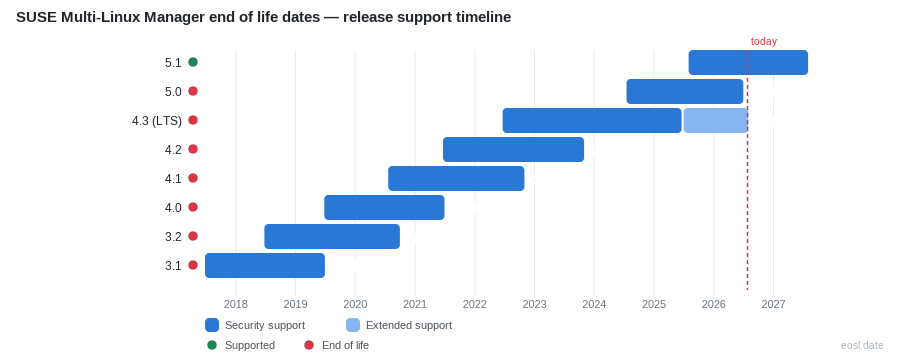
Currently Supported SUSE Multi-Linux Manager Releases - Active EOS/EOSL Support (2)
SUSE Multi-Linux Manager End of Life (EOL) Releases - No Longer Supported (10)
| Release | Released | General Support | LTS | Latest | LTS |
|---|---|---|---|---|---|
| 5.0 | (2 years and 4 months ago) | (4 months ago) | Active | 5.0.8 (6 months ago) | - |
| 4.3 (LTS) | (4 years and 5 months ago) | (1 year and 4 months ago) | (3 months ago) | 4.3.19 (4 months ago) | LTS |
| 4.2 | (5 years and 5 months ago) | (3 years ago) | Active | 4.2.14 (3 years and 2 months ago) | - |
| 4.1 | (6 years and 4 months ago) | (4 years ago) | Active | 4.1.15 (4 years and 5 months ago) | - |
| 4.0 | (7 years and 4 months ago) | (5 years and 4 months ago) | Active | 4.0.14 (5 years and 5 months ago) | - |
| 3.2 | (8 years and 4 months ago) | (6 years and 1 month ago) | Active | 3.2.15 (6 years and 3 months ago) | - |
| 3.1 | (9 years and 4 months ago) | (7 years and 4 months ago) | Active | 3.1.11 (7 years and 4 months ago) | - |
| 3.0 | (10 years and 7 months ago) | (8 years ago) | Active | 3.0.12 (8 years and 5 months ago) | - |
| 2.1 | (12 years and 5 months ago) | (9 years and 9 months ago) | Active | 2.1.19 (10 years ago) | - |
| 1.7 | (14 years and 3 months ago) | (11 years and 4 months ago) | Active | 1.7.6 (13 years and 2 months ago) | - |
Knowing the SUSE Multi-Linux Manager end of life dates tells you how long your current release keeps getting patches before you have to move. SUSE Multi-Linux Manager, formerly known as SUSE Manager, receives three years of general support per release, and the newest 5.2 release is covered until 31 Jul 2029. This guide lists each end of life date by version, explains the support lifecycle behind them, and shows what to do before support ends.
SUSE Multi-Linux Manager End of Life Dates by Version
The table below follows the published lifecycle dates for every SUSE Multi-Linux Manager release, as tracked on the endoflife.date page in August 2026 and cross-checked against SUSE's own product support lifecycle page. Always confirm the final date on the SUSE lifecycle page before you schedule a change window, because SUSE can adjust a maintenance date.
| Release | Released | General support ends | LTS ends | Latest version |
|---|---|---|---|---|
| SUSE Multi-Linux Manager 5.2 | 07 Jul 2026 | 31 Jul 2029 | Unavailable | 5.2 |
| SUSE Multi-Linux Manager 5.1 | 31 Jul 2025 | 31 Jul 2027 | Unavailable | 5.1.4 |
| SUSE Multi-Linux Manager 5.0 | 16 Jul 2024 | 30 Jun 2026 (ended) | Unavailable | 5.0.8 |
| SUSE Multi-Linux Manager 4.3 | 20 Jun 2022 | 30 Jun 2025 (ended) | 31 Jul 2026 (ended) | 4.3.19 |
| SUSE Multi-Linux Manager 4.2 | 21 Jun 2021 | 31 Oct 2023 (ended) | Unavailable | 4.2.14 |
| SUSE Multi-Linux Manager 4.1 | 21 Jul 2020 | 31 Oct 2022 (ended) | Unavailable | 4.1.15 |
Because the end of life for each release is a calendar date rather than a fixed span, the gap between release and end date is not always exactly three years. Read the date, not the rule of thumb.
When General Support Ends for the 5.x Releases
Release 5.0 reached the end of general support on 30 Jun 2026, so any server still on it no longer gets new patches. Release 5.1 keeps general support until 31 Jul 2027, which gives you roughly nine months from the August 2026 snapshot. Release 5.2 is the safest target, since general support ends 31 Jul 2029 and no LTS offering is planned for it.
Version 4.3 and Older Releases
SUSE Manager 4.3, the last release under the old name, is the one exception that received extra time. Its general support ended on 30 Jun 2025, and the additional LTS year closed on 31 Jul 2026. Anything older, from 4.2 down to 1.7, is long past its EOL and receives no fixes at all.
SUSE Multi-Linux Manager Proxy Lifecycle
The SUSE Multi-Linux Manager Proxy follows the same lifecycle as the SUSE Multi-Linux Manager Server. When you plan the end of life for a server, plan it for every proxy attached to it, because a proxy on a retired version cannot be mixed with a newer server for long.
How the Support Lifecycle Works
SUSE publishes one rule for this product: it releases a new version about every 2 years and supports each release for three years. That overlap gives you a window of roughly a year in which two versions are both supported, which is the period meant for upgrades. SUSE lists the same rule on its product lifecycle support policies page, where the Multi-Linux Manager row sits beside SUSE Linux Enterprise Server and the cloud native products.
In practice the support policy has two stages. During general support, SUSE ships bug fixes, security patches and maintenance updates. Once general support ends, the release moves past its EOL and SUSE stops shipping updates, although the software keeps running and your subscription records stay valid.
Release Cadence Every Two Years
The cadence is why upgrades are routine here. A new product release lands, the previous one keeps general support for another year or so, and the one before it expires. Staying on the latest version is the cheapest way to avoid an unplanned migration.
Uyuni and the Rolling Release Model
SUSE Multi-Linux Manager is built from the open source Uyuni project. Uyuni uses a rolling release, so bug fixes only arrive in the newest build, while the commercial product keeps fixed releases with their own end dates. Uyuni itself has no end of life dates, so only the commercial releases carry the dates in the table above.
Salt and Configuration Management Support
The product uses Salt for configuration management and infrastructure management across a mixed Linux estate. The Salt bundle shipped with each SUSE Multi-Linux Manager release is supported only until that release reaches its EOL, so a retired server leaves its Salt stack unpatched too.
Long Term Support and LTSS When Support Ends
SUSE's long term support idea for this product is deliberately thin. SUSE states that there is no additional LTS offering, because the software can be seamlessly upgraded from one release to the next. The one exception is 4.3, which stayed on critical bug fixes and security fixes for an additional year when you held an active LTS subscription.
Do not confuse that with LTSS, short for Long Term Service Pack Support. LTSS belongs to SUSE Linux Enterprise Server and related products, and it extends technical support, maintenance and security patches for up to 3 years beyond general support. The wider LTSS family has several flavours, so check which one your subscription includes.
Why LTSS Does Not Cover Newer Releases
Releases 5.0, 5.1 and 5.2 have no LTSS and no LTS. When their general support ends, the product release is simply out of support, and the only remedy is an upgrade. Treat LTSS as a property of the operating system under your server, not of the management layer on top of it.
The Version 4.3 Extra Year
Version 4.3 shows how extended support worked when it was offered. The extra year was sold as an LTS subscription and covered only critical fixes, not new features. Because that year has also ended, no SUSE Manager 4.3 server has any vendor-backed patch path left.
Product Lifecycle Policy for SUSE Linux Enterprise Server Clients
A management server is only as supportable as the machines it manages. SUSE Linux Enterprise Server, usually shortened to SLES, has its own thirteen-year product lifecycle: ten years of general support plus three years of LTSS, though newer service packs publish shorter dates. SUSE Linux Enterprise Server 15 SP7, for example, has general support to 31 Jul 2031 and LTSS to 31 Jul 2034.
| SUSE Linux Enterprise Server release | Released | General support ends | LTSS ends |
|---|---|---|---|
| SUSE Linux Enterprise Server 16.0 | 04 Nov 2025 | 30 Nov 2027 | 30 Nov 2030 |
| SUSE Linux Enterprise Server 15 SP7 | 17 Jun 2025 | 31 Jul 2031 | 31 Jul 2034 |
| SUSE Linux Enterprise Server 15 SP6 | 26 Jun 2024 | 31 Dec 2025 (ended) | 31 Dec 2028 |
| SUSE Linux Enterprise Server 15 SP5 | 20 Jun 2023 | 31 Dec 2024 (ended) | 31 Dec 2027 |
| SUSE Linux Enterprise Server 15 SP4 | 21 Jun 2022 | 31 Dec 2023 (ended) | 31 Dec 2026 |
| SUSE Linux Enterprise Server 12 SP5 | 09 Dec 2019 | 31 Oct 2024 (ended) | 31 Oct 2027 |
Read the table as a client-side deadline list. A SUSE Linux Enterprise Server 15 SP4 machine runs out of LTSS on 31 Dec 2026, so its SUSE Multi-Linux Manager registration is only as safe as that OS.
SUSE Linux Enterprise Server is also the base operating system under the management server, so the SUSE Linux Enterprise Server service pack you install on constrains your own schedule. SUSE Linux Enterprise Server for SAP Applications and SUSE Linux Enterprise High Performance Computing follow the same SUSE Linux Enterprise Server dates, and SUSE Linux Enterprise Real Time and SUSE Linux Enterprise Desktop publish their own. Customers who rely on Long Term Service Pack Support get three more years of fixes, and the SLES LTSS term is the last stage of the whole life cycle of a service pack. Since LTSS is sold per machine, count your SLES LTSS entitlements before the general support date passes. Long Term Service Pack Support is also what keeps an ageing SUSE Linux Enterprise Server host patched while you plan its replacement, and every LTSS renewal should be matched to a migration date. Enterprise Linux estates in the public cloud follow the same logic, because a SUSE Linux Enterprise Server image is refreshed only while its product is supported.
| SUSE Linux Enterprise product | Published lifecycle length |
|---|---|
| SUSE Linux Enterprise Server 12 and 15 | 13 years: SUSE Linux Enterprise general support plus LTSS |
| SUSE Linux Enterprise Server for SAP Applications | 4.5 years of general support per SUSE Linux Enterprise version |
| SUSE Linux Enterprise High Performance Computing | Same SUSE Linux Enterprise modular lifecycle as Server |
| SUSE Linux Enterprise Desktop | 10 years: 7 of SUSE Linux Enterprise general support, 3 extended |
| SUSE Linux Enterprise Real Time | Dated per SUSE Linux Enterprise service pack |
Four SUSE Linux Enterprise products affect an upgrade plan for the management layer:
- SUSE Linux Enterprise Server: the base operating system for the server and for most SUSE Linux clients.
- SUSE Linux Enterprise Server for SAP Applications: SUSE Linux Enterprise Server with SAP tooling, patched on its own SUSE schedule.
- SUSE Linux Enterprise High Performance Computing: a SUSE Linux Enterprise variant with modular packaging for cluster nodes.
- SUSE Linux Micro: the immutable SUSE Linux base used for the proxy host and edge systems in the cloud or on site.
SUSE Linux Enterprise Server Client Support
Both SUSE Linux Enterprise Server and SUSE Linux Micro can be registered as clients, whether the machine is a SUSE Linux Enterprise Server virtual machine, a bare-metal host or a cloud instance, and the support matrix in each release's documentation lists which service packs it handles. A newer SUSE Multi-Linux Manager release usually adds newer SLES service packs and drops the oldest ones, so a retired SLES service pack can block your next upgrade of the server.
Supported Operating System Clients
Beyond SUSE Linux Enterprise Server, the release notes for 4.3 list supported clients on RHEL, Rocky Linux, AlmaLinux, Ubuntu and Debian, plus support for SUSE Liberty Linux, now sold as SUSE Multi-Linux Support. Each family has its own SUSE-validated lifecycle, and the support matrix only holds while the upstream Linux distribution is still patched.
Planning an Upgrade Before the EOL Date
An upgrade is the standard answer to an approaching EOL. Start about twelve months ahead: read the release notes for the target version, confirm that every client in your fleet is still supported, and test the move on a copy of the server. Run zypper info mgradm to see which version you are on today.
Upgrade Path and Patches
Move one major release at a time, for example 4.3 to 5.0 and then on to 5.2, applying every pending patch first so the server starts the upgrade fully current. Skipping a release is not covered by the guidance in the upgrade guide.
Security Fixes and Subscription Checks
Once general support ends you lose security patches and critical bug fixes, which matters for audits, because unpatched vulnerabilities in an unsupported server are hard to justify to customers or regulators. Check that your subscription is active for the new version, since a lapsed entitlement blocks repository access and leaves a half-finished upgrade.
Linux Server Migration Checklist
- List every SUSE Multi-Linux Manager Server and proxy with its version and general support date.
- Flag every SUSE Linux Enterprise client whose LTSS runs out within a year.
- Back up the database, then run the upgrade in a maintenance window.
- Re-check that the latest patches are applied and re-register any proxy.
Before you close the checklist, match each SLES host to its SUSE Linux Enterprise Server service pack, and each SUSE Linux Enterprise Server service pack to the SUSE Multi-Linux Manager release that lists it as supported. A SUSE Linux Enterprise Server 15 SP4 host is fine on 5.1 today, but SUSE Linux Enterprise Server 15 SP7 is the SLES target SUSE recommends for new machines, and SUSE Linux Enterprise Server 16.0 is the next SUSE Linux Enterprise step.
Treat this as a rolling task: each time SUSE releases a new version, SUSE starts the clock on the one two versions back.