Samsung Galaxy Tab End of Life (EOL) Dates and End of Support (EOS) Dates
Samsung Galaxy Tab end of life (EOL) and end of support (EOS) dates: 57 Samsung Galaxy Tab versions have reached EOL, including Samsung Galaxy Tab Galaxy Tab S6 Lite (EOL date: Jun 04, 2025) — no longer receiving security updates or patches. Samsung Galaxy Tab Galaxy Tab A11+ is the current supported release, with support through Dec 30, 2031 — 25 versions in active support. Also see Intel Processors end of support life for related end-of-life information.
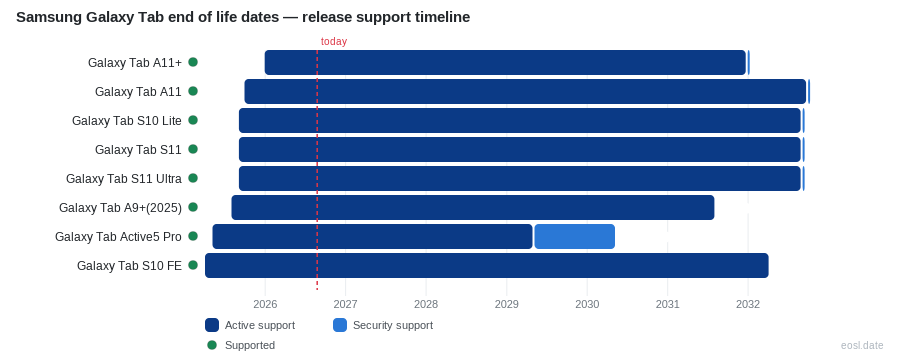
Currently Supported Samsung Galaxy Tab Releases - Active EOS/EOSL Support (25)
| Release | Released | Security Updates | Android Upgrades |
|---|---|---|---|
| Galaxy Tab A11+ | (10 months ago) | (in 5 years and 1 month) | (in 5 years and 1 month) |
| Galaxy Tab A11 | (1 year and 1 month ago) | (in 5 years and 10 months) | (in 5 years and 10 months) |
| Galaxy Tab S10 Lite | (1 year and 2 months ago) | (in 5 years and 9 months) | (in 5 years and 9 months) |
| Galaxy Tab S11 | (1 year and 2 months ago) | (in 5 years and 9 months) | (in 5 years and 9 months) |
| Galaxy Tab S11 Ultra | (1 year and 2 months ago) | (in 5 years and 9 months) | (in 5 years and 9 months) |
| Galaxy Tab A9+(2025) | (1 year and 3 months ago) | Active | (in 4 years and 8 months) |
| Galaxy Tab Active5 Pro | (1 year and 6 months ago) | (in 3 years and 5 months) | (in 2 years and 5 months) |
| Galaxy Tab S10 FE | (1 year and 7 months ago) | Active | (in 5 years and 4 months) |
| Galaxy Tab S10 FE+ | (1 year and 7 months ago) | Active | (in 5 years and 4 months) |
| Galaxy Tab S10+ | (2 years and 1 month ago) | (in 4 years and 10 months) | (in 4 years and 10 months) |
| Galaxy Tab S10 Ultra | (2 years and 1 month ago) | Active | (in 4 years and 10 months) |
| Galaxy Tab S6 Lite (2024) | (2 years and 7 months ago) | Active | (in 4 months) |
| Galaxy Tab Active5 | (2 years and 9 months ago) | (in 2 years and 2 months) | (in 1 year and 2 months) |
| Galaxy Tab A9 | (3 years ago) | (in 11 months) | (3 weeks and 4 days ago) |
| Galaxy Tab A9+ | (3 years ago) | (in 11 months) | (3 weeks and 4 days ago) |
| Galaxy Tab S9 FE | (3 years and 1 month ago) | Active | (in 10 months) |
| Galaxy Tab S9 FE+ | (3 years and 1 month ago) | (in 1 year and 10 months) | (in 10 months) |
| Galaxy Tab S9 | (3 years and 3 months ago) | (in 1 year and 8 months) | (in 8 months) |
| Galaxy Tab S9+ | (3 years and 3 months ago) | Active | (in 8 months) |
| Galaxy Tab S9 Ultra | (3 years and 3 months ago) | Active | (in 8 months) |
| Galaxy Tab A7 10.4 (2022) | (3 years and 11 months ago) | Active | (1 year and 11 months ago) |
| Galaxy Tab Active4 Pro | (4 years and 2 months ago) | (in 9 months) | (1 year and 2 months ago) |
| Galaxy Tab S8 Ultra | (4 years and 6 months ago) | (in 5 months) | (6 months ago) |
| Galaxy Tab S8+ | (4 years and 7 months ago) | Active | (7 months ago) |
| Galaxy Tab S8 | (4 years and 7 months ago) | (in 4 months) | (7 months ago) |
Samsung Galaxy Tab End of Life (EOL) Releases - No Longer Supported (57)
| Release | Released | Security Updates | Android Upgrades |
|---|---|---|---|
| Galaxy Tab S6 Lite | (4 years and 5 months ago) | (1 year and 5 months ago) | (1 year and 5 months ago) |
| Galaxy Tab A8 | (4 years and 10 months ago) | (8 months ago) | (1 year and 10 months ago) |
| Galaxy Tab S7 FE | (5 years and 5 months ago) | (1 year and 4 months ago) | (2 years and 5 months ago) |
| Galaxy Tab A7 Lite | (5 years and 5 months ago) | (1 year and 5 months ago) | (2 years and 5 months ago) |
| Galaxy Tab Active3 | (6 years and 1 month ago) | (1 year ago) | (4 years and 1 month ago) |
| Galaxy Tab A7 10.4 (2020) | (6 years and 3 months ago) | (2 years and 3 months ago) | (4 years and 3 months ago) |
| Galaxy Tab S7 | (6 years and 3 months ago) | (2 years and 3 months ago) | (3 years and 3 months ago) |
| Galaxy Tab S7+ | (6 years and 3 months ago) | (2 years and 3 months ago) | (3 years and 3 months ago) |
| Galaxy Tab S6 Lite (2020) | (6 years and 7 months ago) | (2 years and 7 months ago) | (3 years and 7 months ago) |
| Galaxy Tab A 8.4 (2020) | (6 years and 7 months ago) | (2 years and 7 months ago) | (4 years and 7 months ago) |
| Galaxy Tab S6 5G | (6 years and 9 months ago) | (2 years and 9 months ago) | (3 years and 9 months ago) |
| Galaxy Tab Active Pro | (7 years and 1 month ago) | (3 years and 1 month ago) | (4 years and 1 month ago) |
| Galaxy Tab S6 | (7 years and 3 months ago) | (3 years and 3 months ago) | (4 years and 3 months ago) |
| Galaxy Tab A 8.0 (2019) | (7 years and 4 months ago) | (3 years and 4 months ago) | — |
| Galaxy Tab A 10.1 (2019) | (7 years and 7 months ago) | — | — |
| Galaxy Tab A 8.0 with S Pen (2019) | (7 years and 7 months ago) | (3 years and 7 months ago) | — |
| Galaxy Tab S5e | (7 years and 7 months ago) | (3 years and 7 months ago) | (5 years and 7 months ago) |
| Galaxy Tab Advanced2 | (7 years and 11 months ago) | — | — |
| Galaxy Tab A 8.0 (2018) | (8 years and 2 months ago) | — | — |
| Galaxy Tab A 10.5 (2018) | (8 years and 3 months ago) | — | — |
| Galaxy Tab S4 10.5 | (8 years and 3 months ago) | — | — |
| Galaxy Tab Active2 | (9 years and 1 month ago) | — | — |
| Galaxy Tab A 8.0 (2017) | (9 years and 2 months ago) | — | — |
| Galaxy Tab S3 9.7 | (9 years and 7 months ago) | — | — |
| Galaxy Tab J | (10 years and 3 months ago) | — | — |
| Galaxy Tab A 10.1 (2016) | (10 years and 6 months ago) | — | — |
| Galaxy Tab A 7.0 (2016) | (10 years and 8 months ago) | — | — |
| Galaxy Tab E 8.0 | (10 years and 10 months ago) | — | — |
| Galaxy Tab S2 8.0 | (11 years and 2 months ago) | — | — |
| Galaxy Tab S2 9.7 | (11 years and 2 months ago) | — | — |
| Galaxy Tab A 9.7 & S Pen | (11 years and 4 months ago) | — | — |
| Galaxy Tab E 9.6 | (11 years and 4 months ago) | — | — |
| Galaxy Tab A 8.0 (2015) | (11 years and 6 months ago) | — | — |
| Galaxy Tab A 8.0 & S Pen (2015) | (11 years and 6 months ago) | — | — |
| Galaxy Tab A 9.7 | (11 years and 6 months ago) | — | — |
| Galaxy Tab 3 V | (11 years and 7 months ago) | — | — |
| Galaxy Tab 3 Lite 7.0 VE | (11 years and 8 months ago) | — | — |
| Galaxy Tab Active | (11 years and 11 months ago) | — | — |
| Galaxy Tab Active LTE | (11 years and 11 months ago) | — | — |
| Galaxy Tab S 10.5 | (12 years and 4 months ago) | — | — |
| Galaxy Tab S 10.5 LTE | (12 years and 4 months ago) | — | — |
| Galaxy Tab S 8.4 | (12 years and 4 months ago) | — | — |
| Galaxy Tab S 8.4 LTE | (12 years and 4 months ago) | — | — |
| Galaxy Tab 4 10.1 LTE | (12 years and 5 months ago) | — | — |
| Galaxy Tab 4 10.1 3G | (12 years and 5 months ago) | — | — |
| Galaxy Tab 4 10.1 | (12 years and 5 months ago) | — | — |
| Galaxy Tab 4 8.0 LTE | (12 years and 5 months ago) | — | — |
| Galaxy Tab 4 8.0 3G | (12 years and 5 months ago) | — | — |
| Galaxy Tab 4 8.0 | (12 years and 5 months ago) | — | — |
| Galaxy Tab Pro 12.2 LTE | (12 years and 6 months ago) | — | — |
| Galaxy Tab 4 7.0 LTE | (12 years and 6 months ago) | — | — |
| Galaxy Tab 4 7.0 3G | (12 years and 6 months ago) | — | — |
| Galaxy Tab 4 7.0 | (12 years and 6 months ago) | — | — |
| Galaxy Tab Pro 12.2 3G | (12 years and 7 months ago) | — | — |
| Galaxy Tab Pro 12.2 | (12 years and 8 months ago) | — | — |
| Galaxy Tab 3 Lite 7.0 | (12 years and 9 months ago) | — | — |
| Galaxy Tab 3 Lite 7.0 3G | (12 years and 9 months ago) | — | — |
Looking up the Samsung Galaxy Tab end of life schedule comes down to one question: when do your security updates stop? Samsung tablets get software updates for a fixed window. The Galaxy Tab A9 and A9+ passed their Android cutoff on 23 October 2026, while newer models such as the Galaxy Tab S10 are covered for years. Your display, Wi-Fi and LTE connection may work fine long after that date, but a tablet without support is a device Samsung has stopped protecting.
Samsung Galaxy Tab End of Life Explained
End of life means Samsung has stopped shipping new software for a device. Every model follows a life cycle: a launch version of Android, a run of Android upgrades, then a longer tail of monthly, quarterly or biannual patches. Once the final patch ships, the tablet is unsupported, although it keeps working. The first Galaxy Tab of 2010 ran TouchWiz on Android 2.2, and it reached that point long ago, as did the TouchWiz-era Tab 2, Tab 3 and Tab 4 models.
Samsung Electronics sells its lineup in three tiers, and the tier shapes how long a tablet is supported. The Galaxy Tab S is the flagship and mid-range family with an S Pen, the Galaxy Tab A is the entry-level tablet, and the Galaxy Tab Active is the rugged option. The current generation is the Samsung Galaxy Tab S12, announced in September 2026 and released that October, and its newer chip, whether Exynos, Snapdragon, MediaTek or Unisoc, sets the hardware that the support window applies to, along with the display and camera. Google builds the Android operating system, but Samsung sets the firmware and end-of-support schedule for each tablet.
Support Status by Galaxy Tab Model
The table lists the latest support status for a sample of tablets, based on the dates published by endoflife.date. Android updates end when the final major Android release arrives, and security updates end with the last patch.
| Model | Released | Android updates end | Security updates end | Support status |
|---|---|---|---|---|
| Original Galaxy Tab (TouchWiz) | 5 Nov 2010 | Unsupported | Unsupported | Unsupported |
| Galaxy Tab A8 | 17 Jan 2022 | 17 Jan 2025 | 21 Feb 2026 | Ended |
| Galaxy Tab S8 | 22 Mar 2022 | 22 Mar 2026 | 22 Mar 2027 | Patches only |
| Galaxy Tab Active4 Pro | 31 Aug 2022 | 31 Aug 2025 | 31 Aug 2027 | Patches only |
| Galaxy Tab A9+ | 23 Oct 2023 | 23 Oct 2026 | 23 Oct 2027 | Patches only |
| Galaxy Tab S9 | 11 Aug 2023 | 11 Aug 2027 | 11 Aug 2028 | Supported |
| Galaxy Tab S10+ | 3 Oct 2024 | 3 Oct 2031 | 3 Oct 2031 | Supported |
| Galaxy Tab S11 | 4 Sep 2025 | 4 Sep 2032 | 4 Sep 2032 | Supported |
The update window follows the release year and tier more than the price, even though RAM, storage, camera, display, battery and 5G or LTE options differ across the line-up. A mid-range Samsung Galaxy tablet released in 2024 can outlast a mid-range Samsung Galaxy tablet released in 2022 by years, and a Samsung Galaxy Tab S bought at launch keeps its Galaxy software longer than a Samsung Galaxy Tab A. Wikipedia's model history shows the same pattern for older tablets.
Galaxy Tabs Losing Support in 2026 and 2027
Samsung has already phased out its oldest tablets, and the discontinuation of updates is now reaching models from 2022 and 2023. Customers who bought a budget or premium tablet in those years are the ones affected.
Tab A8 and Tab A9 Budget Models
The Galaxy Tab A8 lost Android upgrades in January 2025 and its last patch in February 2026. The A9 and A9+ followed on 23 October 2026, with security patches ending on 23 October 2027. These Galaxy Tab A models were built for media consumption, streaming, e-reading and browsing, so many owners will keep using them.
Tab S8 and Tab S9 Android Updates
The Tab S8 family stopped receiving new Android updates between March and April 2026 but still gets patches into 2027. The Galaxy Tab S9 line, including the FE models, loses Android updates between August and October 2027, so it may miss Google's main release that year, although patches continue until at least 2028.
Tab S6 Lite and Tab Active4 Pro
The 2024 Tab S6 Lite loses Android updates in March 2027. The Galaxy Tab Active4 Pro, a Galaxy Tab Active model for logistics and construction crews, receives its last patch on 31 August 2027. The Galaxy Tab Active line suits field work, so check the date before renewing a fleet.
Newer Tablets With a Longer Lifespan
Samsung now promises a longer lifespan for new releases. Earlier tablets got about four years of Android upgrades and five years of patches. Apple usually offers its tablets about five years of iOS updates without a formal promise, so Samsung's plan now matches the longest commitments, and anyone buying for education can set a retirement date up front.
Tab S10 and Tab S11 Get Seven Years
The Tab S10 range, released in October 2024, is covered until October 2031, and the Tab S11 and Tab A11 families run into 2032. That is seven years of updates, compared with the five years of patches the Tab S9 receives. A Galaxy Tab S buyer today gets the most support, and a Galaxy Tab A buyer gets less for a lower price.
What to Do After Samsung Is Ending Support
Once your model's final security patch date has passed, it is at end of life, and the steps below confirm that date. The tablet keeps working, but the warranty has usually lapsed, a paid repair is the only fix for hardware faults, and the user manual covers a clean reset before you sell or recycle it.
Check Your Model Code
Open Settings, choose About tablet, and read your model code. Match it to the table above or to Samsung's support page for your Galaxy Tab A, Galaxy Tab S or Galaxy Tab Active device.
- Note the model code and the Android version.
- Look up the final patch date for your model.
- Back up your Samsung files before any reset or trade-in of the Galaxy tablet.
Security Updates Versus Android Upgrades
Android upgrades add features, while security updates close known holes, so the end of patches matters more. After that date, the security risks grow with every new exploit. Keep an unsupported tablet for offline reading or video, avoid banking apps and sensitive logins, and plan a replacement within a year.