Microsoft PowerShell End of Life (EOL) Dates and End of Support (EOS) Dates
Microsoft PowerShell end of life (EOL) and end of support (EOS) dates: 9 Microsoft PowerShell versions have reached EOL, including Microsoft PowerShell 7.5 (EOL date: Nov 10, 2026) — no longer receiving security updates or patches. Microsoft PowerShell 7.7.0 is the current supported release, with support through Nov 14, 2028 — 2 versions in active support. Also see Microsoft .NET EOSL dates for related end-of-life information.
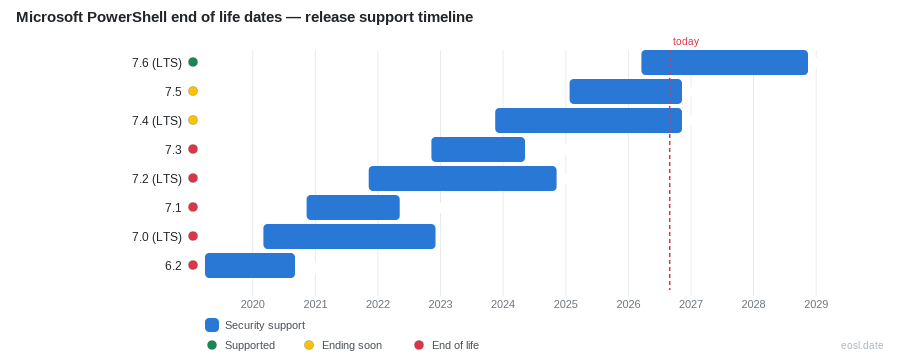
Currently Supported Microsoft PowerShell Releases - Active EOS/EOSL Support (2)
Microsoft PowerShell End of Life (EOL) Releases - No Longer Supported (9)
| Release | Dotnet Version | Released | Support Status | Latest | LTS |
|---|---|---|---|---|---|
| 7.5 | .NET 9.0 | (1 year and 9 months ago) | (1 week ago) | 7.5.13 (3 weeks and 2 days ago) | - |
| 7.4 (LTS) | .NET 8.0 | (3 years ago) | (1 week ago) | 7.4.22 (3 weeks and 2 days ago) | LTS |
| 7.3 | .NET 7.0 | (4 years ago) | (2 years and 6 months ago) | 7.3.12 (2 years and 7 months ago) | - |
| 7.2 (LTS) | .NET 6.0 | (5 years ago) | (2 years ago) | 7.2.24 (2 years ago) | LTS |
| 7.1 | .NET 5.0 | (6 years ago) | (4 years and 6 months ago) | 7.1.7 (4 years and 6 months ago) | - |
| 7.0 (LTS) | .NET Core 3.1 | (6 years and 8 months ago) | (3 years and 11 months ago) | 7.0.13 (4 years ago) | LTS |
| 6.2 | .NET Core 2.1 | (7 years and 7 months ago) | (6 years and 2 months ago) | 6.2.7 (6 years and 4 months ago) | - |
| 6.1 | .NET Core 2.1 | (8 years and 2 months ago) | (7 years and 1 month ago) | 6.1.6 (7 years and 2 months ago) | - |
| 6.0 | .NET Core 2.0 | (8 years and 9 months ago) | (7 years and 9 months ago) | 6.0.5 (8 years ago) | - |
Planning around Microsoft PowerShell end of life comes down to one date: on 10 November 2026, PowerShell 7.4 (LTS) and PowerShell 7.5 both stop receiving updates, while PowerShell 7.6 stays supported until 14 November 2028. Administrators who run automation on Windows, macOS or Linux can use the dates below to see which versions are safe, which are about to expire, and where Windows PowerShell 5.1 fits in. Microsoft builds this cross-platform command-line shell, and its cmdlets and scripts only get fixes while the version underneath them is supported, so a quick check now saves a rushed upgrade later.
PowerShell End-of-Support Dates by Version
Microsoft publishes one authoritative list of end-of-support dates, and the table below summarizes the three releases that are still supported today. The start date is the release date of each version, and the end date is the day Microsoft stops shipping fixes. Because each release is built on a specific .NET version, the .NET column explains why the dates fall where they do.
| Version | Release date | End-of-support | .NET version |
|---|---|---|---|
| PowerShell 7.6 (LTS) | 18 March 2026 | 14 November 2028 | .NET 10.0 |
| PowerShell 7.5 | 23 January 2025 | 10 November 2026 | .NET 9.0 |
| PowerShell 7.4 (LTS) | 16 November 2023 | 10 November 2026 | .NET 8.0 |
PowerShell 7.7 is the next release in the pipeline. It is available only as a preview, and Microsoft does not give preview builds an end date because they are never officially supported.
PowerShell 7.4 and 7.5 End-of-Life on 10 November 2026
Both PowerShell 7.4 and PowerShell 7.5 reach end-of-life on the same day, even though one is an LTS release and the other is a stable release. After that date they receive no further updates, and Microsoft's support page makes clear that this includes security updates for any newly discovered flaw. Any server, laptop or build agent that still runs one of them becomes an unpatched system overnight, so treat 10 November 2026 as a hard deadline and upgrade before it arrives. Teams with change-freeze windows in November should schedule the move this month.
PowerShell 7.6 LTS Support Through 2028
The long term servicing channel is the safest place to land, and PowerShell 7.6 is the latest version of the LTS line. Microsoft built it on .NET 10, and its new features over 7.4, such as better tab completion, matter less than the longer runway. If you want the longest runway, standardize on this LTS release, since its end date is roughly two years away.
Retired PowerShell 7.3, 7.2, 7.1 and 7.0 Releases
Older releases have already reached EOS, and Microsoft will not patch them again. Some of them ended quickly: the non-LTS releases lasted only about eighteen months. Others, like the earlier LTS lines, got longer lives that matched their .NET version. Because only the latest update of any release is supported, even a retired version that is fully patched is now unsupported, and so are the bug fixes and critical fixes that once came with it.
| Version | Release date | End-of-support | .NET version |
|---|---|---|---|
| PowerShell 7.3 | 9 November 2022 | 8 May 2024 | .NET 7.0 |
| PowerShell 7.2 (LTS) | 8 November 2021 | 8 November 2024 | .NET 6.0 |
| PowerShell 7.1 | 11 November 2020 | 8 May 2022 | .NET 5.0 |
| PowerShell 7.0 (LTS) | 4 March 2020 | 3 December 2022 | .NET Core 3.1 |
| PowerShell 6.2 | 29 March 2019 | 4 September 2020 | .NET Core 2.1 |
| PowerShell 6.1 | 13 September 2018 | 28 September 2019 | .NET Core 2.1 |
| PowerShell 6.0 | 20 January 2018 | 13 February 2019 | .NET Core 2.0 |
How the PowerShell Support Lifecycle Works
The PowerShell support lifecycle follows the Microsoft modern lifecycle policy, and the end dates mirror the .NET release that each PowerShell version is built on. The support lifecycle rules are short: a customer must stay current with the servicing and system requirements, be licensed to use the product, and Microsoft must still offer support for it. Only the latest update of a release counts as a supported version, so running 7.4.1 when 7.4.20 exists does not qualify. The lifecycle also ends early if the operating system or distributor drops the platform first.
Stable Release, Preview Release and Long-Term Servicing Types
Three kinds of build exist. A stable release arrives between LTS releases and carries new features along with fixes; Microsoft supports it for about six months after the next LTS release. A long-term servicing (LTS) release tracks an LTS version of .NET and only receives security patches and servicing fixes designed to minimize disruption to existing workloads. A preview release is still in development, may contain breaking changes, and should never run in production. Experimental features follow the same rule, since they get only best-effort support. Both LTS and stable builds receive security updates, so the practical difference is how long each release lasts. The PowerShell lifecycle for stable builds is short on purpose.
Lifecycle Rules Under the .NET Support Policy
Because PowerShell runs on .NET, the .NET support policy sets its end dates. When .NET 8 loses support, PowerShell 7.4 loses support with it, which is why 7.4 and 7.5 expire on the same day in November 2026. Each platform that PowerShell targets must also be supported by .NET, so a new version of Windows, macOS or Linux appears in the support matrix only after .NET supports it. In short, the .NET calendar is the best predictor of the next PowerShell deadline.
Microsoft PowerShell End of Life and Windows PowerShell 5.1
Many devices still run the shell that Windows installs by default, so the end of life for Windows PowerShell 5.1 is the question people ask most. A GitHub discussion on exactly this topic received a clear answer: Windows PowerShell is a component of the operating system, so its support follows whichever Windows version includes it. Microsoft confirms that support for Windows PowerShell 5.1 goes through Windows support channels, not through the separate PowerShell 7 lifecycle page. As long as you run a supported release of Windows 11 or Windows Server, the built-in Windows PowerShell keeps working and keeps getting servicing.
That arrangement also explains why Windows does not list 5.1 as installed software. It is pre-installed and tied to the OS, so inventory tools that scan for installed programs, including audit reports, usually miss it. The same GitHub thread speculated that Microsoft would give at least a year of notice before ending support under the modern lifecycle policy; treat that as a community opinion rather than a promise, and check Microsoft's own Windows lifecycle pages for the real dates on Windows 11 and Windows Server.
Windows PowerShell Release History
The release history of Windows PowerShell stretches back to 2006, when it succeeded an internal project code-named Monad. It started as an optional component of Windows Server 2008, and each later version arrived with a new Windows release or through the Windows Management Framework. Microsoft no longer supports any Windows PowerShell version lower than 5.1, and no new scripting features are planned for it because development moved to the open-source line.
| Version | Released | Shipped with |
|---|---|---|
| Windows PowerShell 5.1 | August 2016 | Windows 10 Anniversary Update and Windows Server 2016 |
| Windows PowerShell 5.0 | February 2016 | Windows Management Framework 5.0 |
| Windows PowerShell 4.0 | October 2013 | Windows 8.1 and Windows Server 2012 R2 |
| Windows PowerShell 3.0 | October 2012 | Windows 8 and Windows Server 2012 |
| Windows PowerShell 2.0 | July 2009 | Windows 7 and Windows Server 2008 R2 |
| Windows PowerShell 1.0 | November 2006 | Optional component of Windows Server 2008 |
How PowerShell Core Differs From the Original Shell
The lifecycle consequence is simple: 5.1 follows Windows, while every 7.x release follows .NET. In 2016 Microsoft made the shell cross-platform and moved it to GitHub under an open source license, and the new line was first called PowerShell Core. Microsoft later dropped the word Core from the name, but PowerShell Core is still the term many older guides use, and it traces back to the same Monad idea. Cmdlets such as Get-Process and Get-Service work in both editions. Windows PowerShell runs on the .NET Framework and ships inside Windows, while PowerShell 7 runs on modern .NET and installs side by side with it on Windows, macOS and Linux. Both are a command-line shell and scripting language for automation and configuration work, optimized for structured data such as JSON, CSV and XML. Administrators can run each version on the same machine, so moving to PowerShell 7 does not remove 5.1. That is useful because some older scripts rely on Windows-only modules that PowerShell 7 does not fully replace.
Supported Platforms and End-of-Life Dates for Windows, macOS and Linux
A PowerShell version is supported only on supported platforms, and Microsoft sets four conditions: .NET supports the platform, Microsoft has tested and approved it, the distributor supports the OS for at least a year, and it is not an interim release. Support for PowerShell ends when either the platform or the PowerShell version reaches end-of-life, whichever happens first. After that, you receive no further updates, including security patches. Microsoft also publishes Docker images with PowerShell for the .NET SDK, but these are meant for testing, so build and maintain your own image for production workloads.
Windows and macOS Platform Support
On Windows, Microsoft supports PowerShell until the release itself or the Windows version reaches end-of-support, so check both the Windows lifecycle and the PowerShell table above. On macOS, Apple sets the schedule. The supported versions are macOS 27 (Golden Gate) on Arm64, macOS 26 (Tahoe) and macOS 15 (Sequoia) on both x64 and Arm64. Microsoft supports PowerShell on a best-effort basis for everything else.
Linux Support: Ubuntu, Debian, RHEL and Alpine
Each Linux distribution follows the same rule: PowerShell is supported until either the release or the distribution version reaches end-of-life. The dates below come from Microsoft's own support page. Ubuntu interim releases, such as 25.10, are not tested or supported at all, and package files for Debian-based and Red Hat-based systems are also available from packages.microsoft.com.
| Distribution | Version | Support ends |
|---|---|---|
| Ubuntu | 26.04, 24.04, 22.04 | 31 May 2031, 31 May 2029, 1 June 2027 |
| Debian | 13, 12 | 30 June 2030, 30 June 2028 |
| Red Hat Enterprise Linux (RHEL) | 10, 9, 8 | 31 May 2035, 31 May 2032, 31 May 2029 |
| Alpine | 3.24, 3.23, 3.22, 3.21 | 1 June 2028, 1 November 2027, 1 May 2027, 1 November 2026 |
Alpine 3.21 is the one to watch, since it expires on 1 November 2026, nine days before the PowerShell 7.4 and 7.5 deadline.
Support Options Once a Release Hits EOL
Once a version reaches EOL, the support options shrink. PowerShell is released under the MIT license, so without a paid agreement you are limited to community support, where Microsoft makes no guarantees about responsiveness or fixes. The most active community channels are Discord and Slack, which mirror each other, and you can file bugs on GitHub, although the team does not provide support there. Businesses can buy paid support through standard Microsoft channels, and Microsoft routes Windows PowerShell requests through its Windows support teams, but that covers supported versions only; it will not revive a retired release. Microsoft adds that support is given on a best-effort basis, so plan upgrades rather than relying on a ticket. A latest update of a supported release is the only version covered. Bug reports and feedback on GitHub are welcome, but they do not extend the support of a retired release.
Support for Modules and Experimental Features
The lifecycle covers PowerShell itself, not every add-on. Modules that ship outside the PowerShell package follow their own rules: the ActiveDirectory module included with Windows Server, for example, is supported under the Windows lifecycle. Experimental features are not meant for production and receive only best-effort help. Many cmdlets arrive as experimental first, so check whether a command your script relies on is still flagged before an upgrade.
Upgrade Before End of Support: Installations, Cmdlets and Scripts
Before 10 November 2026, the fix for an approaching deadline is to upgrade every affected machine to PowerShell 7.6 and to audit the configuration of what you run today. Microsoft recommends moving to a supported version rather than staying on a retired one, and a three-step plan works for most teams:
- Inventory every machine and record its PowerShell version.
- Test your scripts and modules against PowerShell 7.6 in a lab first.
- Roll the upgrade out in waves, starting with build agents.
Find Outdated PowerShell Installations with pwsh
Open any command-line prompt and run pwsh -v on each host to print the version that pwsh launches, and use $PSVersionTable.PSVersion inside a session for the same answer. Most Windows devices will report 5.1 from the built-in shell, which remains supported, so focus on machines running 7.x: reports of 7.4 or 7.5 reach end-of-support on 10 November 2026, and anything older is already past it. Inventory tools such as Lansweeper offer a report that lists outdated PowerShell 7 installations with their end-of-life dates, which beats checking servers one by one when you manage thousands of endpoints. Remember that scripts may call a specific version path, so search them for hard-coded locations.
Cmdlets and Scripting Compatibility
Most cmdlets behave the same across 7.x versions, but an upgrade can bring breaking changes, such as 7.4 APIs that now throw ArgumentException instead of ArgumentNullException for empty strings. Test any scripting that depends on those behaviors well before the end-of-support date, and check Windows-only modules, since they may need the compatibility layer.
Upgrade Path for Your Scripts
Move one LTS step at a time if you must jump from 7.2: first to 7.4 or straight to 7.6, whichever your testing supports. Microsoft documents each change in its release notes, including the updated PSReadLine that ships with newer versions, so read them before you set the 7.6 target. Document the new baseline, pin it in your configuration management, and set a calendar reminder for 14 November 2028, when the 7.6 LTS line expires.