Palo Alto Networks GlobalProtect App End of Life (EOL) Dates and End of Support (EOS) Dates
Palo Alto Networks GlobalProtect App end of life (EOL) and end of support (EOS) dates: 10 Palo Alto Networks GlobalProtect App versions have reached EOL, including Palo Alto Networks GlobalProtect App 6.1 (EOL date: Dec 31, 2025) — no longer receiving security updates or patches. Palo Alto Networks GlobalProtect App 6.3.3-c1205 is the current supported release, with support through Jun 30, 2028 — 2 versions in active support. Also see Chef Infra Client end of support life for related end-of-life information.
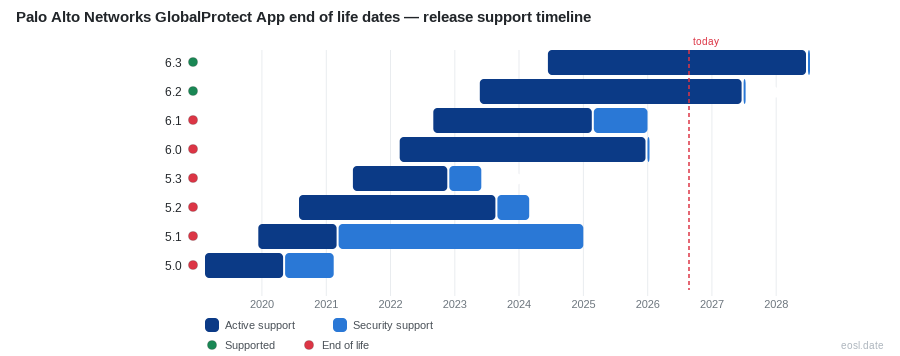
Currently Supported Palo Alto Networks GlobalProtect App Releases - Active EOS/EOSL Support (2)
| Release | Released | End-of-life Date | Active Support | Latest |
|---|---|---|---|---|
| 6.3 | (2 years and 5 months ago) | (in 1 year and 7 months) | (in 1 year and 7 months) | 6.3.3-c1205 (6 days ago) |
| 6.2 | (3 years and 6 months ago) | (in 7 months) | (in 7 months) | 6.2.8-c1085 (2 weeks and 5 days ago) |
Palo Alto Networks GlobalProtect App End of Life (EOL) Releases - No Longer Supported (10)
| Release | Released | End-of-life Date | Active Support | Latest |
|---|---|---|---|---|
| 6.1 | (4 years and 2 months ago) | (10 months ago) | (1 year and 8 months ago) | 6.1.5 (2 years and 5 months ago) |
| 6.0 | (4 years and 9 months ago) | (10 months ago) | (10 months ago) | 6.0.13 (6 months ago) |
| 5.3 | (5 years and 5 months ago) | (3 years and 5 months ago) | (3 years and 11 months ago) | 5.3.4 (4 years and 5 months ago) |
| 5.2 | (6 years and 3 months ago) | (2 years and 8 months ago) | (3 years and 2 months ago) | 5.2.13-c418 (3 years and 4 months ago) |
| 5.1 | (6 years and 11 months ago) | (1 year and 10 months ago) | (5 years and 8 months ago) | 5.1.12 (2 years and 9 months ago) |
| 5.0 | (7 years and 9 months ago) | (5 years and 9 months ago) | (6 years and 6 months ago) | 5.0.10 |
| 4.1 | (8 years and 8 months ago) | (6 years and 8 months ago) | (7 years and 5 months ago) | 4.1.13 |
| 4.0 | (9 years and 9 months ago) | (7 years and 9 months ago) | (8 years and 6 months ago) | 4.0 (9 years and 9 months ago) |
| 3.1 | (10 years and 5 months ago) | (8 years and 5 months ago) | (9 years and 2 months ago) | 3.1 (10 years and 5 months ago) |
| 3.0 | (10 years and 9 months ago) | (8 years and 9 months ago) | (9 years and 6 months ago) | 3.0 (10 years and 9 months ago) |
The Palo Alto Networks GlobalProtect app end of life timeline tells you how long each build keeps receiving fixes, so every Palo Alto Networks admin should know these EOL dates before an outdated release causes trouble. Use the dates below to plan which release your users run next.
What GlobalProtect EOL Means for Your Remote Access
GlobalProtect is the Palo Alto Networks VPN service, built for secure remote access to enterprise networks. It opens encrypted VPN tunnels from endpoints to portals and gateways, so users complete authentication once and all traffic is inspected under your security policies, which suits hybrid and remote work. It runs on Windows, macOS, Android, iOS and Linux. When a release reaches end of life, that protection stops receiving updates.
VPN Gateways on Firewalls and PAN-OS
Gateways run on firewalls with PAN-OS or on the Prisma Access cloud service, and the network team managing Palo Alto Networks hardware controls the client from there. Gateway builds carry their own support end dates, so check them against the client dates in the table below.
GlobalProtect Lifecycle and Release Support Schedule
There is no fixed release schedule: a new major release arrives roughly every 6 to 12 months, with maintenance builds between. Software updates continue only under a valid support agreement. Feature updates and bug fixes stop at the end-of-engineering date, while security fixes and technical assistance run until the end of service life. Support also covers the hardware firewalls the gateways sit on.
Life Cycle of Major Releases
Each major release gets about 3 years of coverage until its end date in the table below, and the end of sale for a build never means support ends the same day.
Palo Alto Networks GlobalProtect App End of Life Dates by Release
This table lists the Palo Alto Networks GlobalProtect EOL dates for the supported release line and the recent releases that already ended.
| Release | Active support ends | End-of-life date | Latest build |
|---|---|---|---|
| 6.3 | 30 Jun 2028 | 30 Jun 2028 | 6.3.3-c1199 |
| 6.2 | 30 Jun 2027 | 30 Jun 2027 | 6.2.8-c1084 |
| 6.1 | 1 Mar 2025 | 31 Dec 2025 | 6.1.5 |
| 6.0 | 31 Dec 2025 | 31 Dec 2025 | 6.0.13 |
Both 6.0 and 6.1 have reached EOL, and EOSL is the same story for every older release. Only a supported release, meaning 6.2 or 6.3, receives patches, and you should treat any other supported version as time-limited. Palo Alto Networks keeps a JSON version and an RSS feed of these dates.
Latest Supported Release to Run
Run 6.3, the release with the furthest cutoff (30 Jun 2028). It adds split tunnel controls, the conditional connect method, always-on explicit proxy access through Prisma Access and Host Information Profile exceptions for patch management. Product identifiers help you match each build against these dates.
GlobalProtect End-of-Life Policy Explained
Under the Palo Alto Networks end-of-life policy, the EOL date is the last day a product is supported, and end of sale is the last day it can be ordered. A vendor support contract is required for technical help. Plan for GlobalProtect end of life and GlobalProtect end-of-life notices the same way.
- Palo Alto Networks sends notice about 6 months before a product stops being sold.
- Palo Alto Networks keeps answering questions for 3 years after that date on software.
Active Support Versus Technical Assistance
After a GlobalProtect build passes its cutoff it gets neither active support fixes nor assistance, whereas before it, assistance continues for the policy period.
Upgrade and Migration Before End of Service Life
Treat the upgrade as a staged migration: pick the replacement release, test it and roll it out in waves across all installations. Palo Alto Networks hardware and cloud gateways need the same plan. A custom report that lists every client build helps you track progress.
Run an Audit Report on Every Client Build
Run an audit report across your inventory to find clients on 6.0 or 6.1, which lost support on 31 Dec 2025, and move them to 6.2 or 6.3.
Compliance Risk of Running GlobalProtect Past EOSL
Regulatory frameworks expect security software to stay patched. Running GlobalProtect 6.0 or 6.1, now expired clients, creates compliance exposure and audit risk, because auditors ask for Palo Alto Networks vendor support evidence.
Unsupported Build Exposure
A GlobalProtect build past its cutoff stops receiving patches, so newly found VPN client flaws stay open permanently.