OpenSSL End of Life (EOL) Dates and End of Support (EOS) Dates
OpenSSL end of life (EOL) and end of support (EOS) dates: 12 OpenSSL versions have reached EOL, including OpenSSL 3.6 (EOL date: Nov 01, 2026) — no longer receiving security updates or patches. OpenSSL 4.1.0 is the current supported release, with support through Nov 23, 2027 — 3 versions in active support. Also see CKEditor EOSL information for related end-of-life information.
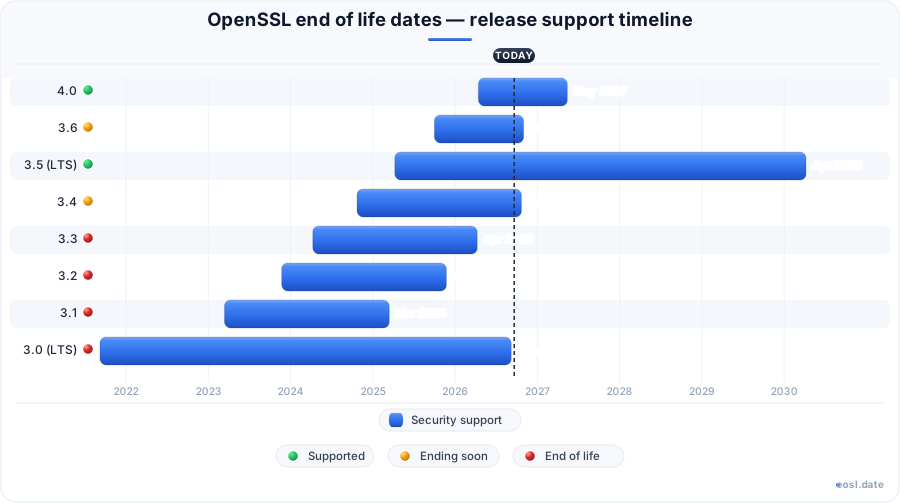
Currently Supported OpenSSL Releases - Active EOS/EOSL Support (3)
| Release | Released | Supported | Premium support | Latest | LTS |
|---|---|---|---|---|---|
| 4.1 | (4 weeks and 1 day ago) | (in 1 year) | Active | 4.1.0 (4 weeks and 1 day ago) | - |
| 4.0 | (7 months ago) | (in 5 months) | Active | 4.0.3 (1 month and 3 weeks ago) | - |
| 3.5 (LTS) | (1 year and 7 months ago) | (in 3 years and 4 months) | Active | 3.5.9 (1 month and 3 weeks ago) | LTS |
OpenSSL End of Life (EOL) Releases - No Longer Supported (12)
| Release | Released | Supported | Premium support | Latest | LTS |
|---|---|---|---|---|---|
| 3.6 | (1 year and 1 month ago) | (2 weeks and 6 days ago) | Active | 3.6.5 (1 month and 3 weeks ago) | - |
| 3.4 | (2 years ago) | (4 weeks and 2 days ago) | Active | 3.4.8 (1 month and 3 weeks ago) | - |
| 3.3 | (2 years and 7 months ago) | (7 months ago) | Active | 3.3.7 (7 months ago) | - |
| 3.2 | (2 years and 11 months ago) | (11 months ago) | Active | 3.2.6 (1 year and 1 month ago) | - |
| 3.1 | (3 years and 8 months ago) | (1 year and 8 months ago) | Active | 3.1.8 (1 year and 9 months ago) | - |
| 3.0 (LTS) | (5 years and 2 months ago) | (2 months ago) | Active | 3.0.22 (2 months ago) | LTS |
| 1.1.1 (LTS) | (8 years and 2 months ago) | (3 years and 2 months ago) | Active | 1.1.1w (3 years and 2 months ago) | LTS |
| 1.1.0 | (10 years and 2 months ago) | (7 years and 2 months ago) | Active | 1.1.0l (7 years and 2 months ago) | - |
| 1.0.2 (LTS) | (11 years and 9 months ago) | (6 years and 10 months ago) | Active | 1.0.2u (6 years and 11 months ago) | LTS |
| 1.0.1 | (14 years and 8 months ago) | (9 years and 10 months ago) | Active | 1.0.1u (10 years and 1 month ago) | - |
| 1.0.0 | (16 years and 7 months ago) | (10 years and 10 months ago) | Active | 1.0.0t (10 years and 11 months ago) | - |
| 0.9.8 | (21 years and 4 months ago) | (10 years and 10 months ago) | Active | 0.9.8zh (10 years and 11 months ago) | - |
If your servers still run an older build of the OpenSSL library, the OpenSSL end of life calendar decides how long you keep receiving security fixes. This software library handles encryption for HTTPS and protects connections against eavesdropping, so a release past its EOL becomes a liability the day patches stop. Below you get every date, the support rules behind them, and a practical way to upgrade.
OpenSSL End of Life Dates by Release
The OpenSSL project publishes a release date and a supported-until date for each stable series. As of 27 October 2026, OpenSSL 3.0 (ended September 2026), OpenSSL 3.4 (ended 22 October 2026) and every earlier series are unsupported, and 3.6 closes on 1 November 2026. Treat each support until value below as the public EOL date for that version; the release dates show how quickly the versions have turned over.
| Version | Type | Released | Supported until | Status |
|---|---|---|---|---|
| 1.0.2 | LTS | 22 January 2015 | 31 December 2019 | Unsupported |
| 1.1.0 | Non-LTS | 25 August 2016 | 11 September 2019 | Unsupported |
| 1.1.1 | LTS | 11 September 2018 | 11 September 2023 | Unsupported |
| 3.0 | LTS | 7 September 2021 | 7 September 2026 | Unsupported |
| 3.1 | Non-LTS | 14 March 2023 | 14 March 2025 | Unsupported |
| 3.2 | Non-LTS | 23 November 2023 | 23 November 2025 | Unsupported |
| 3.3 | Non-LTS | 9 April 2024 | 9 April 2026 | Unsupported |
| 3.4 | Non-LTS | 22 October 2024 | 22 October 2026 | Unsupported |
| 3.5 | LTS | 8 April 2025 | 8 April 2030 | Supported |
| 3.6 | Non-LTS | 1 October 2025 | 1 November 2026 | Supported, ending soon |
| 4.0 | Non-LTS | 14 April 2026 | 14 May 2027 | Supported |
| 4.1 | Non-LTS | 23 October 2026 | November 2027 | Latest version |
Release Plan for OpenSSL 3.6 and OpenSSL 4.0
The official release plan lists planned releases well ahead of time, though the dates can still shift. The stable release line is in ongoing development: 4.1 is the newest tag, a next LTS is pencilled in for April 2027, and from 5.0 in October 2027 the project aims for a major release every other year. Every non-LTS branch in that plan lives for only a little over a year.
Long Term Support in OpenSSL 3.0 and 3.5
Long term support branches carry the longest public promise. OpenSSL 3.0 was an LTS that ran five years, while the OpenSSL 3.5 LTS runs to April 2030. Starting with 3.5, each LTS is supported for at least five years, with a new one at least every two years. Pick an LTS when you cannot upgrade often, because ordinary support for a non-LTS series is short.
OpenSSL Release Life Cycle and Versioning
The release life cycle is simple to state: a series ships, receives patches, then stops. Starting with 3.5, non-LTS series get a minimum of 13 months of support, down from the earlier two-year promise. In practice a supported release is one the OpenSSL project still patches for security flaws, and the lifecycle ends when the last fix ships. Past that point you are on your own, or on a vendor's branch.
Versioning Scheme and API/ABI Compatibility
Since 3.0.0 the versioning scheme follows MAJOR.MINOR.PATCH. A new MAJOR may break API/ABI compatibility, a MINOR adds compatible features, and a patch release is a bug fix drop. Because the project allows backporting of small accessor functions into patches, moving within one series is low risk, while moving between majors needs testing. Staying on patch updates keeps you supported until the series' EOL, and a new major becomes unavoidable once end of support arrives.
OpenSSL 1.1.1 EOL and Vendor Packages
The OpenSSL 1.1.1 end of life arrived on 11 September 2023, five years after its release, and ended public fixes for that LTS. The same applies to OpenSSL 1.1.1 in older tutorials: if a guide tells you to compile it, skip it, since the software you ship inherits every unfixed flaw. The operating system vendor may still patch the version it ships, since packages from your distribution follow the distributor's schedule, not the project's. Check which one you actually run with openssl version on Linux or Windows, and note that the public EOL date alone does not tell you the vendor's date.
Red Hat Enterprise Linux and Backporting
Customers often ask whether a project EOL affects Red Hat products. On Red Hat Enterprise Linux, fixes keep arriving through the vendor's own errata for the lifetime of the release, so a server on a supported RHEL may be safe even when the upstream branch is retired. Verify the package version and the vendor advisory, not the upstream version string alone.
Extended Support After an OpenSSL EOL Date
Commercial options exist when you cannot move yet. The OpenSSL Software Services team sells a premium support plan under a support contract, a form of extended support that keeps delivering fixes for OpenSSL 1.0.2 and 1.1.1 after the public date. Other firms advertise similar support contracts as enterprise level support. The project says it will continue as long as it remains commercially viable, so this is a bridge, not a plan. Weigh the commercial cost against a planned end of support migration. Note that end-of-support for the free branch does not stop the paid one.
FIPS 140 and Licensing at End of Support
Compliance can force your hand. A FIPS deployment relies on a validated module, and FIPS 140-2 support returned in the 3.0 series with 140-3 in 3.1. A FIPS validation certificate names specific module versions, so a series reaching end of support can jeopardise a security audit. On license terms, 3.0 and later use the Apache License 2.0, while 1.x used the older OpenSSL license; check each license against your product before you ship, and note the FIPS provider has its own license and review rules. The cryptography library sits under every certificate check, a cryptographic job where an unpatched cryptography release is hardest to defend.
Security Risks of an OpenSSL EOL Version
An unpatched series gathers vulnerabilities that nobody fixes after the EOL. Each new vulnerability found after the cutoff stays open on your SSL and TLS stack, and a security scanner will flag it long before an attacker's tooling does. Retired builds also miss what current releases offer: TLS 1.3 negotiation, newer protocol options and protocols such as QUIC (3.5 added server-side QUIC), so legacy builds lack both features and security work. Every TLS endpoint, every certificate chain and every TLS certificate renewal depends on that code, as does every piece of software linked against an old build, because a retired branch never gets patched once support ends. TLS handshakes are where attackers start, and cryptographic failures there expose traffic, keys and logins alike.
Heartbleed and Other Vulnerabilities
Heartbleed remains the example everyone remembers: a flaw in 1.0.1's heartbeat code that leaked memory from affected servers. Version 1.0.1 is long past end of support, and an EOL branch never receives fixes for flaws like this. Other past issues include CCS injection, OCSP stapling bugs and denial-of-service flaws in ASN.1 parsing, each a vulnerability that reminds you TLS libraries get probed constantly. The first of these sat in the heartbeat extension of the TLS protocol.
Forks Such as LibreSSL and BoringSSL
A fork is not an escape hatch. LibreSSL and BoringSSL keep their own release rules, and the developers of each decide what they patch. Switching to one means a code change, not a free extension of your OpenSSL schedule.
Upgrade Path From an End-of-Support OpenSSL Version
Planning beats panic. When OpenSSL 3.2 end of life passed in November 2025, anyone on that non-LTS line had to move within days, which is why most teams standardise on an LTS. Follow this order:
- Inventory every server and container with
openssl version. - Pick a target: the LTS 3.5 for stability, or 4.1 for the newest features.
- Read the project's migration guide for removed APIs.
- Run your test suite on staging, then roll out gradually.
The same checklist applies at every end of life of OpenSSL, whether the series is 1.1.1, 3.0 or a non-LTS. To upgrade safely, test the OpenSSL release you want against your own applications first, and keep extended support only as a fallback.