nvm End of Life (EOL) Dates and End of Support (EOS) Dates
nvm end of life (EOL) and end of support (EOS) dates: 39 nvm versions have reached EOL, including nvm 0.39 (EOL date: Jul 30, 2024) — no longer receiving security updates or patches. nvm 0.40.8 is the current supported release. Also see Express end of support dates for related end-of-life information.
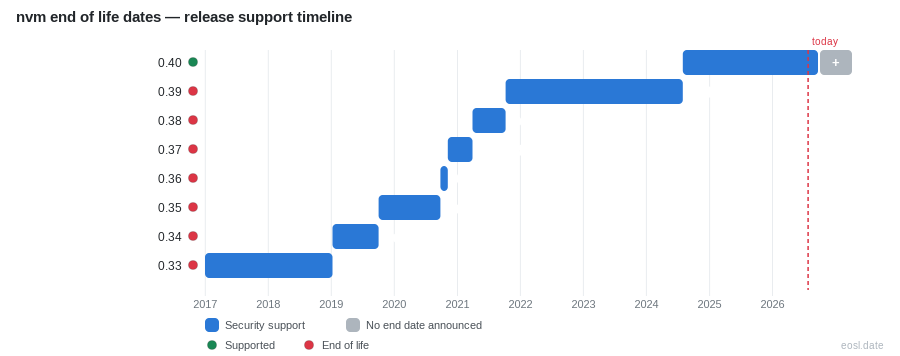
Currently Supported nvm Releases - Active EOS/EOSL Support (1)
| Release | Released | Community Support | Latest |
|---|---|---|---|
| 0.40 | (2 years and 3 months ago) | Active | 0.40.8 (1 month and 3 weeks ago) |
nvm End of Life (EOL) Releases - No Longer Supported (39)
| Release | Released | Community Support | Latest |
|---|---|---|---|
| 0.39 | (5 years and 1 month ago) | (2 years and 3 months ago) | 0.39.7 (2 years and 11 months ago) |
| 0.38 | (5 years and 7 months ago) | (5 years and 1 month ago) | 0.38.0 (5 years and 7 months ago) |
| 0.37 | (6 years ago) | (5 years and 7 months ago) | 0.37.2 (5 years and 11 months ago) |
| 0.36 | (6 years and 1 month ago) | (6 years ago) | 0.36.0 (6 years and 1 month ago) |
| 0.35 | (7 years and 1 month ago) | (6 years and 1 month ago) | 0.35.3 (6 years and 8 months ago) |
| 0.34 | (7 years and 10 months ago) | (7 years and 1 month ago) | 0.34.0 (7 years and 10 months ago) |
| 0.33 | (9 years and 10 months ago) | (7 years and 10 months ago) | 0.33.11 (8 years and 6 months ago) |
| 0.32 | (10 years and 2 months ago) | (9 years and 10 months ago) | 0.32.1 (10 years ago) |
| 0.31 | (10 years and 9 months ago) | (10 years and 2 months ago) | 0.31.7 (10 years and 2 months ago) |
| 0.30 | (10 years and 10 months ago) | (10 years and 9 months ago) | 0.30.2 (10 years and 9 months ago) |
| 0.29 | (11 years and 1 month ago) | (10 years and 10 months ago) | 0.29.0 (11 years and 1 month ago) |
| 0.28 | (11 years and 1 month ago) | (11 years and 1 month ago) | 0.28.0 (11 years and 1 month ago) |
| 0.27 | (11 years and 1 month ago) | (11 years and 1 month ago) | 0.27.1 (11 years and 1 month ago) |
| 0.26 | (11 years and 3 months ago) | (11 years and 1 month ago) | 0.26.1 (11 years and 2 months ago) |
| 0.25 | (11 years and 6 months ago) | (11 years and 3 months ago) | 0.25.4 (11 years and 5 months ago) |
| 0.24 | (11 years and 8 months ago) | (11 years and 6 months ago) | 0.24.2 (11 years and 5 months ago) |
| 0.23 | (11 years and 9 months ago) | (11 years and 8 months ago) | 0.23.3 (11 years and 9 months ago) |
| 0.22 | (11 years and 10 months ago) | (11 years and 9 months ago) | 0.22.2 (11 years and 10 months ago) |
| 0.21 | (11 years and 10 months ago) | (11 years and 10 months ago) | 0.21.0 (11 years and 10 months ago) |
| 0.20 | (11 years and 11 months ago) | (11 years and 10 months ago) | 0.20.0 (11 years and 11 months ago) |
| 0.19 | (11 years and 11 months ago) | (11 years and 11 months ago) | 0.19.0 (11 years and 11 months ago) |
| 0.18 | (12 years ago) | (11 years and 11 months ago) | 0.18.0 (12 years ago) |
| 0.17 | (12 years and 1 month ago) | (12 years ago) | 0.17.3 (12 years ago) |
| 0.16 | (12 years and 2 months ago) | (12 years and 1 month ago) | 0.16.1 (12 years and 2 months ago) |
| 0.15 | (12 years and 2 months ago) | (12 years and 2 months ago) | 0.15.0 (12 years and 2 months ago) |
| 0.14 | (12 years and 2 months ago) | (12 years and 2 months ago) | 0.14.0 (12 years and 2 months ago) |
| 0.13 | (12 years and 3 months ago) | (12 years and 2 months ago) | 0.13.1 (12 years and 3 months ago) |
| 0.12 | (12 years and 3 months ago) | (12 years and 3 months ago) | 0.12.2 (12 years and 3 months ago) |
| 0.11 | (12 years and 4 months ago) | (12 years and 3 months ago) | 0.11.2 (12 years and 3 months ago) |
| 0.10 | (12 years and 4 months ago) | (12 years and 4 months ago) | 0.10.0 (12 years and 4 months ago) |
| 0.9 | (12 years and 4 months ago) | (12 years and 4 months ago) | 0.9.0 (12 years and 4 months ago) |
| 0.8 | (12 years and 4 months ago) | (12 years and 4 months ago) | 0.8.0 (12 years and 4 months ago) |
| 0.7 | (12 years and 6 months ago) | (12 years and 4 months ago) | 0.7.0 (12 years and 6 months ago) |
| 0.6 | (12 years and 6 months ago) | (12 years and 6 months ago) | 0.6.1 (12 years and 6 months ago) |
| 0.5 | (12 years and 6 months ago) | (12 years and 6 months ago) | 0.5.1 (12 years and 6 months ago) |
| 0.4 | (12 years and 7 months ago) | (12 years and 6 months ago) | 0.4.0 (12 years and 7 months ago) |
| 0.3 | (12 years and 7 months ago) | (12 years and 7 months ago) | 0.3.0 (12 years and 7 months ago) |
| 0.2 | (12 years and 11 months ago) | (12 years and 7 months ago) | 0.2.0 (12 years and 11 months ago) |
| 0.1 | (15 years and 8 months ago) | (12 years and 11 months ago) | 0.1.0 (15 years and 8 months ago) |
Wondering whether nvm end of life is something you need to plan for? nvm is a shell script that works as a Node version manager, so its lifecycle is separate from the Node.js releases it installs, and only the newest nvm line gets community support. Below you will see where nvm stands, when each Node.js version reaches end of support, and what to do when yours does.
nvm End of Life: Which nvm Releases Still Get Support
nvm is open source and maintained by volunteers, so it does not publish a long support calendar. Instead, the project supports only the latest major/minor release line. Once a newer line ships, the previous one is marked as ended and receives no further fixes. Commercial support for deprecated nvm versions exists through HeroDevs, and the maintainers take part in the OpenJS Foundation's Ecosystem Sustainability Program. The OpenJS Foundation is part of the Linux Foundation.
nvm Release Lines and the Latest Release
The table shows how the three most recent nvm release lines stand today. The latest release is 0.40.8, and only the 0.40 line is supported.
| nvm release line | Community support | Newest build |
|---|---|---|
| 0.40 | Yes | 0.40.8 (21 Sep 2026) |
| 0.39 | Ended 30 Jul 2024 | 0.39.7 (05 Dec 2023) |
| 0.38 | Ended 07 Oct 2021 | 0.38.0 (29 Mar 2021) |
To see which release you run, type nvm --version in your terminal. Trackers such as endoflife.date also publish a JSON version, an RSS feed and product identifiers for nvm, which helps when you audit many machines.
When nvm Versions Become Unsupported: the Support Policy
The support policy is simple: a release number stays supported until the next line replaces it, so compare your release numbers with the table. If your nvm --version output shows 0.39 or older, you are on an unsupported, deprecated build. It still works, because it is just a script that you install from GitHub and run from the command line on any POSIX shell, though the project will not fix new bugs in it.
Node.js itself treats nvm as a community method on its Downloads page. Community methods must handle every non-EOL version, run on a supported operating system, ship official binaries and stay free. Because nvm follows the Node.js release cycle, the end of life that bites you first is nearly always the Node.js EOL of the version it installed, not nvm itself. Windows users should note that nvm-windows is a different project with its own support.
Node.js EOL Dates and Support Timeline
Every Node.js major version follows a fixed release schedule and cadence, and the whole support lifecycle is public: each Node.js EOL date is known years in advance. A new major arrives roughly every six months, and each even-numbered release moves through four phases: Current, Active LTS, Maintenance LTS and end-of-life. LTS means long-term support, and it typically guarantees about 30 months of critical fixes. From release number 27 the cycle becomes annual, and every major gets LTS status.
| Node.js version | Status | Security support ends |
|---|---|---|
| 18 | EOL | 30 Apr 2025 |
| 20 | EOL | 30 Apr 2026 |
| 22 | Maintenance LTS | 30 Apr 2027 |
| 24 | Maintenance LTS | 30 Apr 2028 |
| 26 | Current, upcoming LTS | 30 Apr 2029 |
Current Release and Active LTS
A new major version starts as the Current release for about six months, when library authors add support. Even-numbered versions then become Active LTS for roughly 12 months of active support, and receive bug fixes, security patches and select improvements. Odd-numbered versions such as 21 and 23 never reach LTS and drop out after six months, so avoid them in production.
Maintenance LTS and Hard End-of-Life
Maintenance LTS lasts about 18 months and delivers only critical fixes and security patches, with no new features. When it ends you reach a hard end-of-life: no patches, no fixes, no support of any kind. Node 20 hit that EOL point on 30 April 2026, and Node 18 had done so a year earlier. The extended support options covered below exist for exactly these cases.
Risks of Running EOL Node.js Versions
An EOL runtime does not stop working, so teams are tempted to leave it alone. The risk grows quietly, because the JavaScript runtime that executes your code stays frozen while its V8 engine, OpenSSL and the HTTP parser keep receiving security disclosures. Several CVEs have already landed this way. A published CVE against a supported line also reveals the same flaw in the EOL line, giving attackers a map of your exposure. Recent examples include a denial-of-service crash, a path traversal in path.join on Windows and HTTP request smuggling.
Unpatched Security Vulnerabilities
Every new CVE found after the Node.js EOL date stays unpatched in the official distribution. Software composition scanners now flag the runtime itself as a finding, with no fix path other than moving to a supported release. Security teams usually treat that as a blocker for production systems.
Compliance and Dependency Toolchain Breakage
Frameworks such as SOC 2, PCI DSS, HIPAA and ISO 27001 expect supported software with a patch path, so an EOL Node.js version fails any compliance framework check and becomes a direct finding in compliance audits at any enterprise. Node.js EOL status is one of the first things an auditor looks up. The ecosystem moves on as well: npm packages drop old majors, CI/CD tooling raises its minimum, and every dependency or toolchain upgrade gets harder. Docker base images built on old Node tags age the same way, and developers lose newer language features.
Upgrade Path When Node Reaches End-of-Life
You have three realistic choices. The best is to upgrade to a supported LTS release, which means Node.js 22 or 24 today, because an EOL Node.js version gets no patches. Check native modules and node-gyp build targets, run your test suite, and then ship. Because nvm installs side by side, trying the new runtime costs little. List installed versions with nvm ls, then switch:
- Install the target LTS, for example
nvm install 24. - Run your tests and a staging build under it.
- Confirm the result with
node --version, then set it as the default.
If a migration is not possible yet, EOL extended support is the second option. HeroDevs Never-Ending Support and TuxCare Endless Lifecycle Support keep patching versions after the official EOL, and the OpenJS Ecosystem Sustainability Program points to both. The third option is to isolate the legacy environment or re-platform away from Node.js, and accepting the risk is only reasonable as a short, documented exception. Whichever path you take, record the EOL date next to each service in your schedule so the next upgrade is planned months before the deadline.