Node.js End of Life (EOL) Dates and End of Support (EOS) Dates
Node.js end of life (EOL) and end of support (EOS) dates: 23 Node.js versions have reached EOL, including Node.js 25 (EOL date: Jun 01, 2026) — no longer receiving security updates or patches. Node.js 22 (LTS) reaches its End of Support date on Apr 30, 2027 — plan your upgrade path now. Node.js 26.13.1 LTS is the current supported release, with support through Apr 30, 2029 — 2 versions in active support. Also see Express end of service life for related end-of-life information.
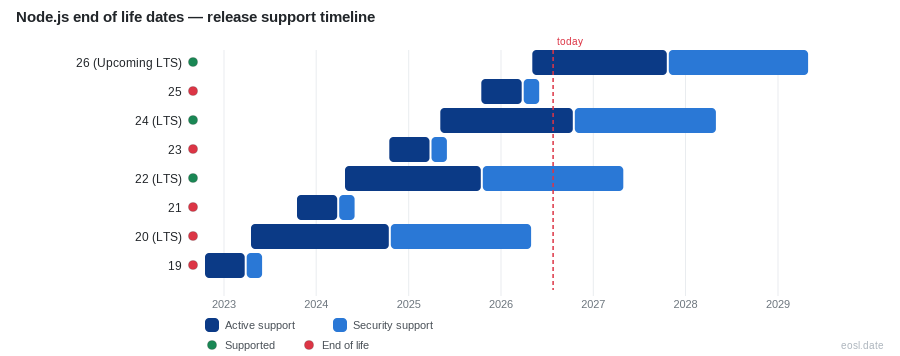
Currently Supported Node.js Releases - Active EOS/EOSL Support (2)
Node.js Releases Nearing End of Life - Support Ending Soon (1)
| Release | Released | Security Support | Active Support | Commercial Support | Latest | LTS |
|---|---|---|---|---|---|---|
| 22 (LTS) | (2 years and 6 months ago) | (in 5 months) | (1 year ago) | Active | 22.23.5 (2 days ago) | LTS |
Node.js End of Life (EOL) Releases - No Longer Supported (23)
| Release | Released | Security Support | Active Support | Commercial Support | Latest | LTS |
|---|---|---|---|---|---|---|
| 25 | (1 year ago) | (5 months ago) | (7 months ago) | Active | 25.9.0 (7 months ago) | - |
| 23 | (2 years ago) | (1 year and 5 months ago) | (1 year and 7 months ago) | Active | 23.11.1 (1 year and 5 months ago) | - |
| 21 | (3 years ago) | (2 years and 5 months ago) | (2 years and 7 months ago) | Active | 21.7.3 (2 years and 7 months ago) | - |
| 20 (LTS) | (3 years and 6 months ago) | (6 months ago) | (2 years ago) | Active | 20.20.2 (7 months ago) | LTS |
| 19 | (4 years ago) | (3 years and 5 months ago) | (3 years and 7 months ago) | Active | 19.9.0 (3 years and 7 months ago) | - |
| 18 (LTS) | (4 years and 6 months ago) | (1 year and 6 months ago) | (3 years ago) | Active | 18.20.8 (1 year and 7 months ago) | LTS |
| 17 | (5 years ago) | (4 years and 5 months ago) | (4 years and 7 months ago) | Active | 17.9.1 (4 years and 5 months ago) | - |
| 16 (LTS) | (5 years and 6 months ago) | (3 years and 2 months ago) | (4 years ago) | Active | 16.20.2 (3 years and 3 months ago) | LTS |
| 15 | (6 years ago) | (5 years and 5 months ago) | (5 years and 7 months ago) | Active | 15.14.0 (5 years and 7 months ago) | - |
| 14 (LTS) | (6 years and 6 months ago) | (3 years and 6 months ago) | (5 years ago) | Active | 14.21.3 (3 years and 8 months ago) | LTS |
| 13 | (7 years ago) | (6 years and 5 months ago) | (6 years and 7 months ago) | Active | 13.14.0 (6 years and 6 months ago) | - |
| 12 (LTS) | (7 years and 6 months ago) | (4 years and 6 months ago) | (6 years ago) | Active | 12.22.12 (4 years and 7 months ago) | LTS |
| 11 | (8 years ago) | (7 years and 4 months ago) | (7 years and 7 months ago) | Active | 11.15.0 (7 years and 6 months ago) | - |
| 10 (LTS) | (8 years and 6 months ago) | (5 years and 6 months ago) | (6 years and 5 months ago) | Active | 10.24.1 (5 years and 7 months ago) | LTS |
| 9 | (9 years ago) | (8 years and 4 months ago) | (8 years and 4 months ago) | Active | 9.11.2 (8 years and 5 months ago) | - |
| 8 (LTS) | (9 years and 5 months ago) | (6 years and 10 months ago) | (7 years and 10 months ago) | Active | 8.17.0 (6 years and 10 months ago) | LTS |
| 7 | (10 years ago) | (9 years and 4 months ago) | (9 years and 4 months ago) | Active | 7.10.1 (9 years and 4 months ago) | - |
| 6 (LTS) | (10 years and 6 months ago) | (7 years and 6 months ago) | (8 years and 6 months ago) | Active | 6.17.1 (7 years and 7 months ago) | LTS |
| 5 | (11 years ago) | (10 years and 4 months ago) | (10 years and 4 months ago) | Active | 5.12.0 (10 years and 4 months ago) | - |
| 4 (LTS) | (11 years and 2 months ago) | (8 years and 6 months ago) | (9 years and 7 months ago) | Active | 4.9.1 (8 years and 7 months ago) | LTS |
| 3 | (11 years and 3 months ago) | — | — | Active | 3.3.1 (11 years and 1 month ago) | - |
| 2 | (11 years and 6 months ago) | — | — | Active | 2.5.0 (11 years and 3 months ago) | - |
| 1 | (11 years and 9 months ago) | — | — | Active | 1.8.4 (11 years and 4 months ago) | - |
Node.js end of life is the date the project stops patching a major version of this open-source JavaScript runtime, and every release line reaches it on a published schedule. After that date the version gets no further security fixes, so you need to know which version you run and how long its EOL clock has left. Check that support status before your next deployment or audit.
What Node EOL Means for Your Runtime
Node EOL is the moment, once a line reaches EOL status, that the project retires a release line: no new patches, no fixes and no security patches for flaws found afterward. Your code keeps running, but each newly disclosed CVE stays open, and any vulnerability found in newer lines that also affects the old one is never backported. That is the practical meaning of end-of-life. The key takeaways are short: neglected software accumulates risk, the risk grows every month, and a supported release is the only way to receive a patch from the project itself.
While a line is supported, the Node.js team ships fixes for several lines at once. When a line leaves that group, its vulnerabilities and defects simply stop being addressed upstream.
Node.js Release Schedule and Lifecycle Phases
The release schedule is predictable. Each new release spends six months in the Current phase, and even-numbered versions then move into long-term support (LTS). Odd-numbered versions never receive LTS and are dropped soon after. From the start of Active LTS to EOL you get roughly 30 months of coverage, which is why production teams standardize on those LTS lines and why legacy services built on odd versions are the first to be stranded. Each LTS line also carries an element codename, such as Iron or Jod. Four phases make up the lifecycle.
Current Release Phase
A new release arrives with new features and APIs. It is meant for testing and for developers and library authors, not for production.
Active LTS Phase
Even-numbered versions graduate here, and the focus shifts to stability, bug fixes and low-risk improvements.
Maintenance LTS Phase
Only critical bug fixes and security patches ship during this maintenance period, and no new features are added.
The End-of-Life Phase
The version is unsupported: nothing more is released, not even for critical flaws.
Node.js EOL Dates and Support Timeline
This table shows where each recent LTS line sits in its support timeline as of late October 2026, using the dates published by the Node.js project.
| Version | Codename | LTS status | EOL date |
|---|---|---|---|
| 18 | Hydrogen | Unsupported | April 30, 2025 |
| 20 | Iron | Unsupported | April 30, 2026 |
| 22 | Jod | Maintenance LTS | April 30, 2027 |
| 24 | Krypton | Maintenance LTS | April 30, 2028 |
| 26 | None yet | Current, LTS soon | April 30, 2029 |
The official Node.js end-of-life page also lists EOL versions back to v0, with the open vulnerability counts for each. To see which supported release you have installed, run node --version and compare the major number to the table. If it is not listed as supported, you need an upgrade path now. HeroDevs and TuxCare are both named by the project as commercial partners for retired lines, covered below.
Node.js End of Life for Versions 18, 20 and 22
These three lines account for most EOL questions teams ask, because each marks a different stage of the process.
Node.js 18 and Node.js 20 After EOL
Node.js 18 reached EOL in April 2025 and Node.js 20 followed in April 2026, yet both remain widely deployed. Flaws published against them, such as CVE-2025-23166, a denial-of-service crash, CVE-2025-23167, an HTTP parser bug that allows request smuggling, or CVE-2025-27210, a path traversal in path.join on Windows, are fixed only in specific later releases of each line. Anything pinned below those builds will never get them.
Node.js 22 as the Next Stop
Node.js 22 stays supported until April 2027. Many teams moving off 20 land here first, but that only buys about six months, so plan the next hop to 24 at the same time.
Risks of Running an Unsupported Version Past EOL
An unsupported version does not fail on its EOL date; the danger builds in production over time and affects applications of every size, from enterprise platforms to small services, and the security exposure turns into a compliance problem.
Unpatched Security Vulnerabilities
New disclosures in the shared code reach your Docker images and Linux hosts with no fix, and scanners flag the runtime itself.
Compliance Failures
Many auditors forbid unmaintained software, so an EOL runtime becomes a compliance gap the moment an audit begins.
Dependency and Toolchain Breakage
Old builds stop linking to updated libraries, which blocks operating system and package managers updates.
Ecosystem Drift
Popular npm packages drop old versions, so you inherit more unpatched defects the longer an EOL version stays in service.
Options After Node End of Life
You have four realistic choices, and a short risk analysis of your own services will tell you which fits. Teams with legacy codebases rarely upgrade overnight, so treat any migration as a project with an owner and a date set before the EOL date, not after it.
Upgrade to a Supported LTS Version
The cleanest fix is to upgrade to the newest LTS. Use nvm or the official binaries to test the new version side by side before switching.
Commercial Support and Extended Support
When an upgrade cannot happen yet, the OpenJS Foundation's Ecosystem Sustainability Program names partners that sell commercial support. HeroDevs offers Never-Ending Support for retired lines. NodeSource runs an upgrade program with risk assessment. TuxCare sells Endless Lifecycle Support, with SLA-backed extended support delivered through your normal package managers. This coverage supplies backported security patches, but treat all of it as temporary.
Re-platform or Isolate the Environment
Move the workload to another stack, or fence the old install off from the network and sensitive data.
Accept the Risk Only Deliberately
If you stay put, record who accepted the risk, why, and when you will revisit it.