Grafana End of Life (EOL) Dates and End of Support (EOS) Dates
Grafana end of life (EOL) and end of support (EOS) dates: 25 Grafana versions have reached EOL, including Grafana 12.3 (EOL date: Aug 19, 2026) — no longer receiving security updates or patches. Grafana 13.0 reaches its End of Support date on Jan 09, 2027 — plan your upgrade path now. Grafana 13.3.1 is the current supported release, with support through Jul 20, 2027 — 3 versions in active support. Also see Artifactory end of support dates for related end-of-life information.
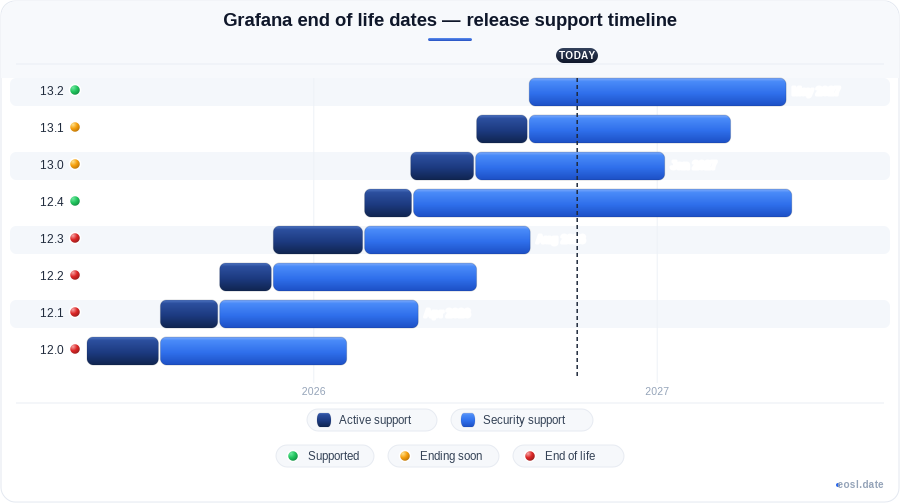
Currently Supported Grafana Releases - Active EOS/EOSL Support (3)
Grafana Releases Nearing End of Life - Support Ending Soon (2)
Grafana End of Life (EOL) Releases - No Longer Supported (25)
| Release | Released | Security Support | Active Support | Latest |
|---|---|---|---|---|
| 12.3 | (1 year ago) | (3 months ago) | (9 months ago) | 12.3.11 (3 months ago) |
| 12.2 | (1 year and 2 months ago) | (5 months ago) | (1 year ago) | 12.2.10 (5 months ago) |
| 12.1 | (1 year and 4 months ago) | (7 months ago) | (1 year and 2 months ago) | 12.1.10+security-01 (7 months ago) |
| 12.0 | (1 year and 6 months ago) | (9 months ago) | (1 year and 4 months ago) | 12.0.10 (9 months ago) |
| 11.6 | (1 year and 7 months ago) | (4 months ago) | (1 year and 6 months ago) | 11.6.16 (5 months ago) |
| 11.5 | (1 year and 9 months ago) | (1 year ago) | (1 year and 7 months ago) | 11.5.10 (1 year and 1 month ago) |
| 11.4 | (1 year and 11 months ago) | (1 year and 2 months ago) | (1 year and 9 months ago) | 11.4.8 (1 year and 3 months ago) |
| 11.3 | (2 years and 1 month ago) | (1 year and 4 months ago) | (1 year and 11 months ago) | 11.3.9 (1 year and 4 months ago) |
| 11.2 | (2 years and 2 months ago) | (1 year and 5 months ago) | (2 years and 1 month ago) | 11.2.10+security-01 (1 year and 5 months ago) |
| 11.1 | (2 years and 4 months ago) | (1 year and 7 months ago) | (2 years and 2 months ago) | 11.1.13 (1 year and 8 months ago) |
| 11.0 | (2 years and 6 months ago) | (1 year and 9 months ago) | (2 years and 5 months ago) | 11.0.11 (1 year and 9 months ago) |
| 10.4 | (2 years and 8 months ago) | (1 year and 5 months ago) | (2 years and 6 months ago) | 10.4.19+security-01 (1 year and 5 months ago) |
| 10.3 | (2 years and 10 months ago) | (2 years and 1 month ago) | (2 years and 8 months ago) | 10.3.12 (2 years and 1 month ago) |
| 10.2 | (3 years and 1 month ago) | (2 years and 4 months ago) | (2 years and 10 months ago) | 10.2.9 (2 years and 4 months ago) |
| 10.1 | (3 years and 3 months ago) | (2 years and 10 months ago) | (3 years and 1 month ago) | 10.1.10 (2 years and 6 months ago) |
| 10.0 | (3 years and 5 months ago) | (3 years and 1 month ago) | (3 years and 3 months ago) | 10.0.13 (2 years and 7 months ago) |
| 9.5 | (3 years and 7 months ago) | (2 years and 6 months ago) | (3 years and 5 months ago) | 9.5.21 (2 years and 3 months ago) |
| 9.4 | (3 years and 8 months ago) | (3 years and 5 months ago) | (3 years and 7 months ago) | 9.4.17 (3 years and 1 month ago) |
| 9.3 | (3 years and 11 months ago) | (3 years and 7 months ago) | (3 years and 8 months ago) | 9.3.16 (3 years and 5 months ago) |
| 9.2 | (4 years and 1 month ago) | (3 years and 8 months ago) | (3 years and 11 months ago) | 9.2.20 (3 years and 5 months ago) |
| 9.1 | (4 years and 3 months ago) | (3 years and 11 months ago) | (4 years and 1 month ago) | 9.1.8 (4 years and 1 month ago) |
| 9.0 | (4 years and 5 months ago) | (4 years and 1 month ago) | (4 years and 3 months ago) | 9.0.9 (4 years and 2 months ago) |
| 8 | (5 years and 5 months ago) | (3 years and 5 months ago) | (4 years and 5 months ago) | 8.5.27 (3 years and 5 months ago) |
| 7 | (6 years and 6 months ago) | (4 years and 5 months ago) | (5 years and 5 months ago) | 7.5.17 (4 years and 1 month ago) |
| 6 | (7 years and 8 months ago) | (5 years and 5 months ago) | (6 years and 6 months ago) | 6.7.6 (5 years and 8 months ago) |
Running your dashboards on an older release? Grafana end of life arrives for every minor version, and once it does, the project stops shipping security fixes for it. This guide lists the Grafana EOL dates for current releases, explains the rules behind them, and shows how to plan an upgrade for your monitoring stack. It also covers the Grafana Agent, which has reached end-of-life, and your options if you cannot upgrade yet.
Grafana End of Life Dates for Supported Versions
Only a handful of supported versions receive fixes at any time. The table below shows each recent version's release date, when active support ended and when security support ends. Check the latest version on your own server with grafana --version (or grafana-server -v before Grafana 13) and match it against the table. Dates come from the public lifecycle listings as of late October 2026.
| Version | Release date | Active support | Security support ends |
|---|---|---|---|
| 13.2 | 18 Aug 2026 | Yes | 18 May 2027 |
| 13.1 | 23 Jun 2026 | Ended 18 Aug 2026 | 20 Mar 2027 |
| 13.0 | 14 Apr 2026 | Ended 22 Jun 2026 | 9 Jan 2027 |
| 12.4 (last minor of 12) | 24 Feb 2026 | Ended 17 Apr 2026 | 24 May 2027 |
| 12.3 | 19 Nov 2025 | Ended 24 Feb 2026 | Ended 19 Aug 2026 (not supported) |
| 12.2 | 23 Sep 2025 | Ended 19 Nov 2025 | Ended 23 Jun 2026 (not supported) |
| 11.6 (last minor of 11) | 25 Mar 2025 | Ended 5 May 2025 | Ended 25 Jun 2026 (not supported) |
Everything from 12.3 downward is out-of-support. If your instance shows one of those numbers, treat it as a Grafana EOL version today.
Active Support and Security Support Dates
Two clocks run for each release. Active support ends first, and it means the version no longer gets feature work or non-critical fixes. Security support keeps running longer, so a release in the second stage still receives patches for vulnerabilities and critical bug fixes. Only the newest version sees active development, and the support level drops as newer releases arrive. A version with an extended support window, such as a last minor, lasts longer than its siblings, so you can keep your dashboards stable while you plan.
How to Work Out Your Support End Date
For self-managed installs, the rule is simple arithmetic. Take the release date of your minor version and add 9 months (nine months). The last minor of each major gets 15 months (fifteen months) instead. For example, 12.2 shipped on 23 September 2025, so its support end date is 23 June 2026. Write the date in your runbook and review it a quarter ahead.
Grafana Support Policy and Version Support Rules
The support policy is short: the newest release gets active development, while the previous minor and the final minor of the previous major get security and critical fixes. In practice that gives each branch a fixed support window, so version support is predictable if you track the calendar. Grafana uses semantic versioning in a MAJOR.MINOR.PATCH layout: every major version arrives about once a year with larger architectural changes, and each patch version inside a minor only carries fixes. Moving from one major version to the next may require migration steps, so allow extra testing time.
Full Support and Patch Support Explained
Grafana describes three levels for self-managed installs:
- Full support: the current major receives new features through minor releases.
- Patch support: an individual minor gets bug fixes and security fixes in a patching release until its end date.
- Not supported: versions past their window receive no updates at all.
Critical bug fixes and urgent patches can land outside the normal cadence. Teams that need on-call support should confirm what their contract covers.
The Last Minor Gets Extended Support
The final minor in a major line stays supported for longer, which suits teams that upgrade once a year. Grafana's higher stages come with a service-level agreement, and your support teams can route escalations to engineering when something breaks after an upgrade.
Grafana Releases and the Release Schedule
A predictable release schedule makes planning easier, because each release's 9-month window starts from its release date. A new minor version arrives every other month, with a release cadence that follows the pattern of even-numbered months for features and patches in between. Each year includes two release freezes around the holidays, which pause scheduled work. Whole product lifecycle planning starts with those dates, and the changelog for each release shows what moved. Treat the published metrics of your own fleet, such as how many hosts run each version, as the second input.
Minor Release, Major Release and Patch Releases
- A minor release (about every two months) adds features, deprecation notices and fixes.
- A major release (yearly, spring) adds larger changes and an upgrade guide.
- Patch releases (at least monthly) include security patches and bug fixes only.
Read the release notes before each step, because breaking changes and removals are announced there first. High-severity fixes trigger ad-hoc releases that skip the calendar.
Security Releases and the Plus Security Naming
Grafana appends "+security" to a version number when a build adds a security fix, for example 12.1.10+security-01. These security releases make an urgent security vulnerability fix easy to spot compared with ordinary patches. Because Docker tags cannot hold a plus sign, it shows up as a dash there. Known CVE identifiers are listed beside the fix.
What Grafana EOL Means for Security Patches
When a version passes its date, upstream stops issuing security updates for it, even for high-severity vulnerability reports. New vulnerabilities keep appearing, and none of the fixes reach your build. That raises your risk every month, especially because Grafana sits in the middle of your observability stack, where alerts, alerting rules and metrics let you visualize production. Many security vulnerabilities only matter once a service is exposed, but you rarely get to choose, and the risk of leaving a known hole open grows with every disclosure.
Compliance Risks After Support Ends
Auditors care about patch timelines. PCI DSS expects critical and high-severity fixes within a month of release, and HIPAA, FedRAMP and SOC 2 have similar expectations. A regulated team running an unpatched build faces a compliance gap that compensating controls rarely close, since the server holds authentication credentials for many data sources and sits on your infrastructure.
CVE History and the Dependency Tree
The record shows what exposure looks like. CVE-2024-9264 allowed remote code execution through an experimental SQL feature, and fixes only reached supported branches. Grafana also bundles Go and JavaScript libraries, so its dependency tree adds exposure that nobody patches after the window closes. Engineers can follow fixes on GitHub, but a fix for the open source project is of no use if your branch is retired. Remember that hidden data sources widen the blast radius.
Release Life Cycle Stages for Grafana Features
These labels are separate from version support dates: an experimental feature can be removed even on a supported release, so check a feature's stage before you depend on it. Separate from version dates, Grafana's life cycle labels describe how mature a feature or product is. The same lifecycle vocabulary explains why an experimental feature can vanish while a generally available one cannot:
- Experimental: engineering-only support, no SLA and possible removal without notice.
- Private preview: invited customers only, limited documentation.
- Public preview: available on request with support limited to setup and troubleshooting.
- General availability: fully supported with an SLA and considered safe for production.
Never build a critical workflow on anything before general availability.
Grafana Agent End-of-Life and Grafana Alloy Migration
The Grafana Agent reached end-of-life on 1 November 2025 and gets no vendor support, security fixes or bug fixes. Users of static mode, Flow mode and the Operator should plan a migration to Grafana Alloy, which now collects the Loki, Tempo and Prometheus signals the Agent used to handle. Inventory every Loki and Tempo pipeline first. If you are migrating inside a Kubernetes cluster, plan to migrate one environment at a time and compare the output before cutting over.
Breaking Changes and Deprecation in Release Notes
Because the Agent is past its 1 November 2025 cutoff, its release notes matter mainly as a checklist for migrating. They are long, and the breaking changes list shows why. Each deprecation eventually turned into a removal, and the many deprecations of YAML fields, tracing metrics and integration names affected Loki, Prometheus and Tempo pipelines. Anyone who ignored them risked a feature degradation that was hard to trace.
Before you leave the unsupported Agent, check the renames for each signal type. Loki log pipelines swapped a processing stage name, Tempo tracing configuration lost push settings and renamed several fields, and Prometheus remote-write defaults changed how failed sends are retried. When you migrate, test Loki logs, Tempo traces and Prometheus metrics separately, because a rename in one pipeline can pass silently in another and leave Tempo dashboards empty while Loki queries still work.
Choosing an Upgrade Strategy Before Your Version Is Out-of-Support
A good upgrade strategy starts with cadence. Following each minor keeps the changelog small, gives the best plugin compatibility and makes a move to the cloud easier. Following the yearly major suits teams that want a rarer, larger review. Both paths receive patches, so choose the one your team can sustain. Plan any upgrade as a rehearsed change: test in staging, review the notes, then deploy. A rushed upgrades cycle can break provisioning and dashboards, so you are better off with a scheduled window than a panic. If the EOL version is a Grafana EOL version already, move first to a supported branch, then continue stepwise. Rolling release channels apply only to the hosted service, so a self-managed team cannot rely on them.
Plugin Incompatibility and Upgrade Guide Checks
Before moving, read the known breaking changes in the upgrade guide, and list every plugin you rely on. Plugin incompatibility is the most common surprise, since plugins maintained by third parties may lag a major release. List installed plugins with their versions, then check each vendor's compatibility notes, since unsigned or abandoned plugins are the first to fail. Check provisioning files too, and confirm how critical behaviour such as sign-in works on the target version.
Endless Lifecycle Support and Migration Choices
When a Grafana version is past its support date and you cannot upgrade yet, vendors such as TuxCare sell endless lifecycle support that backports fixes to retired branches, giving your team room to upgrade on its own timeline. TuxCare extends patching across the full dependency tree, so the Go backend and the frontend libraries are covered, not only Grafana's own code. It is a bridge, not a destination, and the real fix is still an upgrade. Ask TuxCare which versions and CVEs are covered before you sign, and keep a dated plan to leave the old branch.
Migrate to an Alternative Observability Platform
When a Grafana version is out of support, some teams use the deadline to leave. That is a legitimate choice, but a platform move means rebuilding every dashboard and alert, so budget for it as a project, not a patch.
Support Period for Grafana Cloud, Grafana OSS and Grafana Enterprise
Grafana Cloud follows rolling release channels rather than fixed versions, so there is no EOL date for you to track. Grafana OSS and Grafana Enterprise share the same support period rules covered above, which makes the table and the 9-month arithmetic apply to both. If a hosted move is an option, it removes this entire chore.