Firefox End of Life (EOL) Dates and End of Support (EOS) Dates
Firefox end of life (EOL) and end of support (EOS) dates: 58 Firefox versions have reached EOL, including Firefox 159 (EOL date: Nov 10, 2026) — no longer receiving security updates or patches. Firefox 160 reaches its End of Support date on Nov 24, 2026 — plan your upgrade path now. Firefox 153.7.0 LTS is the current supported release. Also see Blender end of life dates for related end-of-life information.
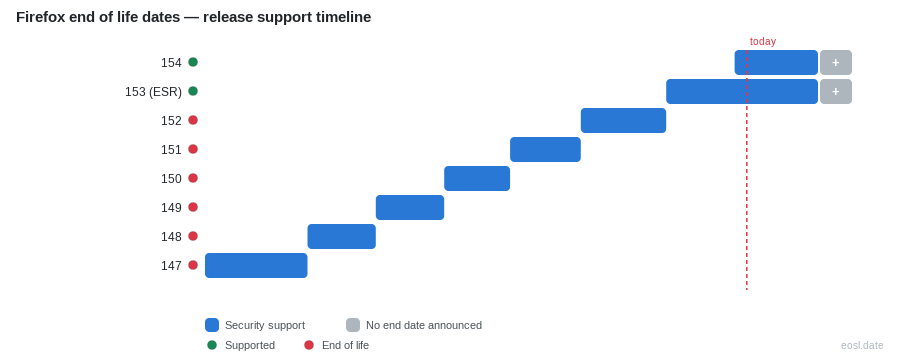
Currently Supported Firefox Releases - Active EOS/EOSL Support (1)
| Release | Released | Security Support | Latest | LTS |
|---|---|---|---|---|
| 153 (ESR) | (3 months ago) | Active | 153.7.0 (3 days ago) | LTS |
Firefox Releases Nearing End of Life - Support Ending Soon (2)
Firefox End of Life (EOL) Releases - No Longer Supported (58)
| Release | Released | Security Support | Latest | LTS |
|---|---|---|---|---|
| 159 | (2 weeks and 3 days ago) | (3 days ago) | 159.0.1 (1 week and 3 days ago) | - |
| 158 | (1 month ago) | (2 weeks and 3 days ago) | 158.0.1 (3 weeks and 3 days ago) | - |
| 157 | (1 month and 2 weeks ago) | (1 month ago) | 157.0.1 (1 month and 1 week ago) | - |
| 156 | (1 month and 4 weeks ago) | (1 month and 2 weeks ago) | 156.0.1 (1 month and 3 weeks ago) | - |
| 155 | (2 months ago) | (1 month and 4 weeks ago) | 155.0.1 (2 months ago) | - |
| 154 | (2 months ago) | (2 months ago) | 154.0.1 (2 months ago) | - |
| 152 | (4 months ago) | (3 months ago) | 152.0.6 (3 months ago) | - |
| 151 | (5 months ago) | (4 months ago) | 151.0.4 (5 months ago) | - |
| 150 | (6 months ago) | (5 months ago) | 150.0.3 (6 months ago) | - |
| 149 | (7 months ago) | (6 months ago) | 149.0.2 (7 months ago) | - |
| 148 | (8 months ago) | (7 months ago) | 148.0.2 (8 months ago) | - |
| 147 | (10 months ago) | (8 months ago) | 147.0.4 (8 months ago) | - |
| 146 | (11 months ago) | (10 months ago) | 146.0.1 (10 months ago) | - |
| 145 | (1 year ago) | (11 months ago) | 145.0.2 (11 months ago) | - |
| 144 | (1 year ago) | (1 year ago) | 144.0.2 (1 year ago) | - |
| 143 | (1 year and 1 month ago) | (1 year ago) | 143.0.4 (1 year and 1 month ago) | - |
| 142 | (1 year and 2 months ago) | (1 year and 1 month ago) | 142.0.1 (1 year and 2 months ago) | - |
| 141 | (1 year and 3 months ago) | (1 year and 2 months ago) | 141.0.3 (1 year and 3 months ago) | - |
| 140 (ESR) | (1 year and 4 months ago) | (1 month and 2 weeks ago) | 140.17.0 (1 month and 2 weeks ago) | LTS |
| 139 | (1 year and 5 months ago) | (1 year and 4 months ago) | 139.0.4 (1 year and 5 months ago) | - |
| 138 | (1 year and 6 months ago) | (1 year and 5 months ago) | 138.0.4 (1 year and 5 months ago) | - |
| 137 | (1 year and 7 months ago) | (1 year and 6 months ago) | 137.0.2 (1 year and 6 months ago) | - |
| 136 | (1 year and 8 months ago) | (1 year and 7 months ago) | 136.0.4 (1 year and 7 months ago) | - |
| 135 | (1 year and 9 months ago) | (1 year and 8 months ago) | 135.0.1 (1 year and 8 months ago) | - |
| 134 | (1 year and 10 months ago) | (1 year and 9 months ago) | 134.0.2 (1 year and 9 months ago) | - |
| 133 | (1 year and 11 months ago) | (1 year and 10 months ago) | 133.0.3 (1 year and 11 months ago) | - |
| 132 | (2 years ago) | (1 year and 11 months ago) | 132.0.2 (2 years ago) | - |
| 131 | (2 years and 1 month ago) | (2 years ago) | 131.0.3 (2 years ago) | - |
| 130 | (2 years and 2 months ago) | (2 years and 1 month ago) | 130.0.1 (2 years and 1 month ago) | - |
| 129 | (2 years and 3 months ago) | (2 years and 2 months ago) | 129.0.2 (2 years and 2 months ago) | - |
| 128 (ESR) | (2 years and 4 months ago) | (1 year and 1 month ago) | 128.14.0 (1 year and 2 months ago) | LTS |
| 127 | (2 years and 5 months ago) | (2 years and 4 months ago) | 127.0.2 (2 years and 4 months ago) | - |
| 126 | (2 years and 5 months ago) | (2 years and 5 months ago) | 126.0.1 (2 years and 5 months ago) | - |
| 125 | (2 years and 6 months ago) | (2 years and 5 months ago) | 125.0.3 (2 years and 6 months ago) | - |
| 124 | (2 years and 7 months ago) | (2 years and 6 months ago) | 124.0.2 (2 years and 7 months ago) | - |
| 123 | (2 years and 8 months ago) | (2 years and 7 months ago) | 123.0.1 (2 years and 8 months ago) | - |
| 122 | (2 years and 9 months ago) | (2 years and 8 months ago) | 122.0.1 (2 years and 9 months ago) | - |
| 121 | (2 years and 10 months ago) | (2 years and 9 months ago) | 121.0.1 (2 years and 10 months ago) | - |
| 120 | (2 years and 11 months ago) | (2 years and 10 months ago) | 120.0.1 (2 years and 11 months ago) | - |
| 119 | (3 years ago) | (2 years and 11 months ago) | 119.0.1 (3 years ago) | - |
| 118 | (3 years and 1 month ago) | (3 years ago) | 118.0.2 (3 years and 1 month ago) | - |
| 117 | (3 years and 2 months ago) | (3 years and 1 month ago) | 117.0.1 (3 years and 2 months ago) | - |
| 116 | (3 years and 3 months ago) | (3 years and 2 months ago) | 116.0.3 (3 years and 2 months ago) | - |
| 114 | (3 years and 5 months ago) | (3 years and 4 months ago) | 114.0.2 (3 years and 4 months ago) | - |
| 113 | (3 years and 6 months ago) | (3 years and 5 months ago) | 113.0.2 (3 years and 5 months ago) | - |
| 112 | (3 years and 7 months ago) | (3 years and 6 months ago) | 112.0.2 (3 years and 6 months ago) | - |
| 111 | (3 years and 7 months ago) | (3 years and 7 months ago) | 111.0.1 (3 years and 7 months ago) | - |
| 110 | (3 years and 8 months ago) | (3 years and 7 months ago) | 110.0.1 (3 years and 8 months ago) | - |
| 109 | (3 years and 9 months ago) | (3 years and 8 months ago) | 109.0.1 (3 years and 9 months ago) | - |
| 108 | (3 years and 11 months ago) | (3 years and 9 months ago) | 108.0.2 (3 years and 10 months ago) | - |
| 107 | (3 years and 11 months ago) | (3 years and 11 months ago) | 107.0.1 (3 years and 11 months ago) | - |
| 106 | (4 years ago) | (3 years and 11 months ago) | 106.0.5 (4 years ago) | - |
| 105 | (4 years and 1 month ago) | (4 years ago) | 105.0.3 (4 years and 1 month ago) | - |
| 104 | (4 years and 2 months ago) | (4 years and 1 month ago) | 104.0.2 (4 years and 2 months ago) | - |
| 103 | (4 years and 3 months ago) | (4 years and 2 months ago) | 103.0.2 (4 years and 3 months ago) | - |
| 102 (ESR) | (4 years and 4 months ago) | (3 years and 1 month ago) | 102.15.1 (3 years and 2 months ago) | LTS |
| 91 (ESR) | (5 years and 3 months ago) | (4 years and 1 month ago) | 91.13.0 (4 years and 2 months ago) | LTS |
| 78 (ESR) | (6 years and 4 months ago) | (5 years ago) | 78.15.0 (5 years and 1 month ago) | LTS |
Planning around Firefox end of life starts with one fact: Mozilla keeps only the newest release of its open-source web browser under full security support, so every standard version stops getting updates within weeks of shipping. This guide shows which Firefox versions still receive patches, when each Extended Support Release branch stops, and what to do on Windows, macOS, Linux or Android before your copy is left without fixes.
Firefox End of Life: Support Dates for Every Active Version
Mozilla publishes a new major version roughly every four weeks, and the previous one loses support soon after. Each end-of-life date below comes from the published support schedule as of late October 2026. The browser itself checks for updates in the background, but a machine that is offline, locked down or running an old operating system can drift out of support without anyone noticing.
Because Firefox is open-source software, anyone can read how Mozilla builds the web browser, and that openness is part of why Mozilla can publish such a precise support schedule. Once a version reaches end-of-life, Mozilla support pages stop listing security updates for it, and the internet keeps producing new attacks that the retired software can never block. A web browser touches every website you visit, so an unsupported build is a bigger risk than an unsupported word processor. Each update replaces the previous version, and Mozilla recommends restarting after every update.
Latest Version and Security Support Status
The latest version is Firefox 158, released on 13 October 2026, and its security support finishes on 27 October 2026. Firefox 157 was released on 29 September and lost its updates on 13 October, while Firefox 156, released on 15 September, lost them on 29 September. Both are now unsupported. A point release such as 158.0.1 only repairs a bug or a vulnerability inside the same version, so it does not stretch the support window. Mozilla then moves everyone to the next release.
| Release | Released | Final security update | Status |
|---|---|---|---|
| Firefox 158 | 13 Oct 2026 | 27 Oct 2026 | Supported |
| Firefox 157 | 29 Sep 2026 | 13 Oct 2026 | Ended, unsupported |
| Firefox 156 | 15 Sep 2026 | 29 Sep 2026 | Ended, unsupported |
| Firefox 155 | 1 Sep 2026 | 15 Sep 2026 | Ended, unsupported |
| Firefox 154 | 18 Aug 2026 | 1 Sep 2026 | Ended, unsupported |
| Firefox 152 | 16 Jun 2026 | 21 Jul 2026 | Ended, unsupported |
| ESR branch | Released | Final security update | Status |
|---|---|---|---|
| ESR 153 | 21 Jul 2026 | Active branch | Supported |
| ESR 140 | 24 Jun 2025 | 29 Sep 2026 | Ended, unsupported |
| ESR 115 | 4 Jul 2023 | 31 Mar 2027 | Supported |
| ESR 128 | 9 Jul 2024 | 16 Sep 2025 | Ended, unsupported |
| ESR 102 | 28 Jun 2022 | 26 Sep 2023 | Ended, unsupported |
| ESR 91 | 10 Aug 2021 | 20 Sep 2022 | Ended, unsupported |
| ESR 78 | 30 Jun 2020 | 2 Nov 2021 | Ended, unsupported |
Firefox 115 ESR and the Windows 7 Deadline
Firefox 115 is the last branch that still runs on Windows 7 and on macOS 10.12 through 10.14. That is why it stays supported until 31 March 2027, while Firefox 140 ESR, which ended on 29 September 2026, and Firefox 128 ESR, which ended on 16 September 2025, already left the software behind. If your computer still uses one of those operating systems, plan a hardware or operating system upgrade before the date, because no later version of the browser will install on it.
Stable and Extended Support Release Channels Explained
Mozilla ships the browser through two main release channels. Understanding the difference tells you whether your install gets a fast stream of new features or a calmer stream of security fixes, and it tells you which row of the tables above applies to you.
Standard Firefox Release and the Stable Branch
The default stable branch is the channel Mozilla recommends and the one most people download. It carries the latest features, and the moment a new release arrives, the older one immediately stops receiving updates. Everyone has to migrate to the next version, and Firefox normally does that by itself when it restarts. Because the cycle is so short, a standard install that has not restarted for a month is already a risk.
Behind every update sits the Gecko engine, the layout engine that renders web pages and enforces the privacy rules of the browser. After a release reaches end of support, a flaw in that engine stays unpatched and can expose the data of anyone browsing the web, which is the main reason Mozilla retires old versions of the software.
- Updates arrive automatically through the built-in updater unless an administrator blocks them.
- Each Firefox release brings new features, interface changes and security patches together.
- Release notes for every version are published on the Mozilla website the same day.
Firefox ESR for Large Organizations
Firefox ESR, the Extended Support Release, is an official version of the browser developed for large organizations such as universities and businesses that set up and maintain Firefox at scale. ESR does not carry the newest interface changes, but it receives the latest stability fixes and security patches, and Mozilla usually supports each ESR branch for about a year before the next one takes over. The ESR timetable is published well in advance, so IT teams can plan the switch to the next branch rather than reacting at the last minute.
Mozilla supports ESR the way a vendor supports a long-term release: Mozilla applies only security patches and critical fixes to an ESR branch, and Mozilla management of the ESR calendar is public. ESR users therefore see far fewer interface changes between ESR updates, and an ESR administrator can test a new ESR branch for months before switching. An ESR rollout in a school or a company usually follows the ESR calendar Mozilla publishes, and each ESR update arrives as a point release of that ESR branch. Mozilla support for an ESR branch continues until the ESR end date in the table above.
- Mozilla designates one ESR branch roughly every year, and each ESR gets point updates until it ends.
- Linux distributions such as Debian package ESR separately from the standard release.
- An ESR installation never jumps to a new ESR on its own; the administrator picks the date.
- Mozilla may extend an ESR for operating systems that newer builds drop, as it did for ESR 115.
Testing Channels Before a Firefox Release Reaches End of Support
Three testing channels feed the stable channel, and each uses a predictable version number compared with the stable release, which we can call X. Knowing the pattern helps you see what is coming before Mozilla retires the current version.
Firefox Beta and Developer Edition
Firefox Beta previews the next stable version, so its number is always X + 1. Every four weeks it receives cherry-picked changes from Nightly, then a point release about every three weeks stabilizes it. Developer Edition is a variant of the Beta branch with extra DevTools included, and it follows the same release pattern. Most beta testers are developers, but any curious person can try the beta build.
Beta and Nightly builds carry no long-term security support and are replaced on the release cycle. A web developer can still use Beta and Developer Edition to test a site or extension before the stable version replaces the old one, which is how each developer team prepares for the next support change.
Firefox Nightly Builds
Firefox Nightly receives daily updates from the main development branch, and its number is always X + 2. New features appear here first, and they reach Beta only after testing. Nightly is meant for developers, so it is not the right choice for a machine you rely on.
Firefox Version Timeline and the Rapid Release Cycle
Firefox began as an experimental branch of the Mozilla Application Suite, and its history explains why support windows are so short today. Wikipedia keeps a long record, and Mozilla keeps the official notes.
Early Versions from Phoenix to Firefox 4
Dave Hyatt and Blake Ross built the browser to escape the bloat of the Mozilla suite, and Firefox 1.0 was released on 9 November 2004, after the Phoenix and Firebird names gave way to a registered trademark. The Netscape lineage and the SeaMonkey suite survive as history, and Internet Explorer was the rival Firefox challenged. The Gecko layout engine and XUL user interface allowed extensions and themes, and the Mozilla Update site later offered approved add-ons. The same retirement pattern began early: Mozilla discontinued Firefox 3.6 on 24 April 2012, and versions 4 through 9 reached end-of-life at that point.
Firefox 5 Through Firefox 153 on a Four-Week Cadence
Starting with version 5, a rapid release cycle brought a new major version every six weeks, which is why security support windows are so short. In late 2019 Mozilla tightened the Firefox release cycle again, and new versions have appeared every four weeks since 2020. The browser now runs on Windows, macOS, Linux, Android, iOS and ChromeOS. Firefox 128 was released in July 2024, Firefox 140 in June 2025 and Firefox 153 in July 2026. Market share figures from StatCounter show that a long tail of old builds is still in use, which is why the pace creates so many unsupported browsers.
The Wikipedia version history article lists every release with its date, and the history shows Mozilla retiring versions on schedule for two decades, from the Netscape and SeaMonkey era through the days of Internet Explorer. StatCounter data for September 2026 puts all Firefox variants at roughly 2.79% of total browser use, and a large part of that share sits on builds that no longer receive security support.
Firefox Support Compatibility on Windows, macOS and Linux
Whether an operating system can keep receiving updates depends on which branch of the software still supports it. The platform list below summarizes the main cases.
- Windows: Mozilla supports current Windows 10 and Windows 11 builds; Windows 7, 8 and 8.1 are limited to ESR 115.
- macOS: Mozilla supports only the most recent releases from Apple, and older ones are frozen on an ESR.
- Linux: Mozilla ships its own tarballs, and most distributions also update Firefox through their package managers.
- Android: Mozilla releases the mobile app on the same schedule as the desktop browser through Google Play.
- iOS and ChromeOS: updates arrive through Apple's App Store and the Chrome OS system, not through Mozilla's updater.
Android users receive each update through Google Play, where the Android build of Firefox follows the desktop version number; a phone stuck on an old Android system reaches end of support for the app even if the hardware still works. Linux users on Debian, Ubuntu or Fedora usually update through the package manager, and a Linux server running an old ESR needs the same attention as a laptop. Linux desktops that rely on a distribution's repository can lag behind Mozilla's own Linux download by several days, so a Linux administrator should compare the installed version with the table. Android, Linux and Windows machines all show history of skipped updates in their logs, and neither Android nor Linux nags as loudly as Windows.
Windows 8.1 Support Ending
Mozilla announced that regular Firefox would stop supporting Windows 7, 8 and 8.1, with the ESR 115 branch carrying those systems for longer. After that branch ends, the machine is running an unsupported browser on an unsupported operating system, which is a poor combination for anything involving privacy, email or banking. The internet gets less safe for those users every month.
macOS Releases and the Apple Support Cycle
Firefox only supports the last 3 macOS releases, matching the Apple support cycle. Firefox 78 ESR was the last version for macOS versions older than 10.12 and for Flash plugins, and ESR 115 was the final one for 10.12 through 10.14. If your Mac cannot move to a newer macOS, a supported alternative is hard to find, so check the Apple compatibility list before you plan a purchase.
x86 Family and Other CPU Architectures
Firefox builds target the x86 family as well as ARM and other CPU architectures, and each architecture follows the same end-of-support dates as the desktop build it belongs to. A 32-bit or older chip may lose its builds before the operating system does.
Firefox ESR and Enterprise Support for Managed Browsers
Mozilla now sells Firefox Enterprise, an enterprise browser for organizations that need on-premises deployment and central management. It builds on the same Mozilla engine and the same ESR security support dates, so a managed fleet, whose infrastructure and audit trail depend on a written policy, still has to move to a supported ESR branch before the old one ends. Regulatory and compliance teams rely on that predictability, and Mozilla gives IT staff a path to the people behind the product.
Browser management through a central console limits what data leaves the browser and which internet services the software may reach, with privacy controls applied to every endpoint. The key point for this guide is that managed fleets still need to track ESR end-of-support dates, because a missed ESR date turns a managed fleet into an unmanaged risk.
Professional Support and Governance Controls
Standard professional support is included with the enterprise product and available as a paid upgrade, giving IT staff private triage and defined response times when an ESR update causes trouble. Governance features such as extension rules, telemetry limits and Lockdown Mode help administrators keep every endpoint on a supported build, and because the browser is open source they can inspect how it handles data. A management API and a clear update policy complete the picture, and the web history of each ESR branch is public.
Check Firefox Releases Against Your Version Before Support Ends
Finding out whether your copy is still safe takes a minute: open the About window or run firefox --version in a terminal, then compare the number with the tables above. If the version number is not listed as supported, plan an update today.
Check every web browser profile on a shared computer, including a second Firefox profile or a portable copy, against the support tables above. A modern web browser is software that handles passwords, payments and personal messages, so keeping that software inside its security support window is cheaper than cleaning up after a breach. Read the Firefox release notes for your version, then use the web to confirm the end date Mozilla gave for your branch, since that web page is the authoritative source. A software team that tests a web app should list Firefox beside its other web browser targets.
Release Notes and the Release Calendar
Each version has its own page of release notes on the Mozilla website. Firefox release notes list new features, security fixes and known issues, and ESR notes are separate from standard ones. Firefox release notes also link to the security advisories that explain each vulnerability. The endoflife.date project adds an iCalendar feed, an RSS feed and a JSON API so you can track the next release date and the next end date from your own tools. The platform, feed and calendar options mean a team can automate its reminders.
The endoflife.date API returns plain JSON with the Firefox support dates, so a small monitoring job built on the API can compare the installed version against it nightly and warn the team before a version ends. The API, the RSS feed and the calendar all publish the same data.
- Firefox release notes name the exact version and the date each one was released.
- Firefox release notes for ESR show which fixes were back-ported from newer builds.
- A calendar feed gives you a reminder before a version reaches end of support.
Upgrade Steps After Discontinued Support
If your version has ended, update through the About window in Settings, or download the current build from Mozilla's official site. On a managed computer, ask your administrator to move to the active ESR branch. Staying on discontinued builds leaves known vulnerabilities unpatched, and attackers aim at exactly those gaps. After the update, restart Firefox, confirm your extensions, add-ons and themes still load, and check the version number once more.
After moving off an unsupported release, confirm that your extensions, add-ons and themes still load, since an extension written for an older engine may stop working. A developer who maintains an extension should test it against Beta first, and extension management policies let an administrator allow only approved add-ons across a company.