Palo Alto Networks Cortex XDR agent End of Life (EOL) Dates and End of Support (EOS) Dates
Palo Alto Networks Cortex XDR agent end of life (EOL) and end of support (EOS) dates: 35 Palo Alto Networks Cortex XDR agent versions have reached EOL, including Palo Alto Networks Cortex XDR agent 9.1 (EOL date: Nov 22, 2026) — no longer receiving security updates or patches. Palo Alto Networks Cortex XDR agent 9.3 is the current supported release, with support through May 16, 2027 — 3 versions in active support. Also see CFEngine end of life dates for related end-of-life information.
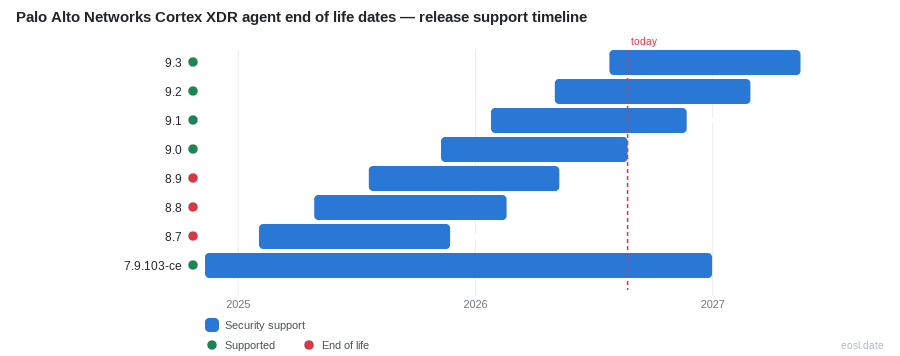
Currently Supported Palo Alto Networks Cortex XDR agent Releases - Active EOS/EOSL Support (3)
| Release | Released | Support Status | LTS |
|---|---|---|---|
| 9.3 | (3 months ago) | (in 5 months) | - |
| 9.2 | (6 months ago) | (in 3 months) | - |
| 7.9.103-ce | (2 years ago) | (in 1 month and 1 week) | - |
Palo Alto Networks Cortex XDR agent End of Life (EOL) Releases - No Longer Supported (35)
| Release | Released | Support Status | LTS |
|---|---|---|---|
| 9.1 | (9 months ago) | (1 day ago) | - |
| 9.0 | (1 year ago) | (3 months ago) | - |
| 8.9 | (1 year and 4 months ago) | (6 months ago) | - |
| 8.8 | (1 year and 6 months ago) | (9 months ago) | - |
| 8.7 | (1 year and 9 months ago) | (1 year ago) | - |
| 8.6 | (2 years and 1 month ago) | (1 year and 4 months ago) | - |
| 8.5 | (2 years and 4 months ago) | (1 year and 7 months ago) | - |
| 8.3-ce | (2 years and 6 months ago) | (6 months ago) | - |
| 8.4 | (2 years and 7 months ago) | (1 year and 9 months ago) | - |
| 8.3 | (2 years and 9 months ago) | (1 year and 11 months ago) | - |
| 8.2 | (3 years ago) | (2 years and 3 months ago) | - |
| 8.1 | (3 years and 4 months ago) | (2 years and 7 months ago) | - |
| 7.9-ce (CE) | (3 years and 8 months ago) | (1 year and 8 months ago) | LTS |
| 8.0 | (3 years and 8 months ago) | (2 years and 11 months ago) | - |
| 7.9 | (3 years and 11 months ago) | (3 years and 2 months ago) | - |
| 7.8 | (4 years and 3 months ago) | (3 years and 6 months ago) | - |
| 7.7 | (4 years and 7 months ago) | (3 years and 10 months ago) | - |
| 7.5-ce (CE) | (4 years and 8 months ago) | (2 years and 8 months ago) | LTS |
| 7.6 | (4 years and 11 months ago) | (4 years and 2 months ago) | - |
| 7.5 | (5 years and 3 months ago) | (4 years and 3 months ago) | - |
| 7.4 | (5 years and 5 months ago) | (4 years and 5 months ago) | - |
| 7.3 | (5 years and 9 months ago) | (4 years and 9 months ago) | - |
| 7.2 | (6 years and 2 months ago) | (4 years and 8 months ago) | - |
| 7.1 | (6 years and 7 months ago) | (5 years and 5 months ago) | - |
| 7.0 | (6 years and 11 months ago) | (5 years and 5 months ago) | - |
| 6.1 | (7 years and 4 months ago) | (4 years and 4 months ago) | - |
| 6.0 | (7 years and 8 months ago) | (6 years and 8 months ago) | - |
| 4.2 | (8 years and 4 months ago) | (4 years and 8 months ago) | - |
| 5.0 | (8 years and 8 months ago) | (2 years and 5 months ago) | - |
| 4.1 | (9 years and 2 months ago) | (7 years and 2 months ago) | - |
| 4.0 | (9 years and 7 months ago) | (8 years and 7 months ago) | - |
| 3.4 | (10 years and 3 months ago) | (7 years and 3 months ago) | - |
| 3.3 | (11 years ago) | (9 years and 8 months ago) | - |
| 3.2 | (11 years and 7 months ago) | (10 years and 7 months ago) | - |
| 3.1 | (12 years and 2 months ago) | (11 years and 2 months ago) | - |
Planning your Palo Alto Networks Cortex XDR agent end of life schedule starts with one fact: every Cortex XDR line is supported for a fixed window, and the date that window closes decides when you must upgrade. This guide lists the dates, explains what stops working afterward, and shows how to keep your endpoints safe from malware and exploits. Palo Alto Networks firewalls follow a separate schedule, so don't mix the two.
Palo Alto Networks Cortex XDR Agent End of Life and Support Policy
Major feature releases of Cortex XDR get nine months of support. That covers technical support, minor feature releases, content updates and workarounds, while minor releases in between carry the bug fixes, and once the window closes, all support ends. Access to software updates also depends on a valid support agreement, so an expired contract can leave you without fixes before a version even retires. The lifecycle is short, so your security posture depends on upgrading on a rolling basis rather than once a year.
Critical Environment Releases for Regulated Networks
A Critical Environment (CE) line lasts 24 months and suits regulated environments that value stability over novelty. It gets only high-severity fixes and security fixes within its existing capabilities, and a new CE line arrives every 12 to 18 months, cut from an existing line once it has proven itself.
Release-by-Release EOL Dates
Palo Alto Networks publishes the schedule, and the table below follows it as tracked on endoflife.date, checked on 27 October 2026. Each date is the day support for that agent version stops.
| Agent version | Release date | End-of-life date |
|---|---|---|
| 9.3 | 26 July 2026 | 16 May 2027 |
| 9.2 | 3 May 2026 | 28 February 2027 |
| 9.1 | 25 January 2026 | 22 November 2026 |
| 9.0 | 9 November 2025 | 23 August 2026 |
| 8.9 | 21 July 2025 | 10 May 2026 |
| 7.9.103-CE | 11 November 2024 | 31 December 2026 |
The newest line, 9.3, is the latest version. The 9.1 line retires in under four weeks, and 7.9.103-CE is the last CE line scheduled to retire this year. Any line whose date has passed is one of the unsupported versions.
Cortex XDR Agent 8.6 and 8.5 End of Life
Version 8.6 reached its end on 13 July 2025 and version 8.5 on 21 April 2025. Their successors added new features such as protection against malicious ASP and ASPX files, plus performance improvements. If any endpoints still report these builds, they have been out of support for over a year.
Older Unsupported Versions Still in the Field
Everything from 9.0 down is already outside its window, including 8.9 (10 May 2026), 8.8 (18 February 2026) and 8.7 (23 November 2025). Outdated installations survive because nothing visibly breaks, yet they no longer receive content updates or fixes.
Security Risks of Passing the End-of-Life Date
Once a version passes its end date, it gets no fixes for new vulnerabilities, so security risks pile up with every passing month. Attackers favour threats that target ageing software, and an unsupported Cortex XDR agent can miss new attack techniques that current builds already block.
Regulated teams face a second problem: auditors expect protection to run on supported software, so a retired build can turn into a compliance finding. Admins should treat the end date as a hard deadline and tell the security team as soon as a line is within six months of it.
Support Status Across Operating Systems
The agent runs on Windows, macOS, Linux and Android, and its support status follows the build you installed, not the operating systems underneath, and the life cycle is identical on each. Palo Alto Networks documents the same schedule for each platform, and a subscription tier such as Prevent or Pro changes features, not how long a version is supported. Each Cortex XDR build bundles these protections, and all of them stop receiving fixes once that build reaches its end date:
- Endpoint security on Windows that stops unknown malware and exploits only while the build is supported
- Behavioral analytics that expose threats and speed up investigation, with detections that age on retired builds
- Extended detection and response across identity, cloud and the network, but only on supported builds
- Detection and response data sent to the Cortex XDR platform, which keeps flowing from retired builds without fixes
Management Console and Cloud Requirements
Upgrading is what keeps each host inside its window. The agent reaches its management console over TCP port 443, so firewalls must allow that outbound traffic. The vendor updates the cloud service itself, but the agent on each endpoint is yours to upgrade. Count every asset that runs it, since your upgrade list should match your inventory, and check before each upgrade that Windows hosts have at least 2GB of RAM and 5GB of disk space for the Cortex XDR platform.
Audit Installations Before End of Support
Start with a version inventory: list every endpoint running the agent, note its agent version, and compare it with the table above. Anything on a line that ends within six months is a security priority, and the 9.1 line retires on 22 November 2026, so move those hosts this week.
Run an Audit Report and Move to a Supported Version
An asset tool can run an audit report that flags every host below a supported version, and Lansweeper ships one for this agent. Then upgrade in rings: a pilot group first, then the rest. Pick the line with the longest remaining window, such as 9.3 through 16 May 2027, or stay on a CE line if your auditors want fewer changes. Keep a calendar entry for each Cortex XDR agent EOL date so the next update never becomes an emergency.