Amazon MSK End of Life (EOL) Dates and End of Support (EOS) Dates
Amazon MSK end of life (EOL) and end of support (EOS) dates: 14 Amazon MSK versions have reached EOL, including Amazon MSK 3.7 (EOL date: Sep 01, 2026) — no longer receiving security updates or patches. Amazon MSK 4.2.x is the current supported release — 5 versions in active support. Also see Amazon CDK EOSL dates for related end-of-life information.
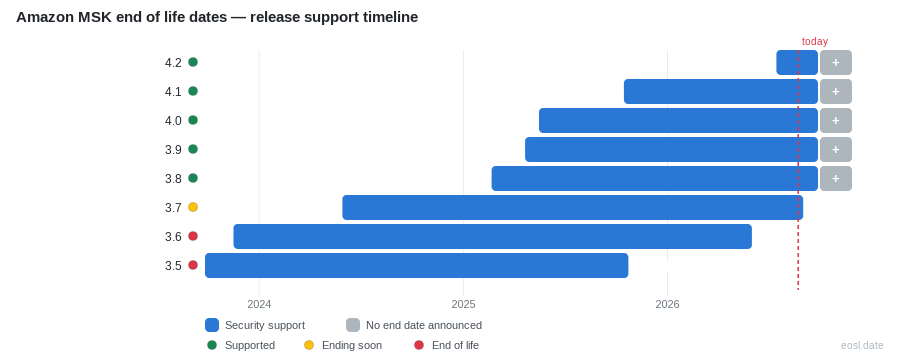
Currently Supported Amazon MSK Releases - Active EOS/EOSL Support (5)
| Release | Released | Support | Latest |
|---|---|---|---|
| 4.2 | (4 months ago) | Active | 4.2.x (4 months ago) |
| 4.1 | (1 year and 1 month ago) | Active | 4.1.x (1 year and 1 month ago) |
| 4.0 | (1 year and 6 months ago) | Active | 4.0.x (1 year and 6 months ago) |
| 3.9 | (1 year and 7 months ago) | Active | 3.9.x (1 year and 7 months ago) |
| 3.8 | (1 year and 9 months ago) | Active | 3.8.x (1 year and 9 months ago) |
Amazon MSK End of Life (EOL) Releases - No Longer Supported (14)
| Release | Released | Support | Latest |
|---|---|---|---|
| 3.7 | (2 years and 5 months ago) | (2 months ago) | 3.7.x (2 years and 5 months ago) |
| 3.6 | (3 years ago) | (5 months ago) | 3.6.0 (3 years ago) |
| 3.5 | (3 years and 1 month ago) | (1 year ago) | 3.5.1 (3 years and 1 month ago) |
| 3.4 | (3 years and 6 months ago) | (1 year and 3 months ago) | 3.4.0 (3 years and 6 months ago) |
| 3.3 | (4 years ago) | (2 years and 2 months ago) | 3.3.2 (3 years and 8 months ago) |
| 3.1 | (4 years and 5 months ago) | (2 years and 2 months ago) | 3.1.1 (4 years and 5 months ago) |
| 3.2 | (4 years and 5 months ago) | (2 years and 2 months ago) | 3.2.0 (4 years and 5 months ago) |
| 2.8 | (5 years and 6 months ago) | (1 year and 10 months ago) | 2.8.2-tiered (4 years ago) |
| 2.7 | (5 years and 10 months ago) | (2 years and 2 months ago) | 2.7.2 (4 years and 11 months ago) |
| 2.6 | (6 years and 1 month ago) | (2 years and 2 months ago) | 2.6.3 (4 years and 11 months ago) |
| 2.5 | (6 years and 1 month ago) | (2 years and 5 months ago) | 2.5.1 (6 years and 1 month ago) |
| 2.3 | (6 years and 11 months ago) | (2 years and 5 months ago) | 2.3.1 (6 years and 11 months ago) |
| 2.4 | (6 years and 11 months ago) | (2 years and 5 months ago) | 2.4.1.1 (6 years and 2 months ago) |
| 2.2 | (7 years and 3 months ago) | (2 years and 5 months ago) | 2.2.1 (7 years and 3 months ago) |
Your Amazon MSK end of life calendar decides when Amazon Managed Streaming for Apache Kafka stops running an older release and moves your clusters to a newer one. This guide lists the retirement dates, explains what happens when a date passes, and shows developers and platform teams how to prepare so a forced change never catches the infrastructure behind their streaming data off guard.
Amazon MSK End of Life Dates for Each Apache Kafka Version
Amazon publishes a retirement date on AWS for every older release in its list of supported Apache Kafka versions. The Apache Kafka community itself maintains a release for roughly 12 months, and Amazon MSK follows with its own schedule. The table below shows the dates published so far; patch releases are not always documented separately.
| Release | Retirement date |
|---|---|
| 2.2.1 to 2.5.1 | 2024-06-08 |
| 2.6.x, 2.7.x, 2.8.x, 3.1.1 to 3.3.2 | 2024-09-11 |
| 2.8.2-tiered | 2025-01-14 |
| 3.4.0 | 2025-08-04 |
| 3.5.1 | 2025-10-23 |
| 3.6.0 | 2026-06-01 |
| 3.7.x | 2026-09-01 |
| 3.8.x, 3.9.x (recommended), 4.0.x, 4.1.x, 4.2.x | None published yet |
Release 3.7.x passed its date on 1 September 2026, so any workloads still on it are already eligible for a forced move.
Amazon MSK End of Support Policy and Automatic Upgrades
Every release stays available until it reaches its retirement date. After that, Amazon phases out cluster creation on it gradually, without a published timeline, and treats the release as past its end of support date.
What Happens After the Date Passes
Any of your Kafka clusters on a retired release is moved to the recommended one through automatic upgrades. These can start at any time after the retirement date, and no notification arrives beforehand. The move is a rolling update, so each node restarts in turn while the service stays online.
Why Early Planning Beats Waiting
Because the timing is unpredictable, an unplanned rolling update could land in the middle of a busy period. Choosing your own window lets you test clients first and watch the rollout.
Choosing a Release Before the EOL Date
When an EOL date is near, pick a target that will outlast it. Release 3.9.x is the one labeled as recommended today, and releases 4.0.x and above run without ZooKeeper.
Which Release Amazon Recommends
Use the recommended Kafka version for every new deployment, because it carries the latest features from both Kafka and MSK. Moving up early also gives you the longest runway before the next retirement.
MSK Express Brokers on Release 4.2
Release 4.2.x is currently offered only on MSK Express brokers, a fully managed option that Amazon says delivers up to three times the throughput per broker and faster scaling than standard brokers.
Preparing Your Clusters for the End of Life
The rolling update restarts brokers, so every topic and client needs to tolerate a node going offline. Review these settings before the date arrives:
- Set the replication factor (RF) to at least 2 for two-AZ clusters and at least 3 for three-AZ clusters, since an RF of 2 can leave a partition offline during patching.
- Keep minimum in-sync replicas at one less than RF, so a replica can drop out without blocking writes.
- Give every client several bootstrap addresses so it can fail over while a broker is patched.
The rule for the second setting is \(\text{minISR} = \text{RF} - 1\). With RF 3, minISR is 2.
Client Upgrades Follow a Different Clock
Client libraries are not tied to the retirement date, because Kafka clients and brokers are compatible in both directions. Clients on 3.x also default to acks=all and enable.idempotence=true, which improves durability and adds only slight latency.
Check the official documentation for the exact upgrade procedure, and run your own stream processing and data pipeline tests on a staging cluster first, with real time traffic if you can. Clients that gain this headroom also keep clean failover behavior.